Updates and new features

10 NOV, 2026

Depot CI logs no longer expire after 14 days. We now keep them indefinitely, so you can investigate older runs and compare builds over time.

Sandbox logs are also retained indefinitely and can be retrieved after a sandbox stops through the Sandbox SDK. Use sandbox.logs.tail() to retrieve recent records, sandbox.logs.fetch() to query a time range, or sandbox.logs.stream() to follow live output.

See the announcement post for a code example and more about the new log platform.
05 NOV, 2026

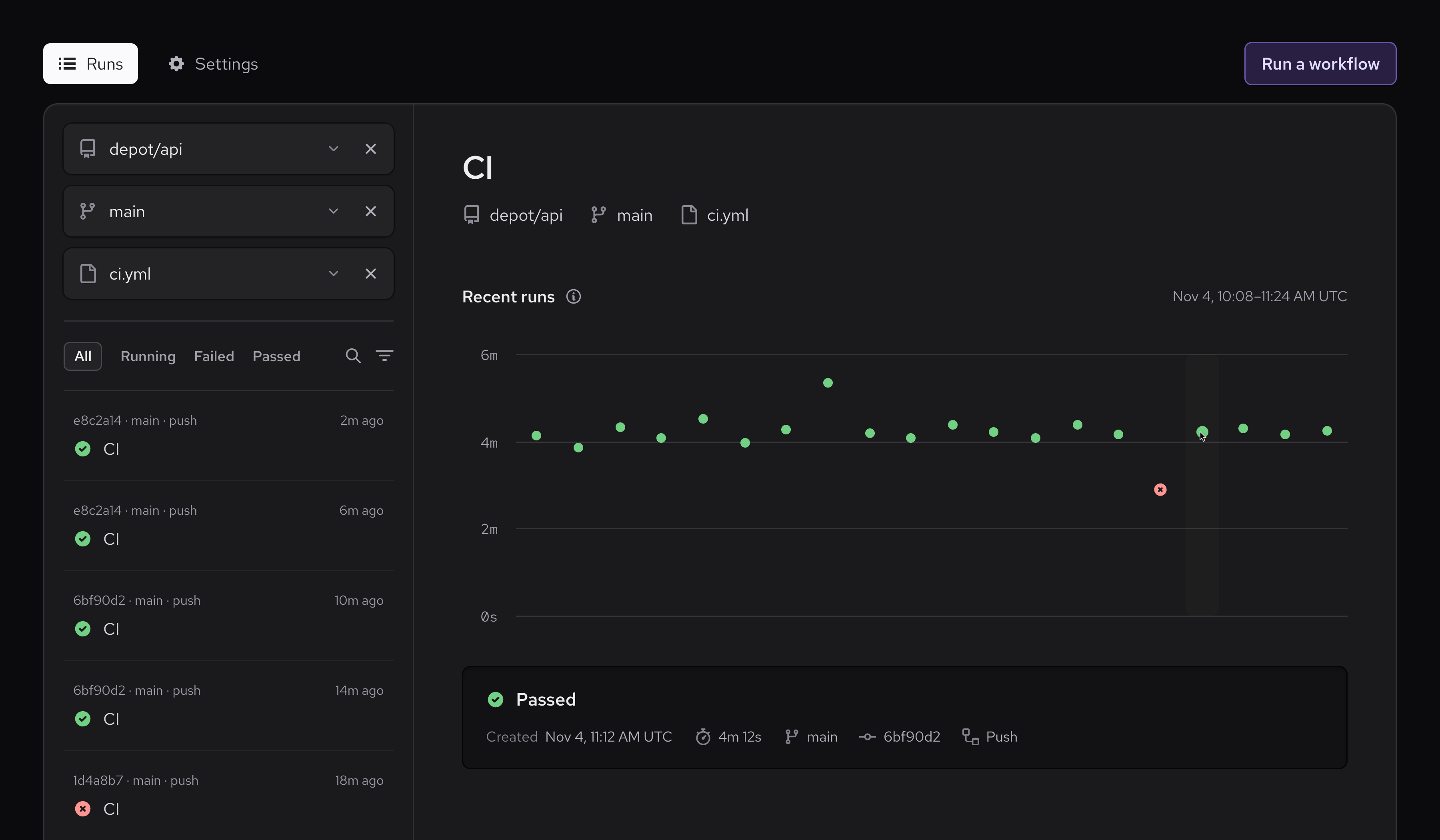
The Runs view in Depot CI now includes repository, branch, and workflow overviews. Select a repository, then narrow by branch or workflow. The sidebar shows runs for that selection. Open a run to inspect it while keeping your filters.

From a run, use the workflow link in the breadcrumb to browse other runs of the same workflow.

Workflow pages include a duration chart for comparing runs. Select a point to open that run.

Depot CI with depot/api, main, and ci.yml selected, recent runs in the sidebar, and a workflow duration chart

04 NOV, 2026

Updates and new features for Managed Agents:

  • Managed Agents now runs Amp threads. Create an orb provider in Amp's Settings > Orbs, then paste its token into Settings > Connections > Agent providers in Depot. Each orb runs the agent's tools in a Depot sandbox with the connection's run settings, and paused orbs keep their files. See the Managed Agents - Amp docs for setup.

  • Runs can now use arm64 sandboxes. Choose amd64 or arm64 in each provider connection's run settings under Settings > Managed Runs. This works with every provider.

  • Runs can now start from your own sandbox image. To start with your toolchains and dependencies already installed, build the image as a Depot snapshot in your organization's registry. Then choose it in the connection's General section under Settings > Managed Runs.

    • Claude Code connections can also use a different sandbox image and setup script for each repository. Runs on any other repository use the connection's image and script.
  • You can now turn off Depot Cache per provider connection. Depot Cache is still on by default. Turn it off for a connection with the Depot Cache switch in the connection's run settings. Runs on that connection then start without cache credentials.

  • OpenAI and Devin runs can now use your organization's MCP servers. Devin needs a one-time step in Devin's settings first. See the Managed Agents - Devin docs for details.

  • The Depot CLI is now signed in as your organization in runs from every provider. To give runs more access, such as starting container builds, add your own token as a run secret named DEPOT_TOKEN. To give runs less access, set the connection's Depot API token role to Read-only. The CLI can then read CI runs, jobs, logs, and test results, but can't start, cancel, or rerun CI runs.

See Managed Agents for setup and limits.

30 OCT, 2026

You can now connect Depot Checks 3 alongside Depot Checks and Depot Checks 2 to give Depot CI more capacity to publish job status to GitHub. The additional app can reduce check update delays for organizations with high CI volume.

If you've already connected the first two apps, open Settings > Connections > GitHub Checks and click Connect Depot Checks 3. Give it access to the same repositories as your other checks apps.

Check names stay the same, and no workflow changes are needed. Before connecting, review the GitHub checks setup guide, including the required check source settings.

29 OCT, 2026

The Managed Runs page now shows run details, including step durations and logs. Filter runs by provider and status, and select a run to investigate failures. Organization owners can also stop active runs.

Download saved files from the Outputs section after a run finishes. To make files available, have the agent save them to /workspace/outputs/.

Each Managed Agents connection now has its own run settings, in one place under Settings > Managed Runs. They cover:

  • Run secrets, including secrets that Depot sends only to hosts you list. Those secrets never enter the sandbox.
  • A setup script.
  • GitHub access through Depot's Code Access app.
  • MCP servers that runs can use.

In runs from Claude Code and OpenAI connections, the depot CLI is now signed in as your organization, so the agent doesn't need its own Depot token.

See Managed Agents for setup and limits.

22 OCT, 2026

Depot CI now supports on.pull_request_review_comment triggers. Run workflows when someone creates, edits, or deletes a comment on a pull request's diff. Use types to select the activities that trigger your workflow:

on:
  pull_request_review_comment:
    types: [created, edited]

Without types, all three activities trigger the workflow. Add the workflow to .depot/workflows/ on your repository's default branch to activate it. Runs use the pull request's merge ref, and the comment is available through github.event.comment.

See Pull request review events for event details and token and secret restrictions.

20 OCT, 2026

Depot CI now includes job errors, step summaries, and artifact names and sizes in completed GitHub checks. Errors, warnings, and notices from workflow commands appear as annotations. Annotations that reference a file path and line number appear inline on pull request diffs.

You can review failures and workflow-generated reports directly in GitHub, then follow the links to the Depot dashboard for full job details and artifacts. Existing workflows use the new output automatically.

See GitHub check output for details and limits.

19 OCT, 2026

You can now connect the Depot Checks and Depot Checks 2 GitHub Apps to give Depot CI more capacity to publish job status to GitHub. Each app provides additional API capacity, reducing check delays for organizations with high CI volume.

Connect the apps from Settings > Connections > GitHub Checks in your Depot organization. No workflow changes are needed.

See the GitHub checks setup guide to get started.

15 OCT, 2026

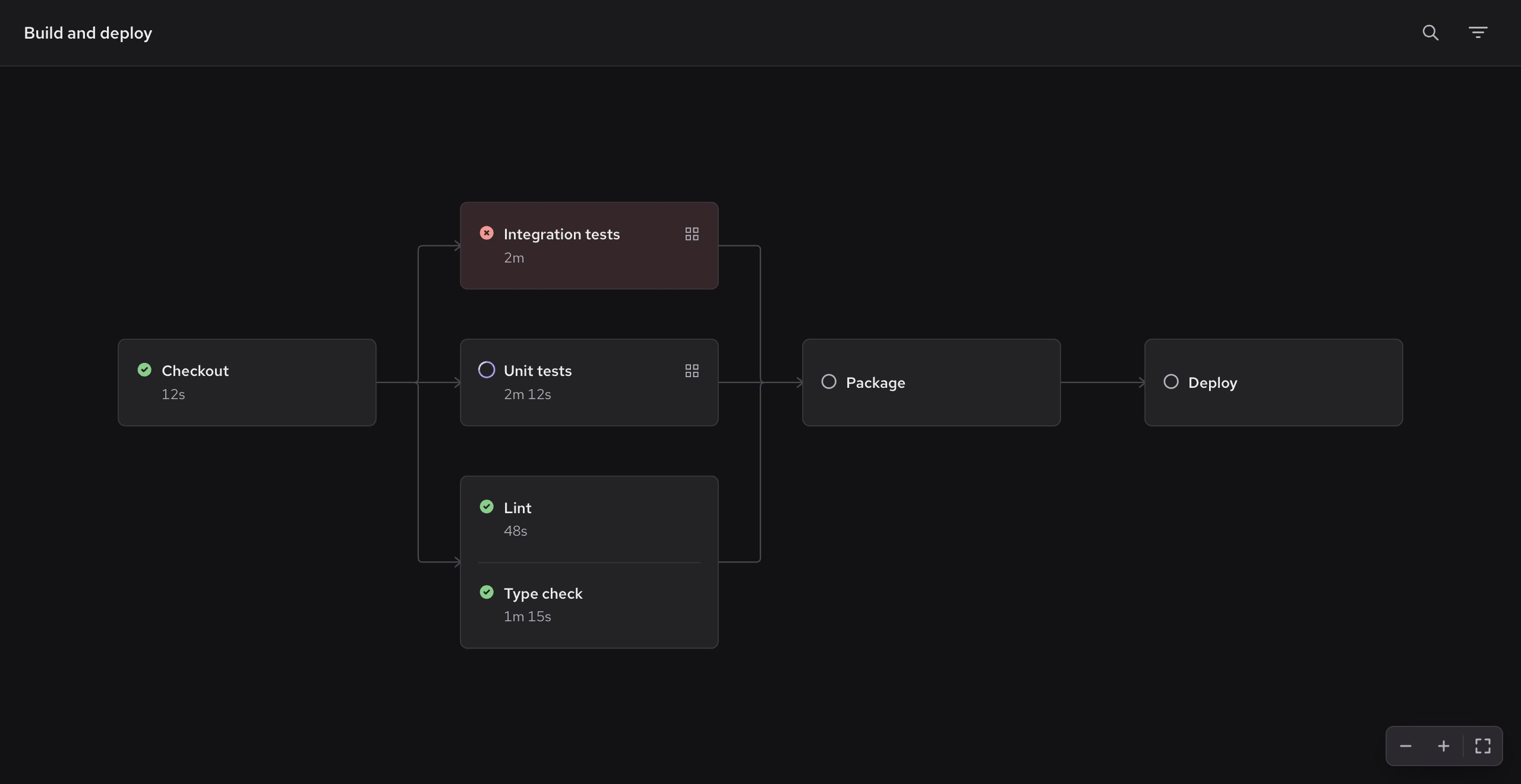
Depot CI now has a graph view for workflow runs, making it easier to follow job dependencies and investigate failures in complex workflows.

Depot CI graph showing Checkout, test groups, Package, and Deploy jobs

Open a workflow run and select Graph above the jobs list. You can also search for jobs in either view.

13 OCT, 2026

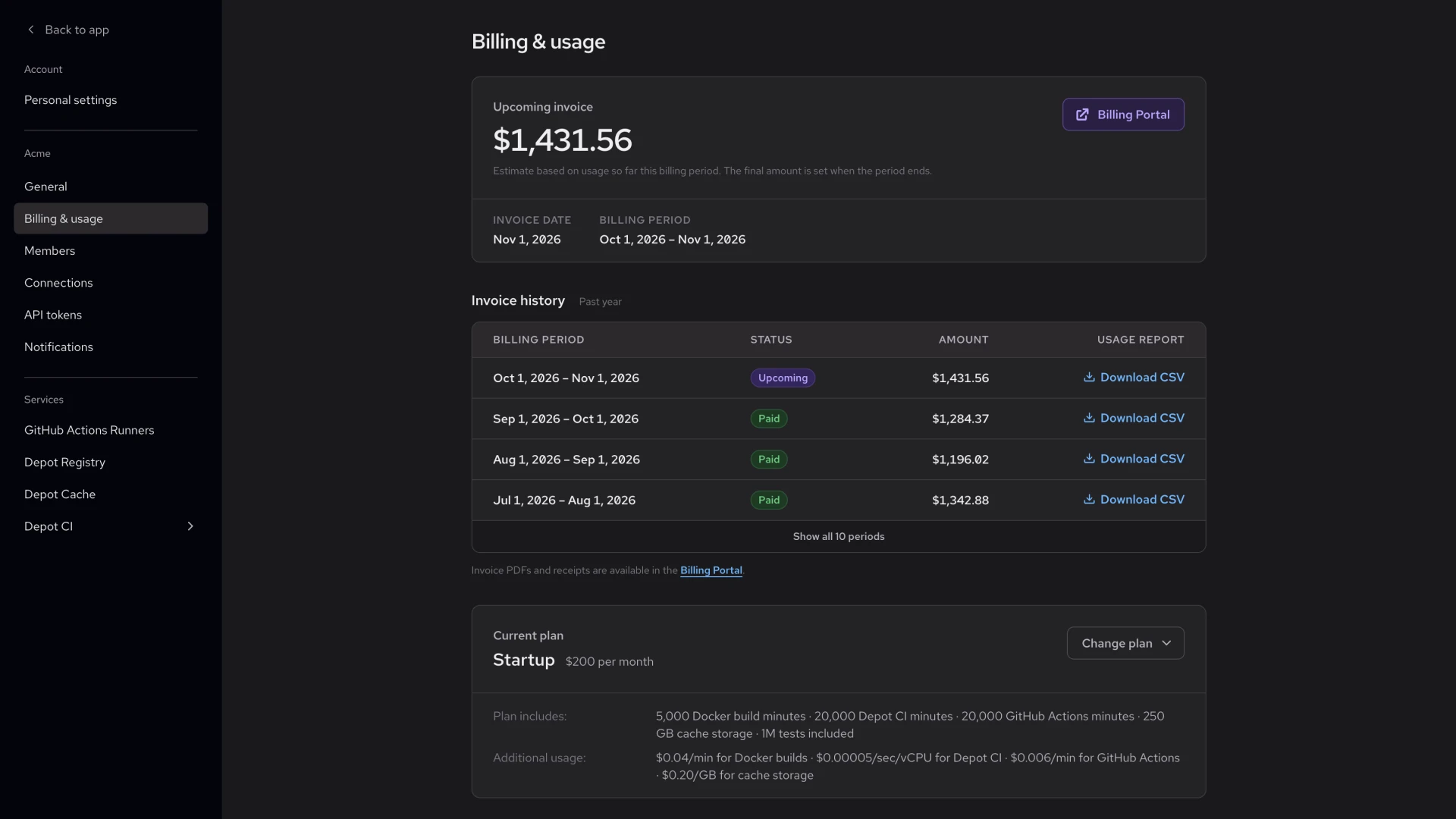
The Billing & usage settings page now shows your upcoming invoice amount and a history of past invoices.

Billing & usage settings showing an upcoming invoice amount with its invoice date and billing period, an invoice history table with status, amount, and Download CSV columns, and a current plan summary

The upcoming invoice is an estimate based on your usage so far in the current billing period, shown with the invoice date and billing period. Invoice history lists each billing period from the past year with its status and the amount paid. Click Download CSV on any row to get the usage report for that period. Invoice PDFs and receipts are available in the Billing Portal.

Your current plan now appears as a summary with its included usage and additional usage rates. Click Change plan to compare plans.

13 OCT, 2026

The Depot dashboard now supports Brazilian Portuguese, French, Japanese, Korean, and Simplified Chinese, alongside English. You can review builds, check GitHub Actions runs, and manage settings in your preferred language.

The dashboard follows your browser's language preferences by default. To choose a different language, open the organization menu at the top of the sidebar and select Language. Depot remembers your choice in that browser.

Read the localization announcement for details.

06 OCT, 2026

Press Cmd+K on macOS or Ctrl+K on Windows and Linux to find and open top-level sections of the Depot dashboard, such as Projects, Depot CI, GitHub Actions, and settings.

06 OCT, 2026

In Depot CI, github.event.workflow_run.name contains the triggering workflow's YAML name, not run-name. Without a name, it falls back to the workflow's repository path, as in GitHub. path now contains the repository path, such as .depot/workflows/ci.yml. A new basepath field contains the filename, such as ci.yml.

To compare filenames, use github.event.workflow_run.basepath || github.event.workflow_run.path || github.event.workflow_run.name, which also handles stored events that keep their original values when replayed. See Workflow run events for details.

05 OCT, 2026

Depot CI now exposes who initiated a workflow through depot.actor, including the user’s ID, name, and email for runs started from the dashboard, CLI, or API. Use this identity in workflow conditions or to personalize notifications.

When a job is retried, depot.triggering_actor identifies who requested the retry, while depot.actor preserves the original initiator. Organization tokens are identified by their token name and ID, with no human email.

Workflow and job pages now display the original initiator and recorded retry actors.

05 OCT, 2026

Depot CI now supports reusable workflows stored in other repositories. Share common CI jobs across projects without copying workflow definitions, with support for nested calls, matrix jobs, inputs, and outputs.

Private repositories can call reusable workflows from private or internal repositories in the same GitHub organization when the Depot Code Access GitHub App has access to the source repository. Pin external workflow references to a full commit SHA or a version tag; branch references are not supported.

See the reusable workflow compatibility guide for supported references and access requirements.

05 OCT, 2026

The GitHub Actions Analytics page now uses the workflow's configured name for workflow filters and job duration and failure summaries. Workflows with a dynamic run-name aggregate together across runs instead of splitting into separate entries for each run title.

The run-name setting still controls individual run titles; those titles remain unchanged.

This applies to newly recorded jobs. Historical jobs retain their previous names and grouping, so date ranges that include older jobs can still show dynamic run titles alongside workflow names.

01 OCT, 2026

The Depot dashboard now supports light mode across project pages, workflows, logs, charts, and settings.

Open the organization menu in the sidebar and choose Theme switch to select Light, Dark, or System. System follows your device's appearance setting. The dashboard and Depot website use the same theme preference.

29 SEP, 2026

The Depot dashboard now warns when a project's BuildKit cache approaches its configured storage limit.

The warning appears on project and build log pages and links to the project settings, where you can increase the limit when cache cleanup affects build performance.

Open Projects in the Depot dashboard, select a project, and open Settings to adjust its Cache Storage Policy. See configurable cache policies for details on storage limits and retention.

Start building with Depot
in minutes