Updates and new features

22 OCT, 2026

Depot CI now supports on.pull_request_review_comment triggers. Run workflows when someone creates, edits, or deletes a comment on a pull request's diff. Use types to select the activities that trigger your workflow:

on:
  pull_request_review_comment:
    types: [created, edited]

Without types, all three activities trigger the workflow. Add the workflow to .depot/workflows/ on your repository's default branch to activate it. Runs use the pull request's merge ref, and the comment is available through github.event.comment.

See Pull request review events for event details and token and secret restrictions.
20 OCT, 2026

Depot CI now includes job errors, step summaries, and artifact names and sizes in completed GitHub checks. Errors, warnings, and notices from workflow commands appear as annotations. Annotations that reference a file path and line number appear inline on pull request diffs.

You can review failures and workflow-generated reports directly in GitHub, then follow the links to the Depot dashboard for full job details and artifacts. Existing workflows use the new output automatically.

See GitHub check output for details and limits.

19 OCT, 2026

You can now connect the Depot Checks and Depot Checks 2 GitHub Apps to give Depot CI more capacity to publish job status to GitHub. Each app provides additional API capacity, reducing check delays for organizations with high CI volume.

Connect the apps from Settings > Connections > GitHub Checks in your Depot organization. No workflow changes are needed.

See the GitHub checks setup guide to get started.

15 OCT, 2026

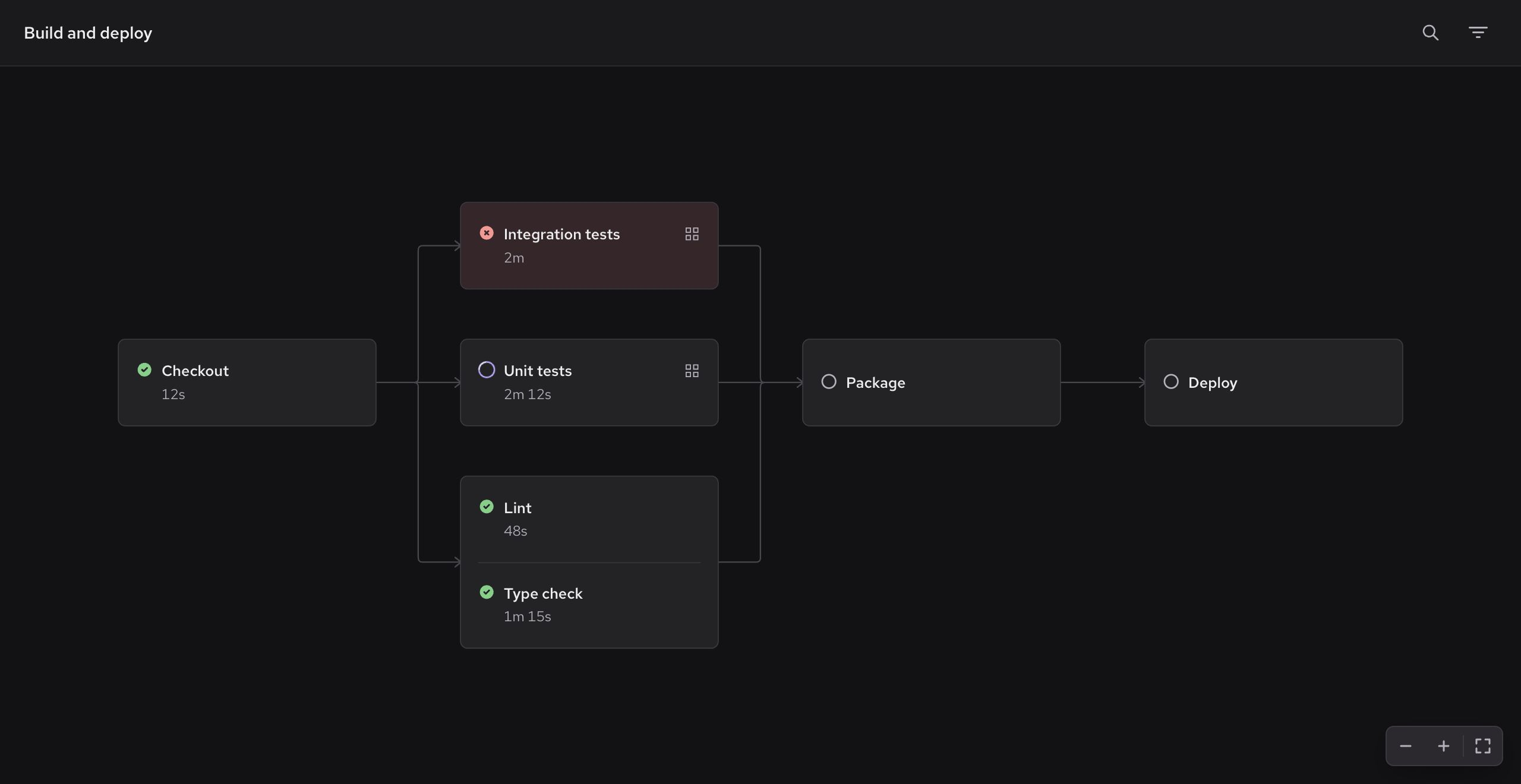
Depot CI now has a graph view for workflow runs, making it easier to follow job dependencies and investigate failures in complex workflows.

Depot CI graph showing Checkout, test groups, Package, and Deploy jobs

Open a workflow run and select Graph above the jobs list. You can also search for jobs in either view.

13 OCT, 2026

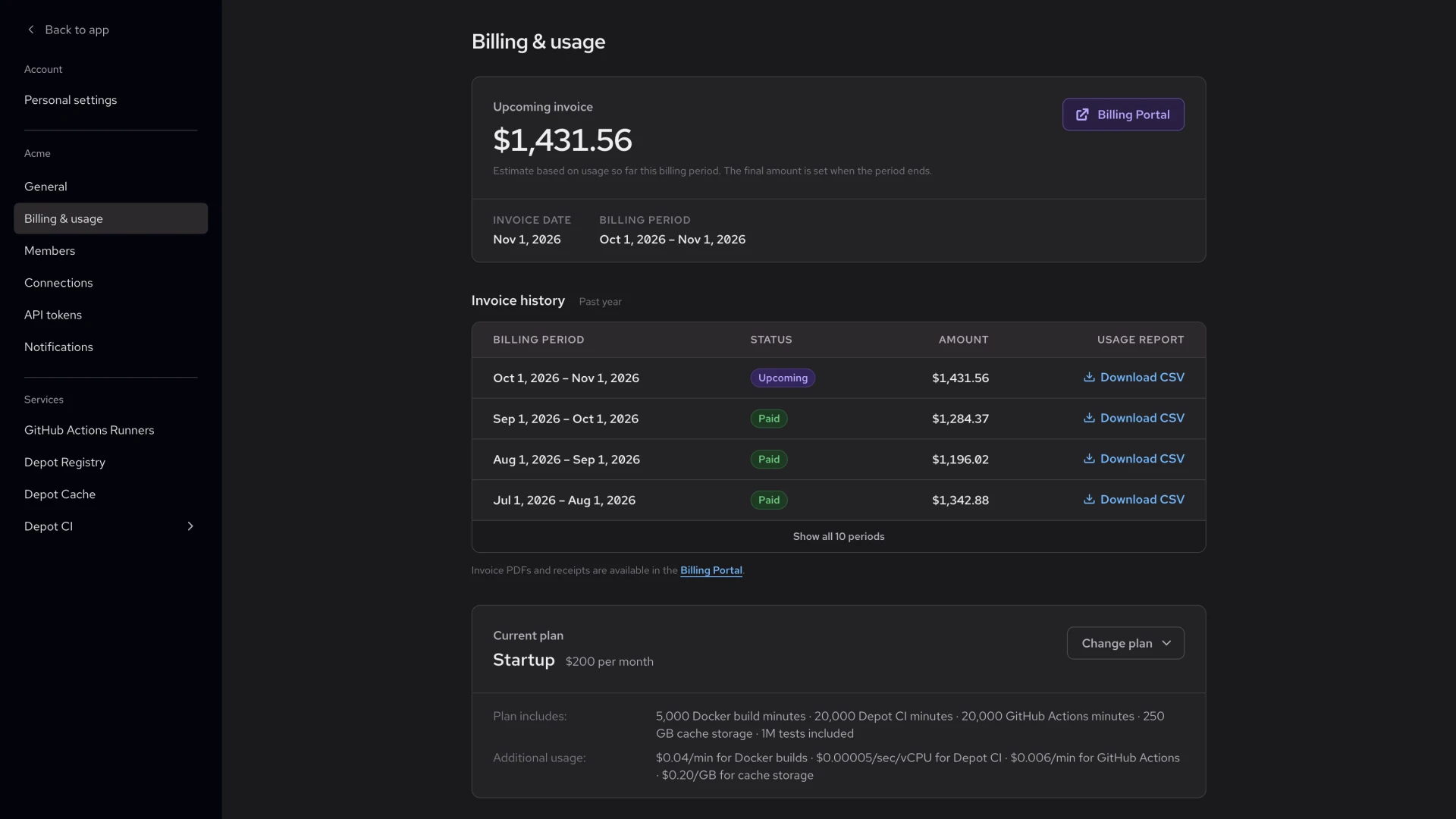
The Billing & usage settings page now shows your upcoming invoice amount and a history of past invoices.

Billing & usage settings showing an upcoming invoice amount with its invoice date and billing period, an invoice history table with status, amount, and Download CSV columns, and a current plan summary

The upcoming invoice is an estimate based on your usage so far in the current billing period, shown with the invoice date and billing period. Invoice history lists each billing period from the past year with its status and the amount paid. Click Download CSV on any row to get the usage report for that period. Invoice PDFs and receipts are available in the Billing Portal.

Your current plan now appears as a summary with its included usage and additional usage rates. Click Change plan to compare plans.

13 OCT, 2026

The Depot dashboard now supports Brazilian Portuguese, French, Japanese, Korean, and Simplified Chinese, alongside English. You can review builds, check GitHub Actions runs, and manage settings in your preferred language.

The dashboard follows your browser's language preferences by default. To choose a different language, open the organization menu at the top of the sidebar and select Language. Depot remembers your choice in that browser.

Read the localization announcement for details.

06 OCT, 2026

Press Cmd+K on macOS or Ctrl+K on Windows and Linux to find and open top-level sections of the Depot dashboard, such as Projects, Depot CI, GitHub Actions, and settings.

06 OCT, 2026

In Depot CI, github.event.workflow_run.name contains the triggering workflow's YAML name, not run-name. Without a name, it falls back to the workflow's repository path, as in GitHub. path now contains the repository path, such as .depot/workflows/ci.yml. A new basepath field contains the filename, such as ci.yml.

To compare filenames, use github.event.workflow_run.basepath || github.event.workflow_run.path || github.event.workflow_run.name, which also handles stored events that keep their original values when replayed. See Workflow run events for details.

05 OCT, 2026

Depot CI now exposes who initiated a workflow through depot.actor, including the user’s ID, name, and email for runs started from the dashboard, CLI, or API. Use this identity in workflow conditions or to personalize notifications.

When a job is retried, depot.triggering_actor identifies who requested the retry, while depot.actor preserves the original initiator. Organization tokens are identified by their token name and ID, with no human email.

Workflow and job pages now display the original initiator and recorded retry actors.

05 OCT, 2026

Depot CI now supports reusable workflows stored in other repositories. Share common CI jobs across projects without copying workflow definitions, with support for nested calls, matrix jobs, inputs, and outputs.

Private repositories can call reusable workflows from private or internal repositories in the same GitHub organization when the Depot Code Access GitHub App has access to the source repository. Pin external workflow references to a full commit SHA or a version tag; branch references are not supported.

See the reusable workflow compatibility guide for supported references and access requirements.

05 OCT, 2026

The GitHub Actions Analytics page now uses the workflow's configured name for workflow filters and job duration and failure summaries. Workflows with a dynamic run-name aggregate together across runs instead of splitting into separate entries for each run title.

The run-name setting still controls individual run titles; those titles remain unchanged.

This applies to newly recorded jobs. Historical jobs retain their previous names and grouping, so date ranges that include older jobs can still show dynamic run titles alongside workflow names.

01 OCT, 2026

The Depot dashboard now supports light mode across project pages, workflows, logs, charts, and settings.

Open the organization menu in the sidebar and choose Theme switch to select Light, Dark, or System. System follows your device's appearance setting. The dashboard and Depot website use the same theme preference.

29 SEP, 2026

The Depot dashboard now warns when a project's BuildKit cache approaches its configured storage limit.

The warning appears on project and build log pages and links to the project settings, where you can increase the limit when cache cleanup affects build performance.

Open Projects in the Depot dashboard, select a project, and open Settings to adjust its Cache Storage Policy. See configurable cache policies for details on storage limits and retention.

23 SEP, 2026

We fixed two cases where GitHub could show an outdated or incomplete Depot CI check result:

  • A new pull request run on the same commit now replaces the completed check for every supported pull request activity type.
  • Matrix jobs with the same explicit name now publish a distinct GitHub check for each matrix combination. If you use these jobs as required status checks, update your branch protection rules to use the new check names.

23 SEP, 2026

Depot CI now supports the security-events and issues permission scopes on the built-in GITHUB_TOKEN.

The new scopes support workflows such as CodeQL uploads and issue maintenance without requiring a separate GitHub token.

Declare the permissions your workflow needs in its permissions: block. For example, an issue maintenance workflow can request:

permissions:
  contents: read
  issues: write

For CodeQL uploads, request security-events: write. See GitHub token permissions in Depot CI for compatibility details.

23 SEP, 2026

We fixed two cases where Depot CI reruns could leave dependent jobs with stale or missing results:

  • Full workflow reruns no longer clear a job's outputs and then skip that same job.
  • Re-run failed now reruns successful dependent jobs when their upstream results change, so externally published statuses and other dependent work stay current.

23 SEP, 2026

We fixed several GitHub Actions compatibility differences in Depot CI workflow evaluation:

  • Steps with an ordinary if: condition now respect GitHub's implicit success() check.
  • Reusable workflow calls remain successful when some inner jobs are skipped and the remaining jobs succeed.
  • Dynamic job environment expressions now select the correct environment-scoped secrets and variables.
  • Missing event properties passed to composite action inputs now resolve to an empty value instead of literal expression text.

Start building with Depot
in minutes