GitHub Actions logs
To view and search GitHub Actions logs, go to your organization's GitHub Actions page and click Logs.
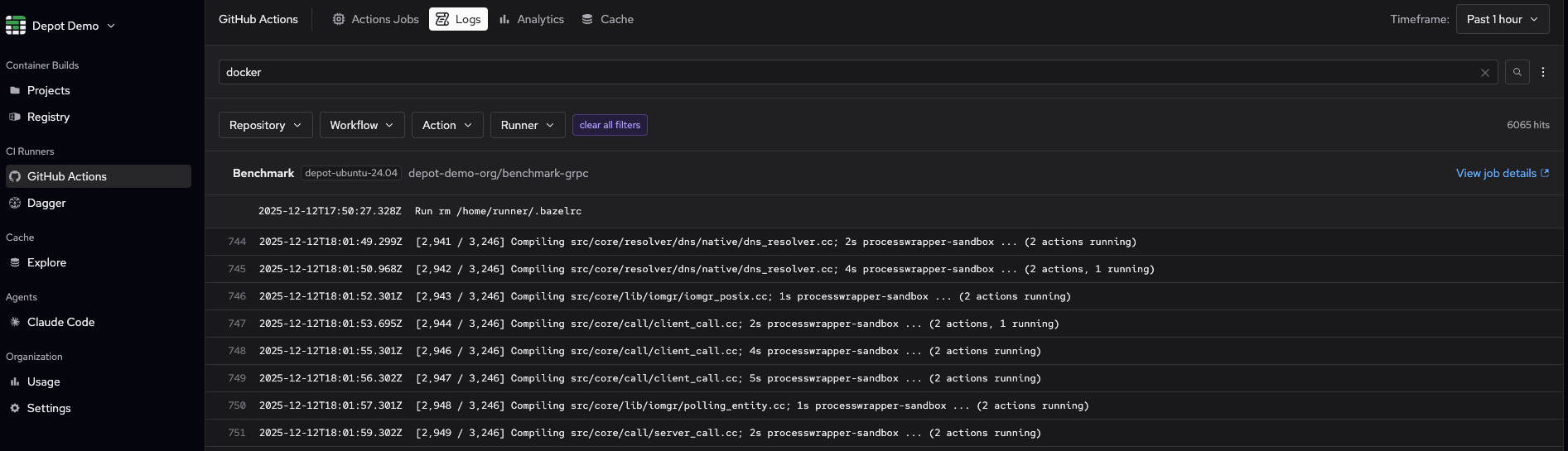
Scrolling to the bottom of the page automatically loads additional logs.
To open a new window with workflow metrics and logs, click View job details. You can share a log search view with others in your organization by copying the URL.
Search logs by keyword
To search for specific keywords, use the search bar. The results highlight the search term and show all matching log lines across your previous workflow runs.
Filter logs by time range
By default, you'll see GitHub Actions logs across all your repositories for the past hour. To filter by time range, select a timeframe or configure a custom range using the Timeframe dropdown in the upper right corner of the page.
Filter logs by repository, workflow, action, and runner type
Use filters to return results for specific repositories, workflows, actions, and runner types. You can select multiple items for each filter. For example, select multiple repositories to view logs from several projects at the same time.
When you apply filters, the options available in other filters update automatically. For example:
- Repository: Lists only repositories with CI builds during your selected timeframe.
- Workflow and Action: Lists only the workflows and actions that run in your selected repositories.
- Runner: Lists only runner types used by your selected repositories.
You can start with any filter. Whether you start with Repository or Runner, the other filters adjust to show only relevant options based on your selections.
View logs in context
To view more context around your search matches, click the three dots next to the search bar and enter the number of lines you want to show above and below each result. Seeing the logs immediately before and after your match makes troubleshooting easier.
View logs for the whole workflow run
To view a match in the context of the whole workflow run, click on a specific log line to load the complete set of logs for that run.