Tailscale
Tailscale is a zero-config VPN that connects your devices, services, and cloud networks to enable secure access to resources on any infrastructure.
By connecting Depot to your Tailscale network, you can enable secure access to private services, such as databases, within your tailnet without opening up those services to the public internet and without maintaining static IP allow lists.
Using Tailscale, Depot GitHub Actions runners, container builders, CI jobs, and sandboxes join your tailnet as ephemeral nodes, and you can control their access to the rest of your infrastructure using Tailscale ACLs.
Note: Tailscale integration with Depot Windows runners is not supported.
Sandboxes and Managed Agents
Depot Sandboxes and Managed Agents automatically join your tailnet when the integration is configured and enabled for sandboxes. They use the configured Tailscale tags and can reach any resource your access rules allow for those tags.
Custom sandbox images need tailscale, tailscaled, and curl. Joining happens in the background, so a sandbox can report running before tailnet services are reachable. The Sandbox SDK lets you opt out for an individual sandbox with disableTailnet: true.
Connecting Depot to your tailnet
Connecting your Depot organization to a Tailscale tailnet is a three-step process:
- Configure your Tailnet ACLs to define a tag for your Depot runners
- Generate new OAuth client credentials using this new tag
- Configure your Depot organization to use those OAuth client credentials
Step 1: Create a new tag in your Tailnet ACLs
First, you will need to create a tag that will be assigned to all Depot runners. Tailscale tags are used by Tailscale to group non-user devices, such as Depot runners, and let you manage access control policies based on these tags.
We recommend creating a new tag named tag:depot-runner for this purpose. This tag will later be used in your ACL rules to determine what Depot runners should have access to.
In your Tailscale admin console access controls, define a new tag under tagOwners:
{
  "tagOwners": {
    "tag:depot-runner": ["group:platform-team"]
  }
}Step 2: Generate a new OAuth client
Next, generate a new OAuth client from your tailnet's settings. This client can be given a descriptive name and should be granted Write access to the Keys > Auth Keys scope. You should select the tag you created in the previous step as chosen tag for this scope:
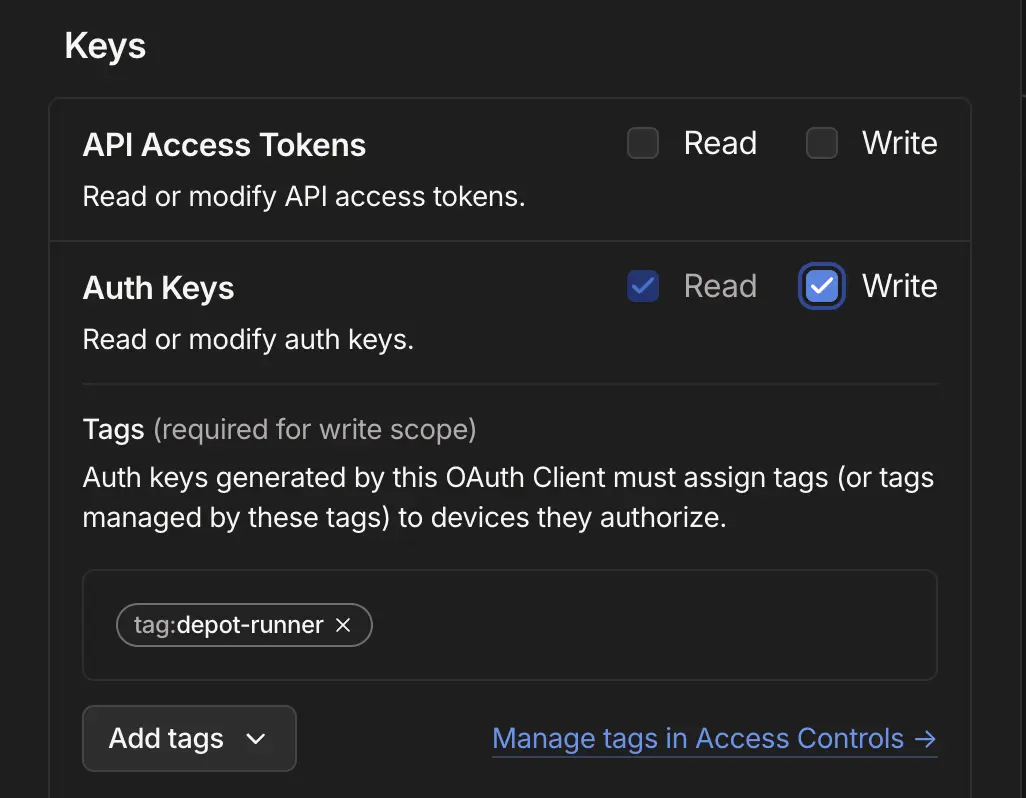
Optionally, you can also grant Write access to the Devices > Core scope, with the same tag. With this scope, Depot can remove leftover offline runner and builder nodes from your tailnet when a machine stops abruptly. Without it, Tailscale's own ephemeral node cleanup removes them later.
The Devices > Core scope covers your whole tailnet, not only Depot nodes. It lets the OAuth client list every device and remove any of them. Depot only removes nodes that are offline, ephemeral, carry your Depot tag, and belong to no running Depot machine. To add this scope to an existing connection, generate a new OAuth client with both scopes and reconnect Depot with its credentials.
You will be given a client ID and client secret that you can use in the next step.
Step 3: Configure Depot to use the new OAuth client
Finally, you will need to configure your Depot organization to use the new OAuth client credentials. From your organization settings page, navigate to the Tailscale section and click Connect to Tailscale. Enter the client ID and secret from the previous step and click Connect:
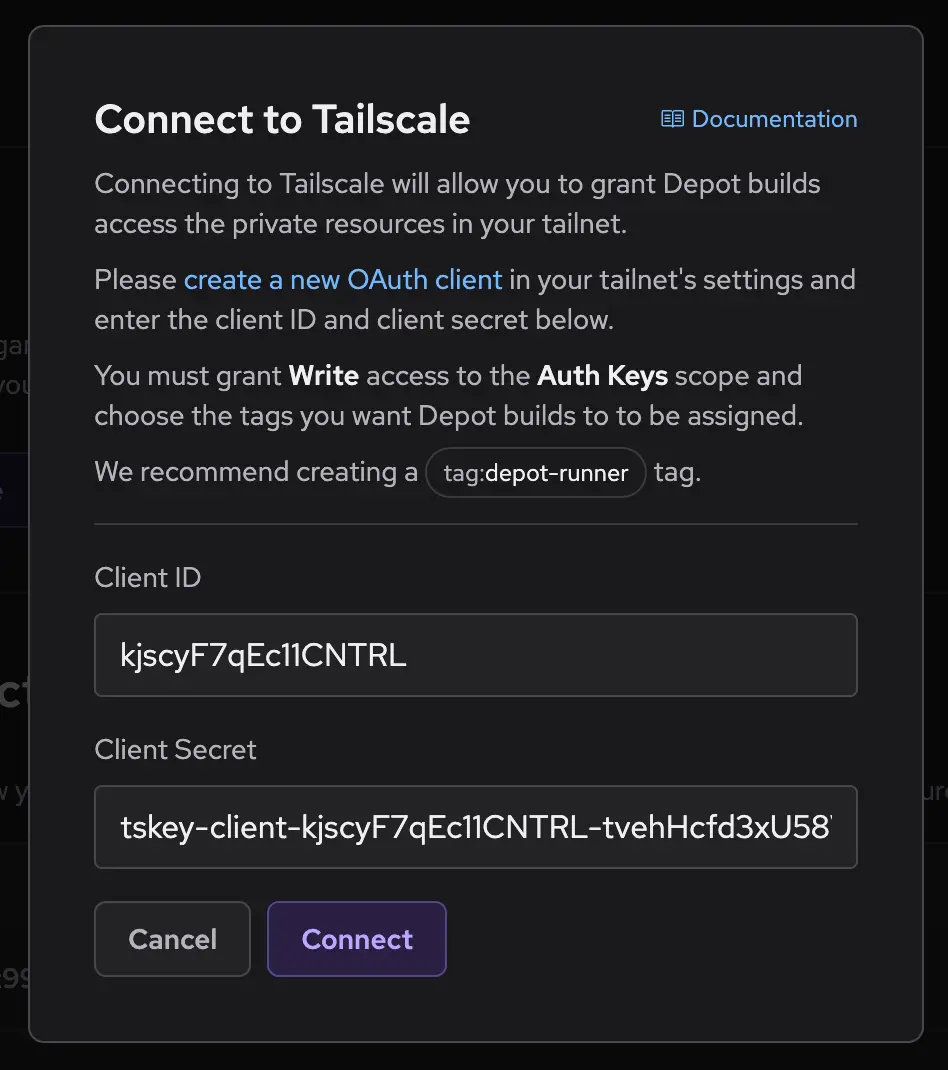
Your Depot organization is now connected to your Tailscale tailnet. Depot runners, container builders, and CI jobs will now join your tailnet as ephemeral nodes, using the tag you have created.
Granting access to private services
Now that your Depot runners are connected to your tailnet, you can use Tailscale ACLs to control their access to the rest of your infrastructure. Depot runners will be tagged with your chosen tag, which you can then reference in your ACL rules.
For example, you can grant your Depot runners access to a private database service by creating a new ACL rule in the admin console:
{
  "acls": [{"action": "accept", "src": ["tag:depot-runner"], "dst": ["database-hostname"]}]
}Using Tailscale subnet routers, you can additionally grant your Depot runners access to entire subnets in any cloud provider VPC or on-premises network.
{
  "acls": [{"action": "accept", "src": ["tag:depot-runner"], "dst": ["192.0.2.0/24:*"]}]
}Disconnecting from Tailscale
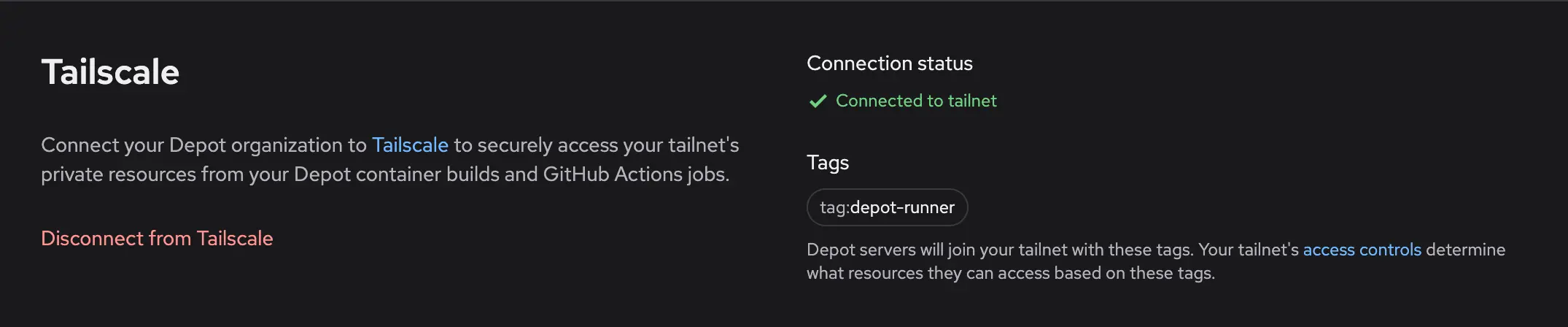
If you wish to disconnect your Depot organization from Tailscale, navigate to the Tailscale section in your organization settings and click Disconnect from Tailscale. This will remove the OAuth client credentials from your organization and your Depot runners will no longer join your tailnet as ephemeral nodes:
Note: disconnecting prevents new Depot runners from joining your tailnet. Any in-flight Actions jobs, container builds, or CI jobs will remain connected until they complete. To immediately disconnect any running jobs, you can remove any of the connected nodes from your Tailscale admin console.