Managed Agents
Give your agents remote compute to write code, run tests, and execute commands. Connect your existing agent provider to Depot Sandboxes without managing runners or workers yourself. Keep your provider’s workflow and keep tasks running after you close your laptop.
Managed Agents replaces the Claude Code remote agent product. To run Claude Code on Depot, follow Run Claude Code in Depot sandboxes.
Supported providers
Select your provider for setup instructions and connection requirements.
How Managed Agents uses Depot Sandboxes
Depot Sandboxes are standalone, isolated environments for executing commands and working with files. You can use them with your own custom agents through the Sandbox SDK, independently of Managed Agents. Depot Sandboxes currently support Linux only.
Managed Agents connects supported providers to Depot Sandboxes. Depot creates the sandbox and manages the provider’s runner or worker for you.
The agent doesn’t have to run inside the sandbox. With Claude Code, the agent loop and tools run inside the sandbox. With Claude Managed Agents, Anthropic runs the agent loop, and Depot executes commands and file operations.
Why use Depot for your agent workloads?
- Keep your existing workflow: Start sessions and interact with your agent through your provider. Depot supplies the compute for commands and tools.
- Let Depot manage the setup: Depot creates the sandbox and starts the provider's runner or worker when work arrives.
- Choose compute for your workload: Select up to 16 CPUs and 64 GB of memory for each provider connection.
- Continue work across sandboxes: Depot saves workspace snapshots and restores saved files when your session moves to a new sandbox. Continue the same conversation through your provider.
- Run work away from your laptop: Keep sessions running on Depot after you close your laptop. Commands and tools execute on Depot compute without using your laptop's CPU or memory.
- Use fast compute and networking: Run commands and tools on Depot's fast CPUs and networks.
- Reuse cached results: Supported tools use Depot Cache automatically to reuse build artifacts, test results, and other task outputs across runs.
- Access private services: Agent sandboxes automatically join your configured and enabled Tailscale tailnet to reach private services, such as databases.
- Track your team's runs: View your team's agent runs, status, timing, and failure details across providers in one Depot dashboard.
View the status of your agents on the Managed Runs page in the Depot dashboard.
Session continuity
A session can continue across multiple sandbox runs. You can send another message in the same conversation through your provider, even after the previous sandbox stops.
Depot automatically saves workspace snapshots. When the session needs a new sandbox, Depot restores the latest available snapshot before starting the agent.
Snapshots preserve files, not running processes. Changes made after the last successful snapshot might not be available when the session resumes.
For your own agents or other workloads, the Sandbox SDK exposes file-based snapshots through sandbox.snapshot() and Sandbox.create(client, {snapshot}).
Depot Cache
Managed Agents automatically configures Depot Cache in agent sandboxes. Supported tools can reuse build artifacts, test results, and other task outputs across runs. They receive cache credentials and configuration without a separate setup step for each provider. Existing tool-specific cache configuration takes precedence. To start a connection's runs without cache credentials, turn off Depot Cache for runs.
Private networking
Agent sandboxes automatically join your organization's Tailscale tailnet when the integration is configured and enabled for sandboxes. Your agent's commands can access private services, such as databases, through the tailnet.
Agent sandboxes use your organization's configured Tailscale tags. Your tailnet access rules determine which private resources agents can reach.
Track runs in Depot
The Managed Runs page lists runs from all your connections, newest first. You can filter by provider and by status. The status filters are Running, which includes queued and starting runs, Failed, which includes runs that timed out, Succeeded, and Cancelled.
Select a run to see its status, its duration, and its run ID. If the run failed, a banner shows the reason. The Agent panel shows the sandbox ID.
Each run lists its steps with their timing: Start sandbox, Run setup script, and Run agent. The setup script step shows the script's output.
The Run agent step shows only what the agent process prints in the sandbox. The agent's conversation stays with your provider. To see it, use the Open in link, such as Open in OpenAI. You need to be signed in to that provider.
Save files from a run
To keep files from a run, have the agent save them to /workspace/outputs/. When the run finishes, Depot saves them before it releases the sandbox. They're listed under Outputs on the run's page, where you can download each one.
These limits apply:
- At most 100 files.
- Each file is at most 500 MB.
- Each path is at most 255 bytes.
- Depot spends at most two minutes saving. Files that aren't saved by then are left behind with the sandbox.
Stop a run
Organization owners see Stop run on a run that's still working. After you confirm, the run shows as Cancelled. Stopping a run releases its sandbox.
Your provider may still show the conversation as active for a short time. With Claude Managed Agents, a command that's already on its way can still run for a few seconds after the stop.
Sandbox sizes
After connecting a provider, you can change its sandbox size in the Sandbox table in the connection's General section in Settings > Managed Runs. Select a Size in the Default row, then select Save. The following sizes are available:
| Size | CPUs | Memory |
|---|---|---|
2x8 | 2 | 8 GB |
4x16 (default) | 4 | 16 GB |
8x32 | 8 | 32 GB |
16x64 | 16 | 64 GB |
Each agent run uses its connection's Default size unless a row in the table overrides it. Compute is billed per vCPU-second, so larger sizes cost more for the same runtime.
Changing the size doesn't resize an existing sandbox. Sandbox size changes can take up to ten minutes to apply to new runs.
Override the sandbox for a repository or orb type
The Sandbox table starts with the Default row, which every run gets. On a Claude Code connection, you can add a row per repository. On an Amp connection, you can add a row per orb type. A row sets the Size, Image, and Setup script for runs that match its key, and inherits the Default for anything it leaves blank.
- Select Add repository or Add orb type.
- Enter the Repository as
owner/repo, or the Orb type exactly as Amp names it. - Set a Size, an Image, or both. Leave a field blank to inherit the Default row's value.
- Select Save.
Once the row is saved, its Setup script cell takes a script of its own. See use a different script for each repository or orb type. To drop a row, select Remove on it, then Save. A row with a setup script keeps its place until you remove the script.
Only Claude Code runs name their repository before the sandbox boots, and only Amp orbs carry an orb type, so other providers have only the Default row.
Sandbox profiles
A sandbox profile is a list of settings that apply to the runs it matches. Each setting is one row: a size, an architecture, an image, a setup script, or a secret with a name and value. Manage profiles from Settings > Managed Runs > Manage sandbox profiles.
Under Applies when, choose the connections, repositories, or orb types a profile matches. Leave every list empty to match every run. With several kinds set, a run must match all of them. Within one kind, matching any entry is enough. A profile matches repositories or orb types, not both.
A value the connection sets for that run's repository or orb type wins over every profile. Otherwise, when several profiles match a run, the one with more condition kinds set wins for each setting it lists. A setting the winning profile leaves out comes from the next matching profile, then from the connection's defaults or the Depot default. Depot refuses to save a profile when another profile as specific as it could match the same run and sets the same setting, and names that profile.
Setup scripts and secret values are write-only. Leave the value empty when you edit a profile to keep what's stored.
Sandbox architecture
Each connection's runs use one CPU architecture: amd64 for x86-64, the default, or arm64 for ARM64. To change it, open the connection's General section in Settings > Managed Runs, select a Sandbox architecture, and click Save. The change applies to new runs and can take up to ten minutes. Through the API, the connection's sandboxArchitecture field holds the same value. Depot agents and Cursor connections don't take a sandbox architecture.
Depot's agent image is built for amd64 only. An arm64 run boots Depot's base ARM64 image, or the connection's sandbox image when it has one, and installs the agent during setup.
A sandbox image must be built for the connection's architecture. Depot doesn't check the image's architecture when you save, so a run with a mismatched image fails when its sandbox boots.
On Amp, each orb boots on the connection's architecture. Depot doesn't restore an orb snapshot taken on the other architecture, so after a change each orb starts once without its saved files. Other providers' workspace snapshots carry only files and are restored on either architecture.
Sandbox images
By default, each run boots Depot's agent image. To start runs from your own environment instead, such as one with your toolchains and dependencies already installed, give the connection a sandbox image.
Build the image
Build the image in Depot CI: a job installs what your agent needs, then depot/snapshot-action pushes a snapshot of the sandbox to your organization's registry. For example, save this workflow as .depot/workflows/build-agent-image.yml:
on:
  workflow_dispatch:

jobs:
  build-image:
    runs-on: depot-ubuntu-latest
    steps:
      - uses: actions/checkout@v4
      - name: Install dependencies
        run: |
          sudo apt-get update
          sudo apt-get install -y postgresql-client
          npm ci
      - uses: depot/snapshot-action@v1
        with:
image: <org-id>.registry.depot.dev/agent-image:latestReplace <org-id> with your organization ID. Run the workflow once to build the image, and again whenever your dependencies change. The snapshot takes the job's architecture, so for an arm64 connection set runs-on to an Arm64 runner such as depot-ubuntu-24.04-arm. See sandbox architecture. For more on building snapshots and pinning them by digest, see Build and use custom images.
Configure the connection
Open the connection in Settings > Managed Runs. In its General section:
- In the Sandbox table, enter the image reference in the Default row's Image, such as
<org-id>.registry.depot.dev/agent-image:latest. - Optionally, give a repository or an orb type its own image: add a row and fill in its Image. See override the sandbox for a repository or orb type.
- Select Save.
How runs pick an image
Each run boots the first image that applies: its repository's or orb type's image, then the Default image, then Depot's agent image. To go back to Depot's agent image, clear the Image in the Default row and in every other row. Changes apply to new runs. On Amp, the image applies to newly created orbs. Existing orbs keep the image they first booted.
The image must be a Depot snapshot image in your organization's Depot registry, such as one built with depot/snapshot-action. Depot checks the registry when you save. Standard container images aren't supported.
If Depot can't find or boot the image, the run fails with sandbox_unavailable before the agent starts, and its failure details name the image. Depot agents and Cursor connections don't take sandbox images.
A sandbox image isn't a workspace snapshot. The sandbox image is where every new run starts. Workspace snapshots carry one session's files from one sandbox to the next.
Run secrets
Give your agent its own credentials, such as a package registry token, by adding them in the connection's Run secrets section in Settings > Managed Runs. Each run that connection starts can access every run secret as an environment variable in its sandbox. Only organization owners can add or delete run secrets.
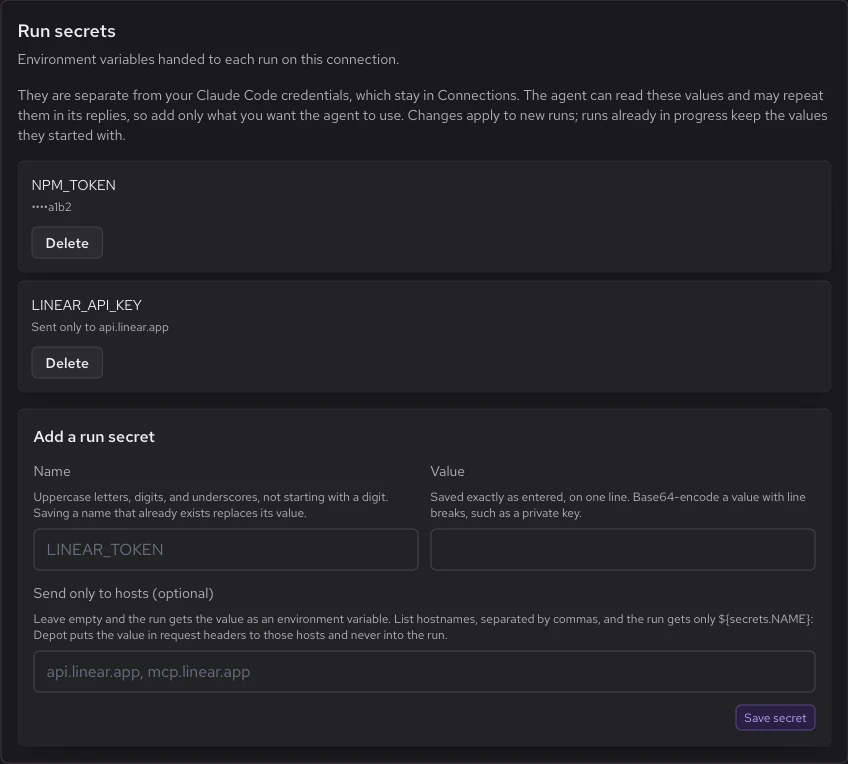
The agent can read run secrets and may repeat them in its replies or tool output, so add only values you want the agent to use. Run secrets are separate from the provider credentials you connected with, and adding or deleting one doesn't change the connection.
After you save a run secret, Depot shows only its name and, for values of 16 or more characters, the last four characters. Shorter values show as Set. To change a value, save the same name again. Changes apply to new runs. Runs already in progress keep the values they started with.
Run secrets have these limits:
- Names use uppercase letters, digits, and underscores, don't start with a digit, and are at most 128 characters.
- Names that Depot or the provider sets are reserved, such as
PATH,HOME, and names that start withDEPOT_orANTHROPIC_. The one exception isDEPOT_TOKEN. - Each value is at most 32 KiB and fits on one line. Base64-encode a value with line breaks, such as a private key.
- Each connection holds at most 50 run secrets.
- Depot agents and Cursor connections don't take run secrets.
Use your own Depot token
To give runs a Depot token with more access, such as one that can start container builds, add it as a run secret named DEPOT_TOKEN. For example, use an organization token or a project token. The depot CLI in the run then uses your token instead of the short-lived one Depot creates.
The agent can read this token like any other run secret, so give it only the access your runs need. DEPOT_TOKEN can't be sent only to listed hosts.
Send a secret only to listed hosts
To keep a value out of the sandbox entirely, list hostnames in Send only to hosts when you add the run secret. The run then gets the placeholder ${secrets.NAME} instead of the value. Depot puts the real value into request headers sent through its gateway to those hosts, and never into the run. Each run secret can list a maximum of 16 hosts.
Depot writes instructions into the sandbox that tell the agent how to send those requests through the gateway. Agents that run inside the sandbox, such as Amp, Claude Code, and OpenAI agents, read them automatically.
Use host-bound secrets with Claude Managed Agents
Claude Managed Agents runs its agent loop at Anthropic, outside the sandbox, so it doesn't read those instructions. Without them, the agent sends the placeholder text instead of the value, and a server that ignores it may still return success. When a Claude Managed Agents connection has a secret sent only to listed hosts, its Run secrets section shows this text under Show system prompt, with a copy button. Add it to your agent's system prompt:
An environment variable whose value is ${secrets.NAME} holds a placeholder, never the secret itself, which stays outside your sandbox.

A request sent straight to a host carries the placeholder text, and a server that ignores it may still answer 200: that is not success. Send it through Depot's gateway, which puts the real value in place of the placeholder. Prefix the host and path with `$DEPOT_AGENT_GATEWAY_URL/`, add the gateway token header, put the variable in a header, and skip any HTTP proxy:

```sh
curl --noproxy '*' "$DEPOT_AGENT_GATEWAY_URL/<host>/<path>" \
  -H "x-depot-agent-token: $(curl -s --noproxy '*' "$DEPOT_AGENT_GATEWAY_TOKEN_URL" | sed -n 's/.*"value" *: *"\([^"]*\)".*/\1/p')" \
  -H "Authorization: Bearer $NAME"
```

- The gateway fills a placeholder in only from a header, never from the URL or the body.
- It sends a secret only to the hosts listed for it, and its error says why it refused.
- From an SDK or script, set the base URL to `$DEPOT_AGENT_GATEWAY_URL/<host>`, send the token header with each request, and keep the gateway host in `NO_PROXY`.GitHub access for runs
To let runs clone and push to your repositories through Depot's Code Access app instead of a personal access token, select Give runs GitHub access via Depot's Code Access app in the connection's GitHub access section in Settings > Managed Runs. Then choose which repositories runs can Read and which they can Write to. Write access includes read access. Runs get one-hour GitHub tokens. A GitHub API request whose path names a repository, such as /repos/{owner}/{name}/..., gets a token for that repository. A request whose path names no repository, such as /graphql, gets one token covering all the selected repositories, even when the query itself names one repository. That token is read-only unless every selected repository has Write.
The repository list comes from the repositories Depot's Code Access app can reach in your organization. If the app loses access to a repository you selected, the settings mark it and runs no longer get access to it.
To use your own token instead, add it as a run secret named GH_TOKEN.
Use the Depot CLI in a run
In every run, the depot CLI is signed in as your organization. You don't need to set a token.
The CLI can read your organization's projects, container builds and their logs, Depot CI runs, jobs and logs, test results, and credit balance. It can also start, dispatch, cancel, rerun, and retry Depot CI runs. It can't start container builds, read secrets, usage, or sandbox logs, or change projects, tokens, members, or organization settings.
Each command gets a fresh short-lived token, so the sandbox doesn't keep a long-lived Depot token.
To give the CLI more access, such as starting container builds, use your own Depot token.
Limit the CLI to reading
To take the Depot CI run controls away from a connection's runs, open Settings > Managed Runs, click Run settings for the connection, and set Depot API token role to Read-only. Default keeps the access listed earlier in this section. Read-only keeps the same reads and refuses starting, dispatching, cancelling, rerunning, and retrying CI runs, workflows, and jobs.
The role takes effect at once, for runs already in progress too. Existing connections keep Default. A run secret named DEPOT_TOKEN is your own token, and the role doesn't limit it.
The role governs only DEPOT_TOKEN. The sandbox uses its own credentials for Depot Cache and for its snapshots, and the role doesn't change those. To keep runs away from the cache, turn off Depot Cache for runs.
Turn off Depot Cache for runs
Each run's sandbox gets its own Depot Cache token with read and write access to your organization's cache, as described under Depot Cache. The token has no read-only mode, and the Depot API token role doesn't govern it. To keep a connection's runs away from the cache, open Run settings for the connection, turn off the Depot Cache switch, and click Save. It's on by default. Off starts each run's sandbox without the cache token, environment variables, and config files that Depot adds. Cache credentials you supply yourself, such as a token in a run secret or a config file in your repository, still work.
The switch applies to runs started after the change, including runs that resume from a snapshot. A sandbox already running keeps what it booted with. The token role, by contrast, applies to running runs at once.
Setup script
To install tools or prepare files before the agent starts, add a setup script in the connection's Setup script section in Settings > Managed Runs. Drop the script file onto the page, or select Choose file. Only organization owners can change it.
Depot doesn't show a saved script again. The settings page shows only its size and when it was last updated, so keep your own copy. To change the script, select Replace and upload the new file. To stop using a script, select Remove.
Each run that connection starts runs the script with bash in /workspace, after Depot's own setup and after GitHub access is in place, so the script can clone the repositories runs can read. The script gets your run secrets and a basic environment, such as PATH and HOME. It never gets the provider credentials you connected with.
The script has up to five minutes. If it fails or runs out of time, the run still starts. When the script ends, its output and how it ended are written to /workspace/.depot-setup/setup.log, with run secret values masked. The log isn't written while the script runs.
The script is a UTF-8 text file of at most 32 KiB. Changes apply to new runs. On Devin connections, runs with a setup script skip Devin's initialize cache, so they can take longer to start.
Use a different script for each repository or orb type
On a Claude Code connection, a repository can have its own setup script. On an Amp connection, an orb type can. A run that matches the row runs that script instead of the connection's script. Every other run runs the connection's script. Only Claude Code runs name their repository before the sandbox starts, and only Amp orbs carry an orb type, so other providers always run the connection's script.
- In the Sandbox table in the General section, add a row and name the repository or orb type. See override the sandbox for a repository or orb type. The row can leave its size and image blank.
- In that row's Setup script cell, select Choose file. The script saves on its own, so the cell asks you to select Save first if the table has other unsaved changes.
Each row's script follows the same rules as the connection's script. A connection can have scripts for up to 100 rows. To change a row's script, select Replace in its cell. To go back to the connection's script, select Remove in the cell. The Default row's cell shows the connection's script and links to this section.
Use MCP servers in runs
Runs can call tools from MCP servers. Configure them in the connection's MCP servers section in Settings > Managed Runs. The section lists the servers that runs on this connection can use: the servers you added for this connection, plus your organization's servers, which are tagged Organization.
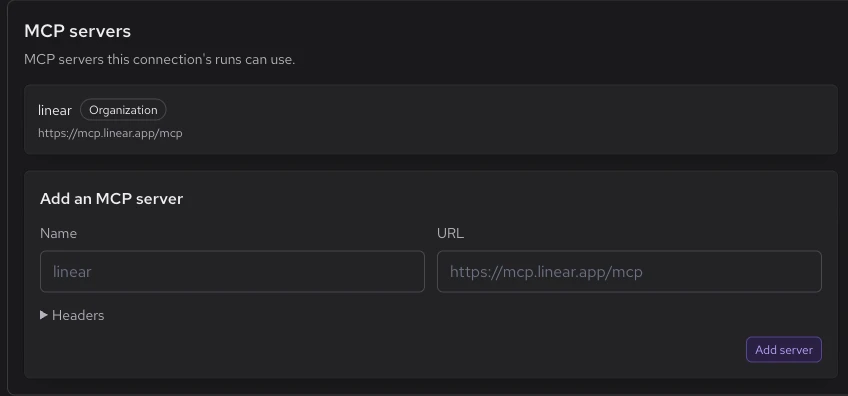
To add a server, enter a Name and a URL, then select Add server.
- The name can have up to 20 lowercase letters, digits, and hyphens, and must start with a letter.
- The URL must use https, with no username, password, or fragment.
Then select Log in to sign in to the server with OAuth. After you sign in, the server shows Connected. If you remove a server, new runs no longer reach it.
For a server that takes a token instead of OAuth, add a header whose value comes from a secret, written as ${secrets.NAME}. Depot fills it in when the run calls the server. It first uses the connection's run secret named NAME, which must be sent only to the server's host. If the run secret isn't sent to that host, the call fails with run secret NAME is not bound to HOST. Without a run secret of that name, Depot uses your own or your organization's agent credential, and then your organization's CI secret.
Amp, Claude Code, and OpenAI agents see these tools as native MCP tools from a server named depot. For OpenAI, the session's environment must include the Depot capability directory, as described in Start a session. For Devin, add Depot's server in your Devin organization once, as described in Add Depot's MCP server in Devin. Any agent can also reach them from the sandbox with the depot-mcp command:
# List every tool with its input schema
depot-mcp tools

# Call one tool and print its JSON-RPC result
depot-mcp call <server>__<tool> '<json arguments>'depot-mcp call exits nonzero when the call fails.
Depot writes these instructions into the sandbox. Claude Managed Agents doesn't read them, because Anthropic runs its agent loop outside the sandbox. If you use Claude Managed Agents, tell the agent about depot-mcp in its system prompt.
Pricing
Managed Agents, Depot Sandboxes, and Depot CI share one pool of included sandbox minutes. There's no separate allowance for each product. Compute is tracked and billed by the second, with no one-minute minimum per run.
Included minutes are measured at 2 vCPUs. Larger sandboxes consume the pool proportionally faster. For example, the default 4-vCPU agent sandbox uses 2 included minutes for every minute it runs.
| Developer plan | Startup plan | Business plan | |
|---|---|---|---|
| Plan cost | $20/month | $200/month | Custom |
| Shared sandbox minutes | 2,000/month | 20,000/month | Custom |
| Additional compute | $0.00005/vCPU-second | $0.00005/vCPU-second | Custom |
| Cache and registry storage | 25 GB included + $0.20/GB/month after | 250 GB included + $0.20/GB/month after | Custom |
The included minutes aren't a hard cap. Additional usage is billed automatically at $0.00005 per vCPU-second on Developer and Startup. A 4-vCPU sandbox costs $0.0002 per second after the shared allowance is used.
Depot charges for sandbox compute. Your agent provider's model usage and subscription charges are separate.
Try out Depot free for 7 days, no credit card required.
Plans also include separate container build and GitHub Actions runner minutes. See Pricing for plan features and costs.
Limitations
- Platform: Managed Agents sandboxes run Linux on x86-64 or ARM64, chosen per connection. See Sandbox architecture.
- Depot CI secrets: Managed Agents doesn't currently inject your organization's Depot CI secrets into sandbox commands. Provider credentials are handled separately. To use Depot CI secrets with your own agents, configure secrets through the Sandbox SDK.
- Workspace snapshots: Snapshots preserve files, not running processes. Managed Agents snapshots exclude dependency and cache directories such as
node_modules,.venv, andtarget. Reinstall excluded dependencies when a session starts in a new sandbox. See Session continuity for how saved files are restored.