

Stay in the loop
How we use PostHog to keep our AI assistant on track
When we created our AI assistant Sherlock, we underestimated the effort it would take to monitor and maintain it. We strongly believe humans need to participate in making sure Sherlock is helpful and meets expectations, and this initially meant a lot of manual toil.
Sherlock started in the docs. Over the last seven months we added the ability to read customer logs and tell them why a job or build failed and how to fix it, or why it's slow and how to optimize it. Customers liked the new capabilities, usage increased, and so did the load on the review team.
After some suffering and disappointment, we started using PostHog's AI observability tools. The tools help us by doing all the work of filtering and finding only the conversations that indicate a problem with Sherlock's performance.
Why it got harder to keep up with Sherlock
Customers can access Sherlock from the docs or the dashboard.
From the docs, Sherlock answers questions about how Depot works. From the dashboard, it can access usage and logs, and can tell customers what's wrong or what can be optimized. In addition to the regular chat window, the dashboard has buttons that trigger pre-written prompts for Sherlock to analyze builds and jobs. We call these the Analyze buttons.
The following chart shows Sherlock usage over time based on where the user is when they start a conversation:
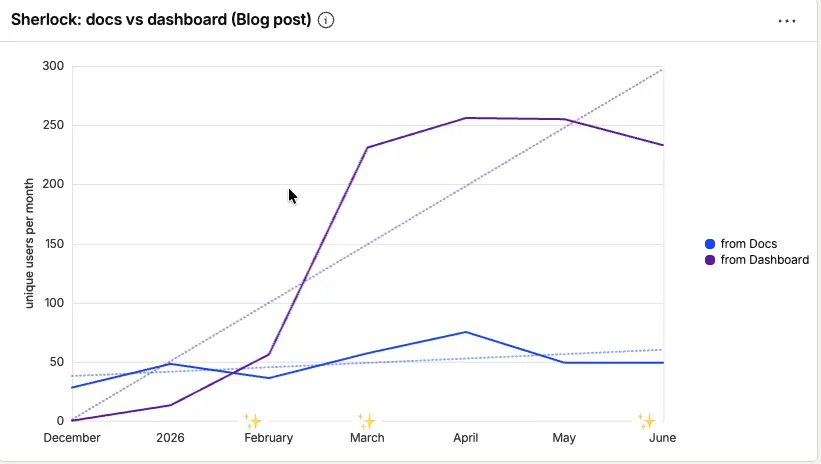
The sparkle annotations on the x-axis of the chart indicate when we added new capabilities. Here's a recap:
- 27 January: added a button to access Sherlock from the Depot dashboard.
- 6 March: expanded by adding buttons to analyze specific builds and GitHub Actions jobs, as well as access to logs and usage.
- 27 May: added a button to Depot CI for expanded error diagnosis, plus access to logs and usage.
The adoption trend is clear: the number of customers using Sherlock from the dashboard increased steadily over several months as we added capabilities for different parts of Depot. Usage from within the docs stayed steady the whole time.
If Sherlock was docs-only, we could handle manual sorting and reviews for a while. But Sherlock in the dashboard is 5x the volume and higher stakes: it's helping people with their production workflows and builds.
What we expect from Sherlock
Before we could tell whether Sherlock was working, we had to agree on what "working" meant. We need Sherlock to:
- Be truly helpful, and not frustrating for customers who might already be stressed or looking for help.
- Stay within the guardrails and use only Depot sources to give advice about Depot.
- Resist attempts to misuse it; avoid doing someone's homework or something way worse.
- Help us spot gaps in our docs: legit questions that Sherlock couldn't answer because the documentation was unclear or missing.
These expectations are the focus when we assess how Sherlock is performing.
The sad way we used to do reviews
In retrospect, we were using the wrong instrumentation and inadvertently ignoring the most useful features of the tool we already had.
Depot as a whole uses PostHog for data. For Sherlock, we wired messages and responses as events in PostHog so we could wrangle them into insights and look for trends using Product Analytics features. But there was no way for us to view whole conversations in an efficient way.
For the first iteration of our review process, we'd export a table of messages and responses into a Google Sheet and then meet to review it. We had to group conversations manually, re-order them, and then try to assess if Sherlock was behaving. No surprise; we fell behind.
We attempted various rounds of automation using scripts and AI. The last version was almost comically complex. Our sherlock-triage skill included:
- A Python script that took a raw CSV export from PostHog and grouped the individual message rows into conversations (same user, within 30 minutes of each other).
- A model that read, categorized, and filtered each conversation, and then wrote the output CSV, which by that point was supposed to contain only actionable conversations.
Using this process, our review team of two often only addressed things we flagged as blatantly wrong when we skimmed past them in a spreadsheet. And yet we were still behind and that felt really bad.
We weren't living up to our own expectations for how we wanted to monitor Sherlock.
The solution was there the whole time 🥲
One day, as we stared at PostHog through our tears, we found the solution was right there in the sidebar: AI engineering. PostHog docs define AI engineering as "the practice of integrating, building, and shipping software that utilizes LLMs".
Well, duh. That's what we were doing with Sherlock. We obviously needed AI engineering, but to make it work we had to adjust how we pull data into PostHog.
How we hooked into AI engineering
When we launched Sherlock, we started with regular PostHog events that tracked whether the chat window was opened, or a message was sent by a user. That told us whether people were using it, but not much about what they were trying to accomplish.
We switched our main reporting to AI observability traces. A trace gives us the full shape of an interaction: the user's question, Sherlock's response, latency, session grouping, and the product surface where the conversation started. All that data gives you more than just usage charts. (Obviously it's even more useful when you can read the messages, but this screenshot gives you an idea of the interface.)
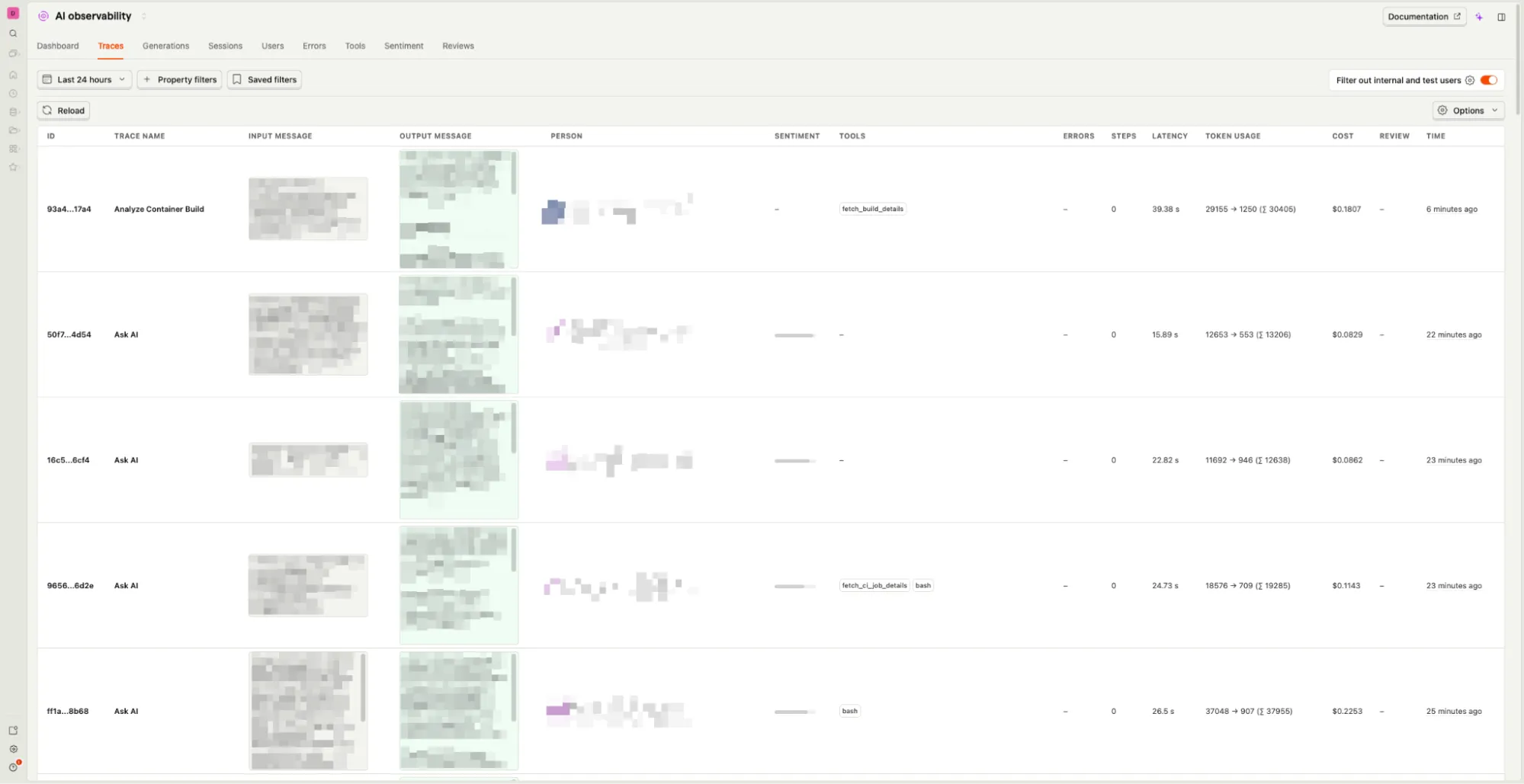
Making these changes not only helps us keep an eye on Sherlock, it also forces us to improve the data collection and retrieval. We made the switch in May, so we've been getting better, more reliable, more granular data for a few months now.
Reviews take 30 minutes a week instead of forever
Once we transitioned from tracking custom events to using PostHog's AI events, we could streamline our review sessions. We had a much clearer perspective on LLM transactions (traces, in PostHog terminology). Our synchronous review sessions are now 30 minutes a week and way more productive.
So far we're primarily using Sentiment and Clusters to speedrun Sherlock reviews.
Sentiment
Sentiment is the way we triage traces for review and where we might still look at individual traces. To get sentiment running on your traces, you configure an evaluation that uses the Sentiment analysis method. Our sentiment evaluation triggers on 100% of traces that are not started by a user clicking an Analyze button. As we become more efficient at reviews or as usage grows, we can expand or adjust the sampling.
PostHog Sentiment labels traces as Positive, Neutral, or Negative. You set the intensity as a percentage, which represents how confident the model is about the label. Set at 50%, our experience is that it reliably flags any level of user frustration we might care about—from a basic "my build failed" to someone upset about a third-party outage—even when the conversation ends satisfactorily.
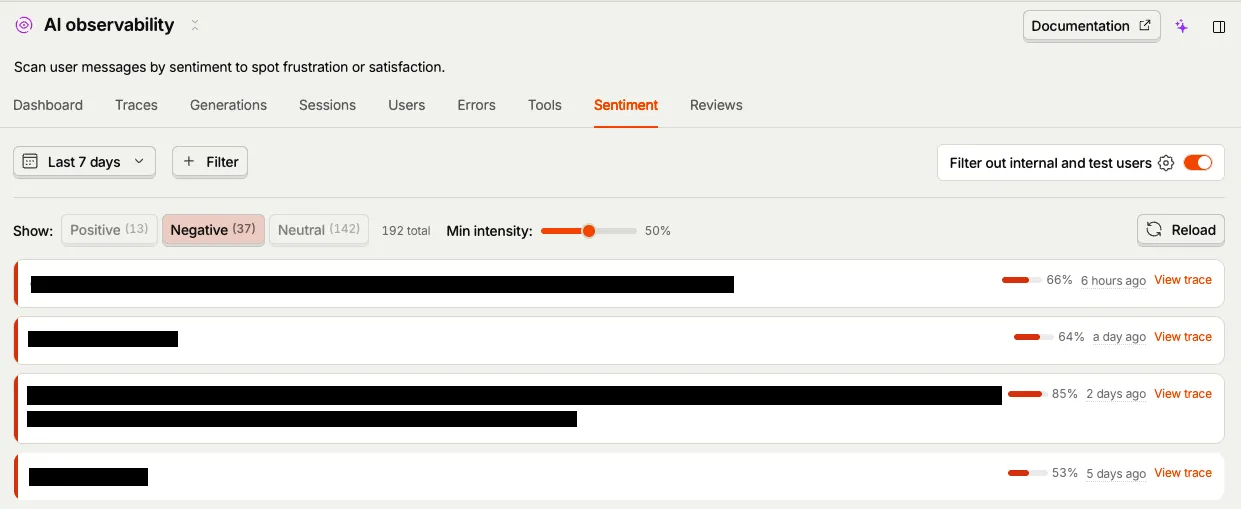
In our weekly review, we look at traces for the last 7 days and filter out internal users. We keep the intensity at 50% and review all traces labelled as Negative. We'd rather read a few traces that turned out okay than miss the ones that didn't.
Some of the negative traces are already on our radar as support tickets, because Sherlock offers to create a ticket when it can't solve a problem. Some negative traces indicate real problems with docs, the product, or Sherlock itself. For those, we create issues to follow up on according to priority.
Clusters
Another tool we use for reviewing and classifying user prompts is PostHog's Clusters feature, where similar interactions are grouped together based on their content.
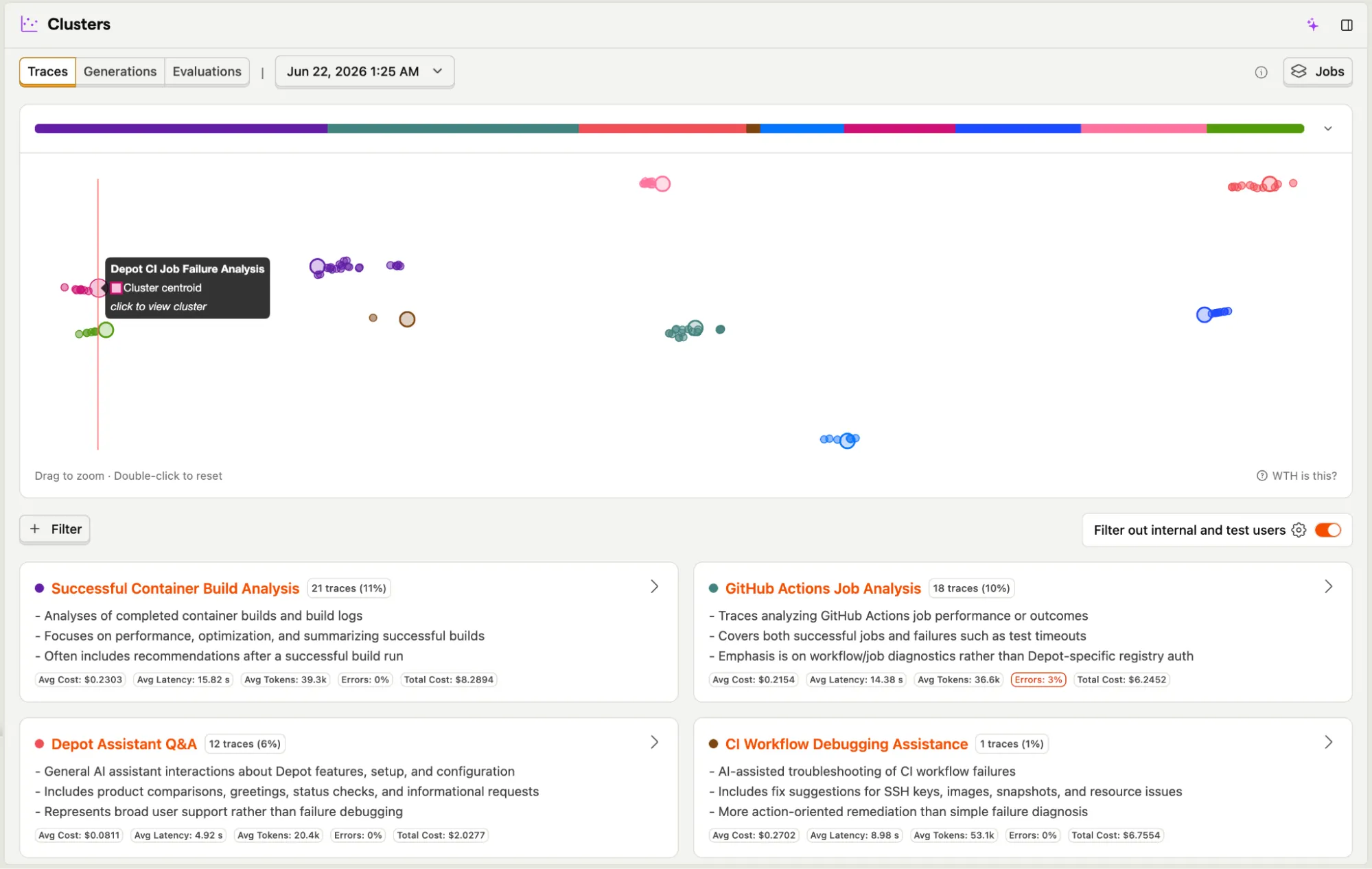
The clusters reinforce our observation: customers predominantly use Sherlock for CI and build troubleshooting, followed closely by general documentation queries.
Using the Clusters tool, we can perform a more granular analysis of these interaction types. It enables us to pinpoint exactly where our documentation or support resources might be falling short, as illustrated here:
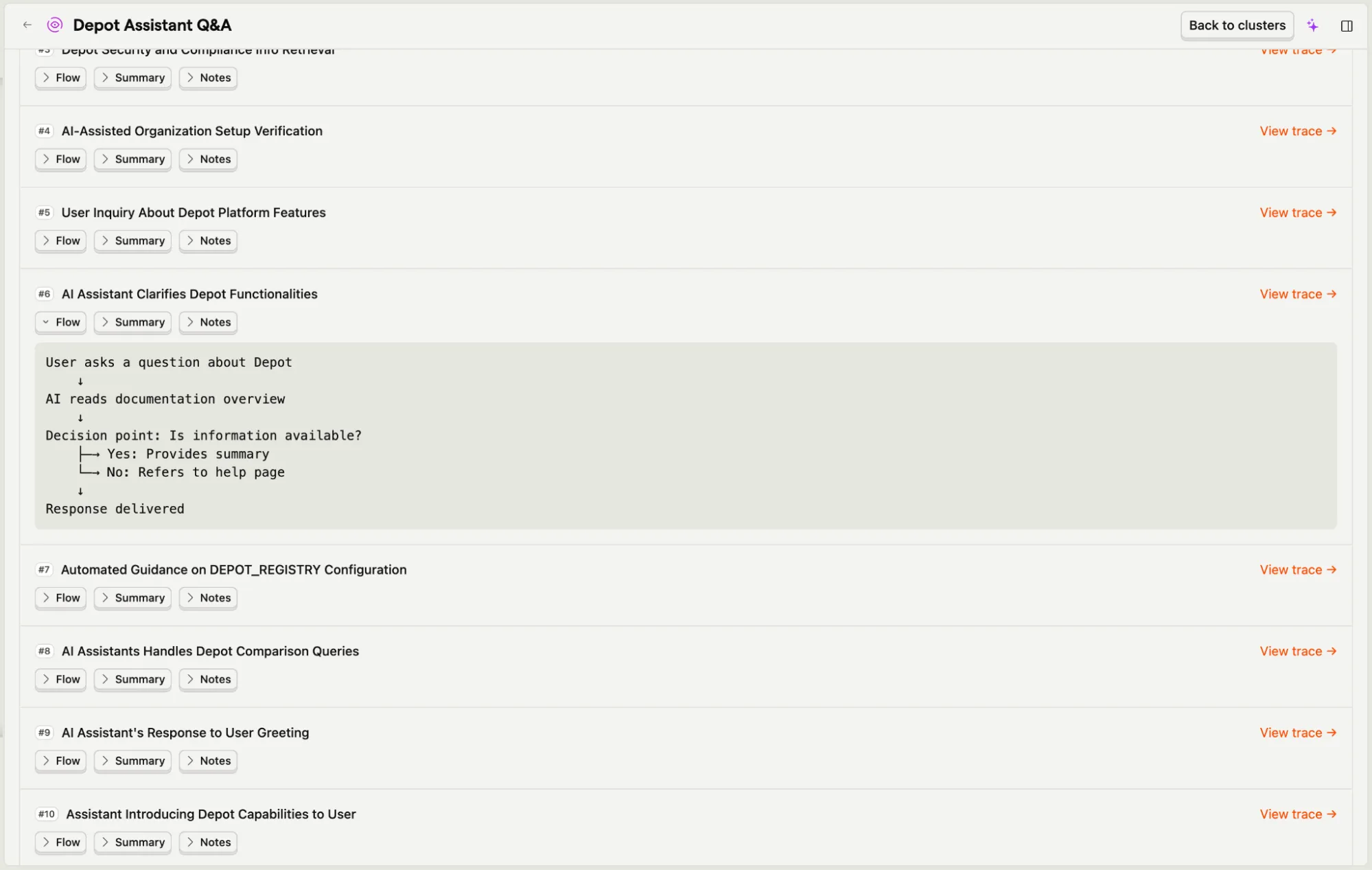
Clusters give us a roadmap for what to build next. It replaces our manual attempts to categorize conversations and lets us focus on the areas where users are getting stuck. By iterating on Sherlock based on this real-world feedback, we can make sure it keeps getting smarter and more helpful, and we can see the overall improvements in the cluster results.
A few things we haven't figured out yet
We're not automatically surfacing docs gaps, which was one of the primary things we looked for in the manual review process. We plan to experiment with Evaluations in PostHog to find instances where the docs are missing info or missing altogether.
And since we find filtering, sentiment, and clusters so useful, we haven't made time to try PostHog's built-in Reviews yet. We often create issues to follow up on during our review meetings, but the Review feature will let us flag and evaluate traces we can't get to in the meeting or want to evaluate in-depth later against specific criteria.
What the new data gives us
We now get high level data, like total cost, cost per model or user, and generation latency over time.
Tuning our telemetry also gave us a more granular view of what the usage looks like:
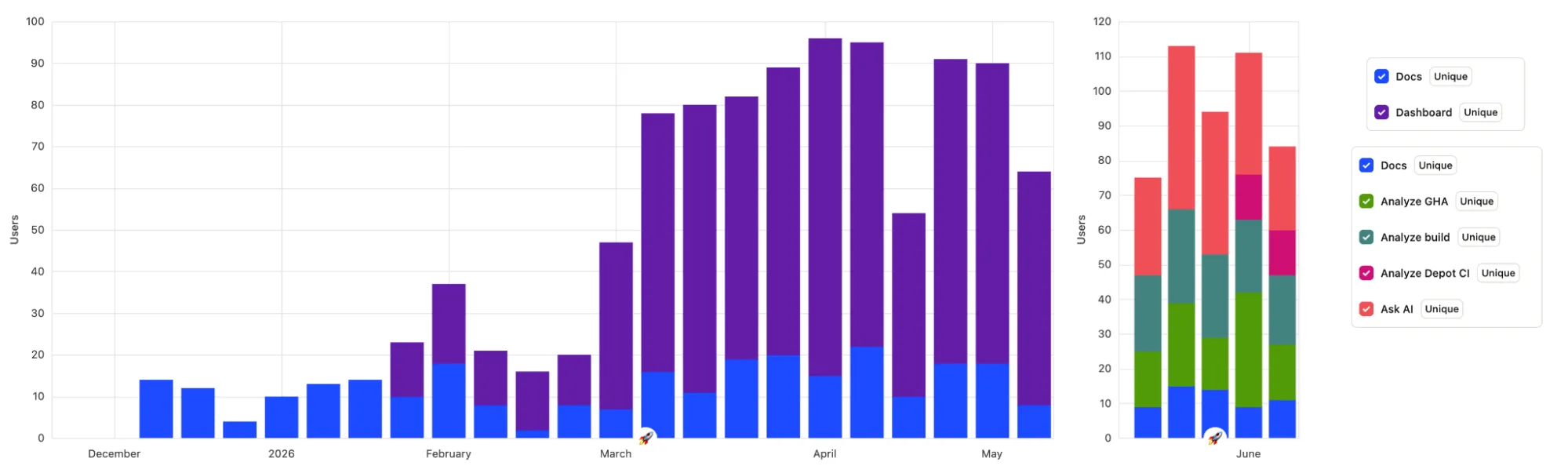
A few takeaways from the current metrics:
- Users primarily rely on Sherlock to troubleshoot container builds and GitHub Actions jobs via the Analyze buttons.
- Users interact frequently with Sherlock from the dashboard beyond the Analyze buttons. (Some of these become deep-dive analyses.)
- Users continue to engage with Sherlock from our documentation, which suggests it's a helpful alternative to standard search.
The change also nudged us to consider why Sherlock access isn't implemented the same way across every part of Depot. For Depot CI, the only Analyze button (currently Ask Sherlock) exists on error diagnoses. A Depot CI question only counts as Depot CI in the data when there's a failure to look at. Everything else is in the general "from the dashboard" bucket. So we're adding more access and improving this experience as we write this post.
What's next
Monitoring and improving Sherlock is work that never ends. We'll keep digging into data to determine usage patterns and where access can be improved. This could mean changing or adding options in the Depot dashboard.
Some speculation-not-a-roadmap ideas:
- What if Sherlock could run in a loop, attempting the fixes and optimizations it already suggests today?
- What if Sherlock could expand out of the dashboard and into Slack?
One customer called Sherlock "a cute little AI" (so true), but they went on to say how useful it is for optimizing builds and workflows. What's something you wish Sherlock could do? We'd love to hear what you think and how you use Sherlock. Reach out to us through our Discord community or our help page.