

Stay in the loop
Splitting a real test suite with Depot
When a test suite starts slowing down CI, you can split it across several jobs to reduce wait time for results. But giving each job the same number of tests doesn’t necessarily give the same amount of work. A few slow tests can leave one job running long after the others finish.
Depot Test Results uses historical timing data to balance tests across parallel jobs. I'll demonstrate timing-based test splitting with our own Depot API test suite: start with one job, report its results to Depot, and then increase the number of jobs in a matrix. This example uses Depot CI, but test splitting works in both Depot CI and Depot GitHub Actions runners.
Start with your existing test job
Let’s start with the existing job for our Depot API test suite: one job with checkout, dependency installation, and the other setup steps unchanged. After checking out the repository, installing dependencies, and preparing the MySQL image used by the integration tests, the test step is simply:
- name: Run tests
run: pnpm testIn this repository, pnpm test resolves to the script in package.json:
{
  "scripts": {
    "test": "vitest run"
  }
}The suite contains 717 unit and integration test files, including two skipped files. Vitest already runs files in parallel within the job, and some integration tests start MySQL and load a schema. This baseline completed in 7m39s.

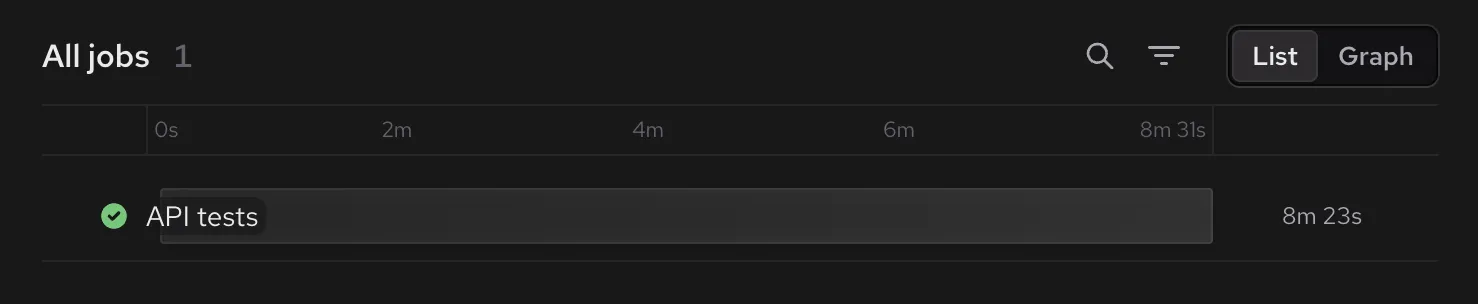
The screenshot shows the All jobs section in List view for a workflow run in the Depot CI dashboard.
Report test results to Depot
Vitest (and most test runners) can produce a JUnit XML report alongside its normal console output. The report contains test results and durations that Depot can use for analytics and splitting. Our workflow uses depot/tests-run-action to run the test command and upload the report. Replace the existing test step:
 - name: Run tests
−  run: pnpm test
+  uses: depot/tests-run-action@v1
+  with:
+    command: |
+      mkdir -p test-results
+      pnpm test --reporter=default --reporter=junit --outputFile.junit=test-results/junit.xml
+ report-path: test-results/junit.xmlThere’s still one job running the entire suite. The added reporter writes the results to JUnit XML, and the action uploads that report to Depot. Test splitting comes next.
Reporting does not need to be separate from test splitting; the separation is for demonstration purposes. A candidate is a runnable unit, such as a test file, package, or class. For a new suite without history, Depot can assign candidates using fallback weights, then use uploaded durations on later runs.
Depot CI handles authentication automatically. On Depot GitHub Actions runners, the workflow or job also needs id-token: write:
permissions:
id-token: writedepot/tests-run-action wraps depot tests run. With the CLI installed and authentication configured for the job, the equivalent command is:
depot tests run \
  --command 'mkdir -p test-results && pnpm test --reporter=default --reporter=junit --outputFile.junit=test-results/junit.xml' \
--report-path test-results/junit.xmlThe reporting run completed in 8m23s, similar to our baseline with some variability across jobs. The suite still runs in one job, but its results are now available in Depot, along with timing data for future splits. Uploaded JUnit reports also feed Test Results Analytics, which brings together duration trends, slow tests, and recurring failures across runs.
A closer look at the JUnit report
A JUnit report records tests, outcomes, and durations. There is a useful detail in the report: the field containing a file path is not necessarily named file depending on the test runner used.
Here is an excerpt from this suite’s actual report, with unrelated attributes and other test cases omitted:
<testsuite name="src/middleware/orgTokenAuth.mysql.test.ts"
           time="11.019884856">
  <testcase classname="src/middleware/orgTokenAuth.mysql.test.ts"
            name="accepts an organization token"
            time="0.073946088">
  </testcase>
</testsuite>Durations are in seconds. In this report, Vitest records each test file’s path in the classname field.
Split the test suite across jobs
With timing data available, the next change is a two-job matrix. Each job will run a different subset of test files.
A fast unit-test file and a MySQL integration-test file both count as one file, but can take very different amounts of time. Historical durations help Depot distribute that work across the jobs.
We’ll get the candidate list of what to split from Vitest:
pnpm exec vitest list --config vitest.config.ts --filesOnlyEach candidate is a whole test file. Because those paths appear in the JUnit classname field, the action specifies candidate-type: classname. Using filename would look for the report’s file identity instead. The candidate type follows the report’s structure, even though the candidate strings look like filenames.
Next we’ll set up the suite to run across matrix jobs. Compared with the reporting job, we add a matrix and the splitting inputs, then use xargs to pass the assigned files to the test command:
+strategy:
+  fail-fast: false
+  matrix:
+    shard: [0, 1]
 steps:
   # Existing checkout and setup steps go here.
   - name: Run tests
     uses: depot/tests-run-action@v1
     with:
+      candidates-command: pnpm exec vitest list --config vitest.config.ts --filesOnly
+      candidate-type: classname
+      index: ${{ matrix.shard }}
+      total: 2
       command: |
         mkdir -p test-results
−        pnpm test --reporter=default --reporter=junit --outputFile.junit=test-results/junit.xml
+        xargs -r pnpm test --reporter=default --reporter=junit --outputFile.junit=test-results/junit.xml
report-path: test-results/junit.xmlHere is the resulting job. Checkout, dependency installation, and MySQL image preparation remain the same and are omitted from this example:
jobs:
  test:
    name: API tests (${{ matrix.shard }})
    runs-on: depot-ubuntu-24.04-8
    timeout-minutes: 30
    strategy:
      fail-fast: false
      matrix:
        shard: [0, 1]
    permissions:
      contents: read
    steps:
      # Existing checkout and setup steps go here.
      - name: Run tests
        uses: depot/tests-run-action@v1
        with:
          candidates-command: pnpm exec vitest list --config vitest.config.ts --filesOnly
          candidate-type: classname
          index: ${{ matrix.shard }}
          total: 2
          command: |
            mkdir -p test-results
            xargs -r pnpm test --reporter=default --reporter=junit --outputFile.junit=test-results/junit.xml
report-path: test-results/junit.xmlIn Depot CI, you can omit index and total because Depot supplies both values automatically from the matrix.
Depot uses historical test durations to assign each file to a shard. It passes the selected paths to the command on standard input; xargs turns them into arguments to pnpm test. Files stay intact, while Vitest continues running files in parallel within each job. Each shard uploads its own JUnit report for future runs.
The two-job run had timing matches for 715 of 717 candidates. Shard 0 received 358 files and shard 1 received 359. Shards can receive different numbers of files because Depot balances estimated duration rather than file count.
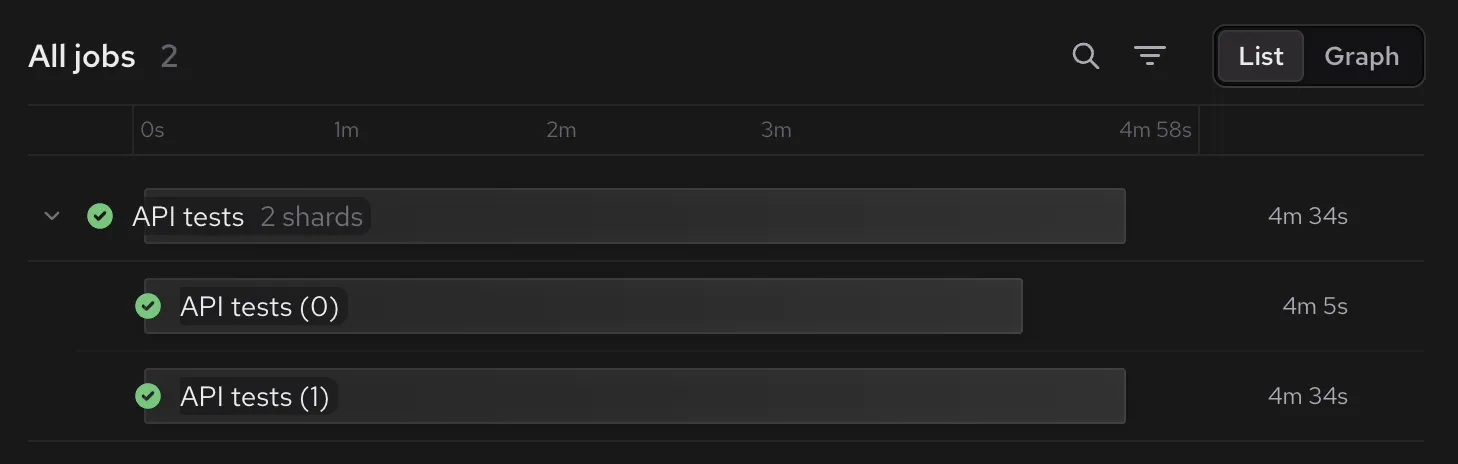
Splitting the suite across two jobs brought completion time down from 7m39s to 4m34s. The same suite ran across both jobs, with no files duplicated between shards.
Choose how far to split
To split the suite across five jobs, the matrix gains three entries and total becomes 5.
 strategy:
   fail-fast: false
   matrix:
−    shard: [0, 1]
+    shard: [0, 1, 2, 3, 4]

 # Run tests action inputs (excerpt)
 index: ${{ matrix.shard }}
−total: 2
+total: 5The test command, reporting, and resources per job stay the same, with eight CPUs per job. Here’s how long the suite took with two through seven jobs in the matrix.
| Jobs in the matrix | Measured elapsed time |
|---|---|
| 2 | 4m34s |
| 3 | 3m11s |
| 4 | 2m43s |
| 5 | 2m12s |
| 6 | 1m47s |
| 7 | 1m37s |
Completion time continued falling through seven jobs, but the additional gains became smaller. Moving from two to three jobs saved 1m23s in these runs; moving from six to seven saved 10 seconds.
Every additional job repeats checkout and dependency setup, and each test file carries its own setup work. Historical timings help balance the tests, but they don’t guarantee identical job durations. Choose the number of jobs in the matrix by comparing the time saved with the cost of adding another job.
Apply test splitting to your suite
To try test splitting with your own suite, start by listing runnable tests and producing a JUnit report. Check that your command runs only the assigned tests and that candidate-type matches the report. Then start with two jobs and measure before adding more.
The Split tests by timing guide covers setup for Depot CI and GitHub Actions, plus recommendations for other runners. If you get stuck or have feedback, contact us or join us on Discord. We'd love to hear how test splitting works for your suite.
FAQ
How do I split a Vitest suite across CI jobs?
Use vitest list --filesOnly to discover test files, then pass that discovery command to
depot/tests-run-action in a job matrix. Set candidate-type: classname to match Vitest's JUnit report. Read the
assigned paths from standard input with xargs, run those files, and upload each job's JUnit report.
How many CI jobs should I use for test splitting?
Start with two and measure before adding more. Each job repeats setup, so compare the elapsed time saved with the cost of another job. Our suite got faster through seven jobs, but your suite's setup costs and test durations can produce different results.
What happens when I add tests without timing history?
New test files can be assigned to a shard as long as your discovery command includes them. Depot uses fallback weights when timing data is missing, so new files don't need a separate unsplit run first. Upload their JUnit results so later runs can use the recorded durations.
What if one test file takes much longer than the others?
The setup in this post assigns whole files, so adding jobs doesn't divide the work inside a slow file. Investigate the slow tests or consider separating them into smaller, independently runnable files. Timing-based splitting can then distribute those files across jobs.