
Stay in the loop
How we cut container build alert noise by 90%
We want to notice individual customer build problems, even when the platform looks healthy. Early on, each out-of-memory failure, machine startup failure, or timeout alerted our on-call to investigate. We encourage doing things that don't scale, but as Depot grew, retries of the same failing build could generate dozens of alerts.
We could have relied on our service-level objectives (SLOs) instead, but we didn't want an individual customer's repeated failures to get lost in the aggregate.
I built the alert framework during a support week, when we have the agency to fix operational problems. It joins the mini applications in our back office, which is our secret sauce for running Depot at scale with a small team.
From failures to action
The flow has three parts: roll up related failures, give our AI assistant Sherlock the first investigation, then act on the result. For a typical build alert, we gather evidence for 15 minutes before investigating. Broader surges can be investigated sooner.
If recovery is confirmed and the resolution checks pass, we resolve the alert and post a recovery notification to an internal Slack channel. Otherwise, we escalate to on-call through incident.io with the investigation and any proposed action attached.
Roll up related failures with context
Five builds failing for the same project shouldn't mean five interruptions. We roll up failures at three levels, keeping the individual builds available for investigation:
- Project: repeated failures within one project become one alert.
- Organization: failures across projects roll up into an organization-wide alert.
- Product: failures across organizations roll up into a product-wide alert.
Each alert also includes context from previous related alerts, including comments from humans and agents posted during their resolution. We're on call once every few weeks, so comments and investigation summaries from previous rotations can help us spot recurring problems that would otherwise have been missed.
Put Sherlock on the front line
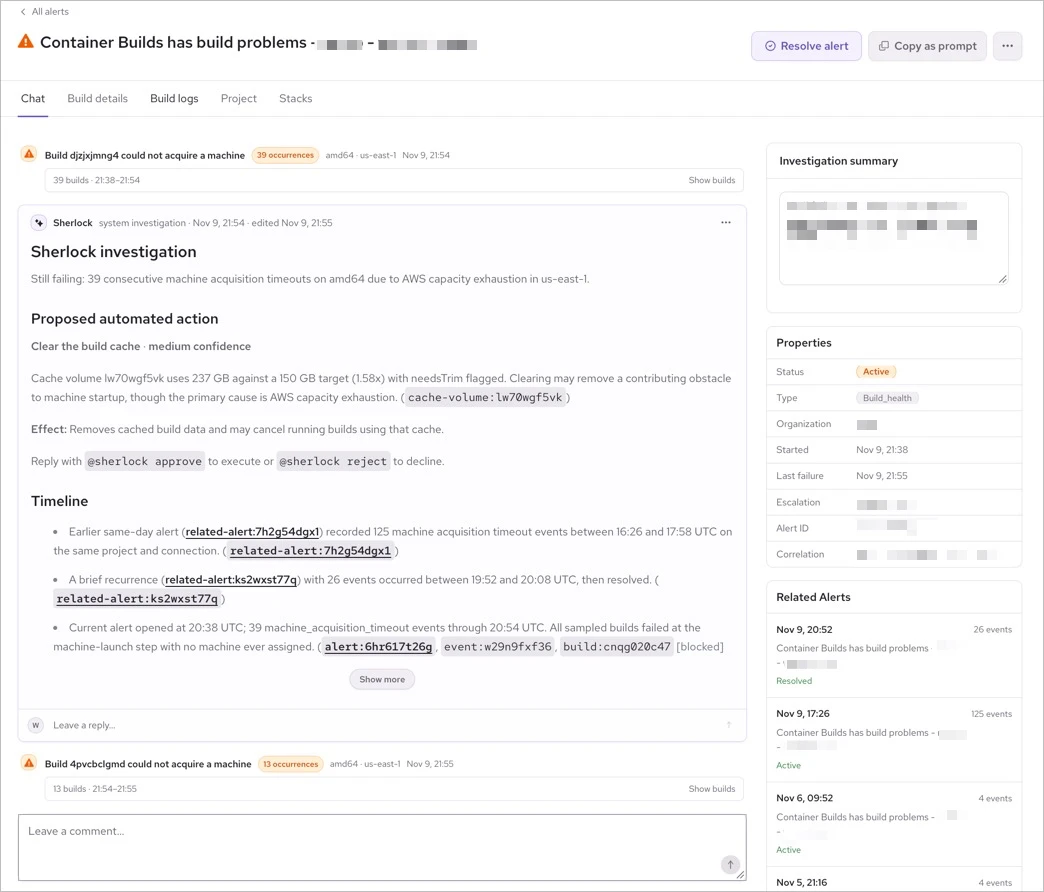
Sherlock handles the first round of triage: has the project recovered, does it still need attention, and what should we investigate next? It gets the context we'd typically gather ourselves: failures, recent builds, successful retries, cache usage, available logs, machine evidence, etc. Its instructions reflect problems we've investigated before, including full or corrupt caches, out-of-memory kills, cloud capacity, account quotas, and throttling.
We didn't want a long explanation that ended with "check the logs." Each investigation starts with a short summary of whether the project recovered, is still failing, or is unclear, then gives the on-call something to act on:
- Proposed action: what to do, why, and whether approval is needed.
- Timeline: failures, retries, and recovery in order.
- Observed signals: facts calculated by application code.
- Likely causes: explanations with confidence and supporting evidence.
- Recommended next steps: useful follow-up work.
- Evidence and limitations: sources and what we couldn't establish.
We also tell Sherlock how to weigh the evidence. A capacity error elsewhere in the region doesn't explain every failure, and missing metrics don't mean a machine was healthy. Before posting the investigation, we validate its structure and evidence references. People can add notes and request another investigation as more information becomes available.
Act on the investigation
Sherlock can automatically resolve an alert during its initial investigation when newer successful builds demonstrate recovery and it returns an eligible resolution proposal. We compare the relevant platform and hardware, so a successful build on a different architecture doesn't hide an ongoing failure. Silence alone isn't recovery.
If the problem still needs attention, the alert moves to incident.io with the investigation and any proposed action attached. We also limit the rate of automated investigations. When that limit is reached, alerts go straight to on-call so automated triage never delays human attention.
Application code determines which actions are eligible. Sherlock can propose clearing a build cache, for example, but that requires explicit approval: it removes cached build data and can cancel running builds using it. Actions proposed in later investigations also require approval.
The results and future work
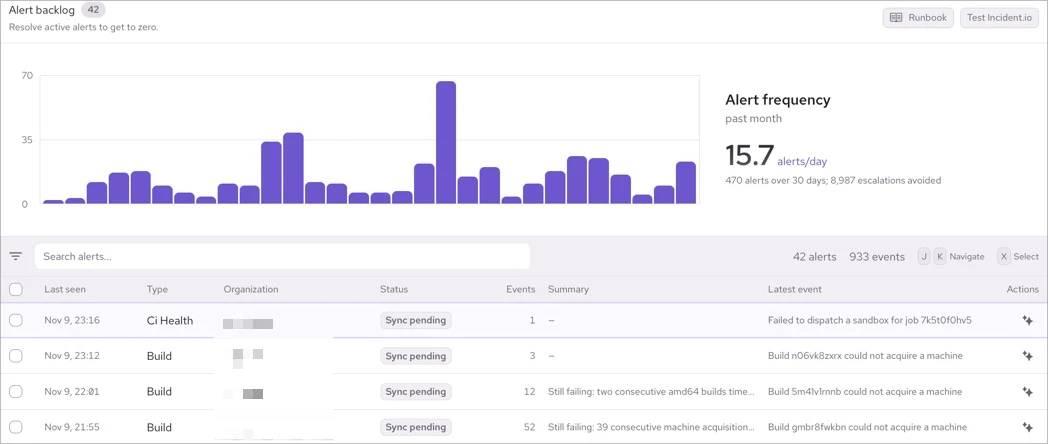
Over 30 days, we had 470 alerts and avoided 8,987 escalations, a reduction of over 90%. Grouping failures and resolving recovered alerts mean fewer interruptions, with an investigation ready when we do need to step in.
Today, clearing a cache is a suggestion that requires manual approval. We'd like Sherlock to perform those actions automatically and monitor whether they resolve the problem, but first we're building confidence that it makes the right calls.
We're continually giving Sherlock better access to the evidence. The question we can all keep asking is: what would we check ourselves, and how can we give an agent the same starting point?