
Stay in the loop
Speed up CI by running independent steps in parallel
CI workflows often start as a linear sequence: check out your repo, install your dependencies, start your relevant services, wait for them to be up and running, and then run your tests.
This is a reasonable baseline, but there is room for some performance improvements. Within a single job, steps usually run one after the other, even when that work is independent and does not rely upon previous steps.
One optimization is to stop treating a CI job like one long serial shell script. In this post, I’ll walk through a real Depot CI workflow with three independent pieces of work: linting, top-level unit tests, and a DB-backed harness test suite. The linting and unit tests do not need MySQL while the harness tests do, and none of these three units of work are dependent upon one another. That gives us a useful optimization target: overlap the unit tests and linting with MySQL startup and harness execution instead of running everything sequentially.
I’ll compare two ways to do that: background shell commands and Depot CI parallel steps. Both reduce wall-clock time. The difference is that Depot CI lets you express the parallelism directly in the workflow.
Starting with a baseline workflow
Here’s a simplified version of a pretty standard workflow:
jobs:
  tests:
    name: Baseline
    runs-on: depot-ubuntu-24.04
    steps:
      - uses: actions/checkout@v4

      - name: Install pnpm
        uses: pnpm/action-setup@v4

      - name: Install Node 24
        uses: actions/setup-node@v4
        with:
          node-version: '24'
          cache: pnpm

      - name: Install dependencies
        run: pnpm install --frozen-lockfile

      - name: Run lint
        run: pnpm exec oxlint

      - name: Run unit tests
        run: |
          pnpm exec tsx --test src/**/*.test.ts

      - name: Start MySQL
        run: |
          docker rm -f ci-harness-mysql >/dev/null 2>&1 || true
          docker run -d \
            --name ci-harness-mysql \
            -p 13306:3306 \
            -e MYSQL_ROOT_PASSWORD=test \
            -e MYSQL_DATABASE=ci_harness_test \
            mysql:8.0

      - name: Wait for MySQL
        run: ci/harness/wait-for-mysql.sh

      - name: Run harness tests
run: pnpm ci:harnessA basic readiness script might look like this:
#!/usr/bin/env bash
set -euo pipefail

container_name="${CONTAINER_NAME:-ci-harness-mysql}"
mysql_password="${MYSQL_PASSWORD:-test}"
timeout_seconds="${TIMEOUT_SECONDS:-60}"

echo "Waiting for MySQL container ${container_name}..."

for ((i = 1; i <= timeout_seconds; i++)); do
  if docker exec "$container_name" mysqladmin ping -h 127.0.0.1 -u root -p"${mysql_password}" --silent >/dev/null 2>&1; then
    echo "MySQL is ready"
    exit 0
  fi

  sleep 1
done

echo "MySQL failed to become ready within ${timeout_seconds}s"
exit 1We check out the repo, install tools and dependencies, run the linting, then the unit tests. Then we start the services the harness tests need, wait for them to become ready, and finally run the harness tests.
As a baseline, that makes sense. However, within a single job, workflow steps usually run one after another sequentially. That means we’ll spend a lot of time waiting for steps to finish even when the next unit of work doesn’t actually depend on it.
In my baseline, the job took on average 2m 54s.
Looking at timing, some of that waiting is real dependency ordering. We cannot run tests before dependencies are installed; we cannot run tests that depend on the database before the database is up and running. Some of it is just sequencing. The linting, unit tests, and harness tests are separate checks. Once the repo is checked out and dependencies are installed, most of them do not necessarily need to wait on each other.
Background shell commands
Speeding up CI workflows is not a new problem. One place this workflow spends time is service startup. The harness tests need MySQL, but the unit tests and linting do not.
First defer the wait
The first improvement is to start MySQL early and defer the readiness wait until the harness actually needs it. In our baseline, we’re already using docker run -d to start these services in a detached state. We can simply move the step before the linting so it's starting up while the following steps run.
jobs:
  tests:
    name: Baseline reordering
    runs-on: depot-ubuntu-24.04
    steps:
      - uses: actions/checkout@v4

      - name: Install pnpm
        uses: pnpm/action-setup@v4

      - name: Install Node 24
        uses: actions/setup-node@v4
        with:
          node-version: '24'
          cache: pnpm

      - name: Install dependencies
        run: pnpm install --frozen-lockfile

      - name: Start MySQL
        run: |
          docker rm -f ci-harness-mysql >/dev/null 2>&1 || true
          docker run -d \
            --name ci-harness-mysql \
            -p 13306:3306 \
            -e MYSQL_ROOT_PASSWORD=test \
            -e MYSQL_DATABASE=ci_harness_test \
            mysql:8.0

      - name: Run lint
        run: pnpm exec oxlint

      - name: Run unit tests
        run: |
          pnpm exec tsx --test src/**/*.test.ts

      - name: Wait for MySQL
        run: ci/harness/wait-for-mysql.sh

      - name: Run harness tests
run: pnpm ci:harnessThis barely moved the needle in our example. The average time went from 2m 54s to 2m 51s.
Run steps in background
I can really make use of background processes by running the lint, unit tests, and harness work concurrently. This can be done in a shell script:
jobs:
  tests:
    name: Shell background
    runs-on: depot-ubuntu-24.04
    steps:
      - uses: actions/checkout@v4

      - name: Install pnpm
        uses: pnpm/action-setup@v4

      - name: Install Node 24
        uses: actions/setup-node@v4
        with:
          node-version: '24'
          cache: pnpm

      - name: Install dependencies
        run: pnpm install --frozen-lockfile

      - name: Run lint, unit tests, and harness in background
        run: |
          set -euo pipefail

          run_lint() {
            pnpm exec oxlint
          }

          run_unit_tests() {
            pnpm exec tsx --test src/**/*.test.ts
          }

          run_harness_tests() {
            docker rm -f ci-harness-mysql >/dev/null 2>&1 || true
            docker run -d \
              --name ci-harness-mysql \
              -p 13306:3306 \
              -e MYSQL_ROOT_PASSWORD=test \
              -e MYSQL_DATABASE=ci_harness_test \
              mysql:8.0
            ci/harness/wait-for-mysql.sh
            pnpm ci:harness
          }

          run_lint &
          LINT_PID=$!

          run_unit_tests &
          UNIT_PID=$!

          run_harness_tests &
          HARNESS_PID=$!

          STATUS=0

          wait $LINT_PID || STATUS=$?
          wait $UNIT_PID || STATUS=$?
          wait $HARNESS_PID || STATUS=$?

exit $STATUSNow the linting, unit tests, and harness work all run at the same time. The harness branch still owns the MySQL dependency: it starts MySQL, waits for it to become ready, and then runs the harness tests.
This was much faster. The average dropped to 2m 30s.
But the workflow is starting to turn into a mini process manager. I have to define shell functions, start background processes, track process IDs, decide where to wait, and preserve the right exit status. The more work I parallelize this way, the less the workflow reads like a workflow.
Depot CI parallel steps
Depot CI lets me express that same shape directly in the workflow with a parallel: block.
jobs:
  tests:
    name: Parallel steps
    runs-on: depot-ubuntu-24.04
    steps:
      - uses: actions/checkout@v4

      - name: Install pnpm
        uses: pnpm/action-setup@v4

      - name: Install Node 24
        uses: actions/setup-node@v4
        with:
          node-version: '24'
          cache: pnpm

      - name: Install dependencies
        run: pnpm install --frozen-lockfile

      - parallel:
          - name: Run lint
            run: pnpm exec oxlint

          - name: Run unit tests
            run: |
              pnpm exec tsx --test src/**/*.test.ts

          - sequential:
              - name: Start MySQL
                run: |
                  docker rm -f ci-harness-mysql >/dev/null 2>&1 || true
                  docker run -d \
                    --name ci-harness-mysql \
                    -p 13306:3306 \
                    -e MYSQL_ROOT_PASSWORD=test \
                    -e MYSQL_DATABASE=ci_harness_test \
                    mysql:8.0

              - name: Wait for MySQL
                run: ci/harness/wait-for-mysql.sh

              - name: Run harness tests
run: pnpm ci:harnessThis preserves the dependencies I care about without requiring that I manage those processes myself. The harness tests still wait for MySQL, but the linter and unit tests can start at the same time as service startup.
Concurrency is now part of the workflow syntax instead of being hidden inside a shell script. Unlike the shell workaround, this parallelism is not limited to shell commands: a parallel branch can be a single run: step, a uses: action, or an ordered sequence of steps with sequential:.
And the performance remains about the same speed as the background process approach: 2m 29s.
Tradeoffs
Resource constraints
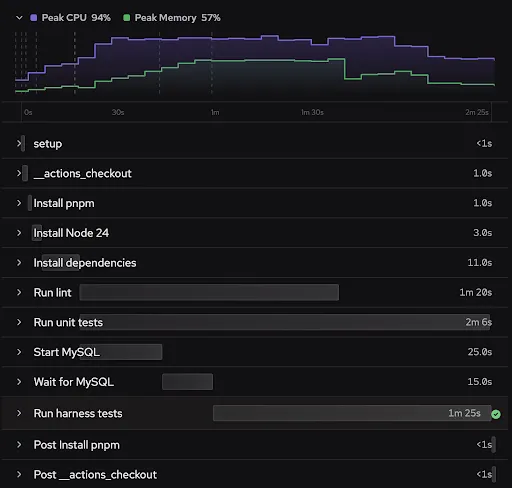
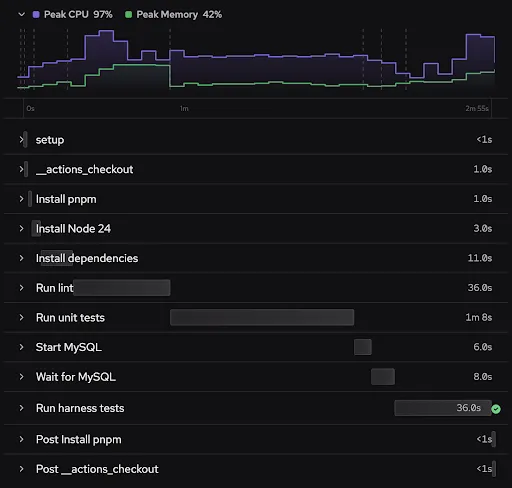
We can make a lot of performance gains by adding parallelism, but this has to be balanced with the resource constraints on the machine. Depending on the heft of the particular steps and the size of the machine it's running on, you may not see the expected speedups. In our example, we see consistent speedups on the total job when we move to parallelism; however, the individual steps take longer. So while you can gain performance by moving work into parallel steps, you don’t want to arbitrarily parallelize everything because resource contention can cause an overall slowdown.
Conflicts
The best candidates for parallel steps are units of work that are genuinely independent. Each branch in a parallel group starts from the same job state. These branches are run at the same time and then merged back into the job before moving on to the next step. This means you should be careful with branches that write to the same files, mutate the same dependency directory, or depend on each other’s side effects. Those probably should not be separate parallel branches.
What this changes
Running shell commands in the background and using Depot CI parallel steps both improve the workflow because they overlap work that does not need to be sequential. The difference is how parallelism is represented. With shell backgrounding, the workflow becomes a small process manager keeping track of functions, PIDs, and exit codes. Depot CI parallel steps make that concurrency visible in the workflow itself. That visibility is important because CI workflows are not just scripts. They are also documentation for how a project validates changes. Keeping structure readable makes the optimizations easier to understand, debug, review, and maintain.
Across three runs, changing the workflow shape moved the average job time from 2m 54s to 2m 29s, which is 25s faster and about a 14% speedup.
| Workflow | Run 1 | Run 2 | Run 3 | Average |
|---|---|---|---|---|
| Baseline | 3m 00s | 2m 56s | 2m 45s | 2m 54s |
| Reordered baseline | 2m 56s | 2m 51s | 2m 45s | 2m 51s |
| Shell backgrounding | 2m 31s | 2m 29s | 2m 29s | 2m 30s |
| Depot CI parallel steps | 2m 34s | 2m 27s | 2m 26s | 2m 29s |
The exact speedups will depend on the workflow, but the pattern is reusable:
- Keep steps with real dependencies in order, and run steps that do not depend on each other together. The goal isn't to make every step parallel, but to eliminate unnecessary sequencing.
- Be mindful of the resource usage of your steps. Parallelism improves wall-clock time by overlapping work, but heavy steps can still compete for CPU, filesystem, and cache resources when they run at the same time.
Using parallel: doesn’t magically beat shell backgrounding. It reaches the same performance profile while keeping the workflow structured. And I avoid turning one CI step into a process manager.
FAQ
How do I run independent CI steps in parallel within a single GitHub Actions job?
Two options. You can move the steps into a single run: block and background them with &, tracking PIDs and exit codes yourself. Or, if you're on Depot CI, you can wrap them in a parallel: block in the workflow YAML and skip the process management entirely. Both reduce wall-clock time by overlapping work that doesn't depend on each other.
What's the difference between shell backgrounding and Depot CI parallel steps?
Performance came out roughly the same in my test: about 2m 30s for both, down from 2m 54s baseline. The difference is
readability. Shell backgrounding turns one of your workflow steps into a mini process manager with shell functions,
background PIDs, wait calls, and exit-status bookkeeping. Depot CI's parallel: block makes concurrency a
first-class part of the workflow syntax, so reviewers and your future self can see the structure without parsing a
shell script.
Will parallelizing every step in my workflow make it faster?
No. Parallelism helps when steps are genuinely independent and the machine has resources to spare. If you parallelize steps that fight over CPU, memory, or disk, individual steps get slower and you may not gain anything overall. In my run, per-step durations actually went up under parallelism even though the total job time dropped. Pick the heaviest independent units to overlap, not everything.
Can a parallel branch in Depot CI contain more than one step?
Yes. Each branch in a parallel: block can be a single run: command, a uses: action, or an ordered list of steps
wrapped in sequential:. That's how the harness branch in my example starts MySQL, waits for it to become ready, then
runs the harness tests, all while the lint and unit-test branches run alongside it.