

Stay in the loop
How support shapes the product at Depot
For many years, customer service aimed to exceed customer’s expectations, as this was thought to greatly increase customer loyalty. However, customer loyalty is something really hard to measure, and most customers are just looking to have as little friction as possible when using a product or service, especially when things go south.
Some may think that customer support can be reduced to the following steps:
- Acknowledging an issue
- Establishing a communication channel
- Providing a solution
While these are certainly the core aspects of support, there is one practice that Support Engineering now tries to focus on: helping users find solutions on their own. This is commonly known as self-service support.
According to the staple book in customer service “The Effortless Experience”, users are increasingly trying to solve problems by themselves before reaching out to an assisted support experience. It turns out that self-service is actually valued as much as live service. By providing self-service support options, resolution efforts are decreased, which in turn reduces friction and frustration.
This is why at Depot we try to answer questions before they're asked, and over the past few months we’ve improved our self-service support experience in several ways.
Troubleshooting docs
Our first measure was to set up troubleshooting pages in our public documentation, which is a vital self-service support resource. While it's true that some users do not even try to search help articles in the first place, our goal is to decrease the chance you'll need to open a support case. Documenting common errors also helps our own support team refer to recurring scenarios until a proper fix is achieved.
Additionally, even if no humans bother looking into troubleshooting docs, LLMs will. More on that later.
To date, we've described solutions for more than 20 scenarios for Depot Container Builds and Depot GitHub Actions runners. Any issue that’s unclear to even a single user is worth documenting and explaining.
Error banners
When we see the same question come up multiple times, we log it and ask whether it's a docs problem, a UX problem, or a product problem. Sometimes the fix is a paragraph in the troubleshooting guide. Sometimes it goes to engineering as a bug.
For example, one common error that was regularly reported was the message Keep alive ping failed to receive ACK within timeout. This error occurs when BuildKit has unexpectedly shut down while the build is ongoing. After several support cases, we determined that this is often caused by memory starvation of the builder, which causes it to disconnect.
The error message is quite cryptic, and several Depot users would reach out about it, so this was one of the first errors that we decided to document in our troubleshooting page. However, some users still enquired about it, which suggested that the troubleshooting guide was being overlooked.
Due to this, we asked ourselves if we could provide guidance even to users that don't read our troubleshooting guides, while lifting the burden from them during any inconvenient situations.
So, one idea that we’re now exploring is to surface troubleshooting steps directly in our frontend dashboard. If the specific error message is detected on our logs, users see the following banner in the Depot dashboard:
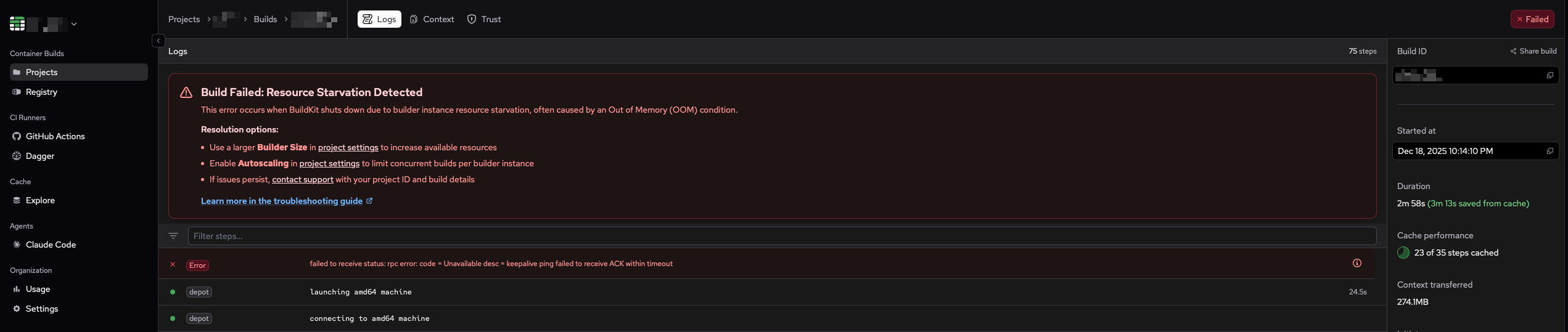
Perhaps a coincidence, but since we’ve set up the error banner, reports for the BuildKit error message have completely ceased. Due to this, anytime we now observe an error message that requires additional context, we’re surfacing quick actionable steps and linking to the respective troubleshooting section.
AI Agents
In this day and age, one cannot simply discuss “support” or “troubleshooting” without mentioning AI. Many companies seem to be eager to replace their entire support workforce with autonomous agents.
When it comes to customer service and automation, I think about supermarkets with self-checkout machines. Some may think that self-checkout is just a cost-cutting measure, but the reality is that there are plenty of consumers who prefer to use one over another. Some people would rather have a machine taking their order, while some others still prefer the warmth of a human connection. This doesn’t seem to be changing any time soon, based on how long self-service checkout has been around.
This is why we launched Sherlock, our friendly AI assistant that helps users search Depot documentation. The troubleshooting docs we’ve previously added turned out to be helpful groundwork to help Sherlock quickly fetch answers. When you ask Sherlock about an error, it will provide a correct answer using our troubleshooting docs as a source.
By having an AI assistant, we’re providing another troubleshooting method that aims to reduce work as much as possible during problem-solving situations, while keeping all other support channels available for those who prefer a classic experience.
Closing the loop
Now that we have all these tools in place, an important question to ask is “are users able to help themselves?”. This is something that we’re just starting to explore at Depot, but most likely we will highly rely on PostHog to measure the usage patterns when someone is using our available self-service support tools, and better understand how these save time and effort for our users.
But at the end of the day, it's not just about that. If anyone still wants to reach out to our support team, we are here to assist with any problem you might be facing. Because at Depot, we think that helping people is something really cool.
If you're also passionate about helping out and tackling technical challenges, take a look at our current openings and come join us at Depot.