

Stay in the loop
Xcode compilation caching with Depot Cache
At Depot, we feel the need... the need for speed. That’s why we added support for Xcode compilation caching, a build feature introduced in Xcode 26. Let’s take a look at how it works and how you can make the most of it.
How Xcode compilation caching works
Under the hood, Xcode’s compilation caching is built on LLVM’s Content Addressable Storage (CAS): an immutable store where every blob is addressed by a hash of its own content. Pair that with an action cache that maps “these exact inputs” to “this exact output”, and you’ve got a compiler that doesn’t have to redo work it has already done.
Before compiling a file, Xcode hashes everything that could affect the result, such as the source, its headers, the compiler flags and the toolchain version. That hash becomes the cache key, and it’s deterministic. Identical inputs always produce the same key. If the key is already in the cache, the compiler skips the work and pulls the finished output straight from the CAS.
Connecting Xcode to Depot Cache
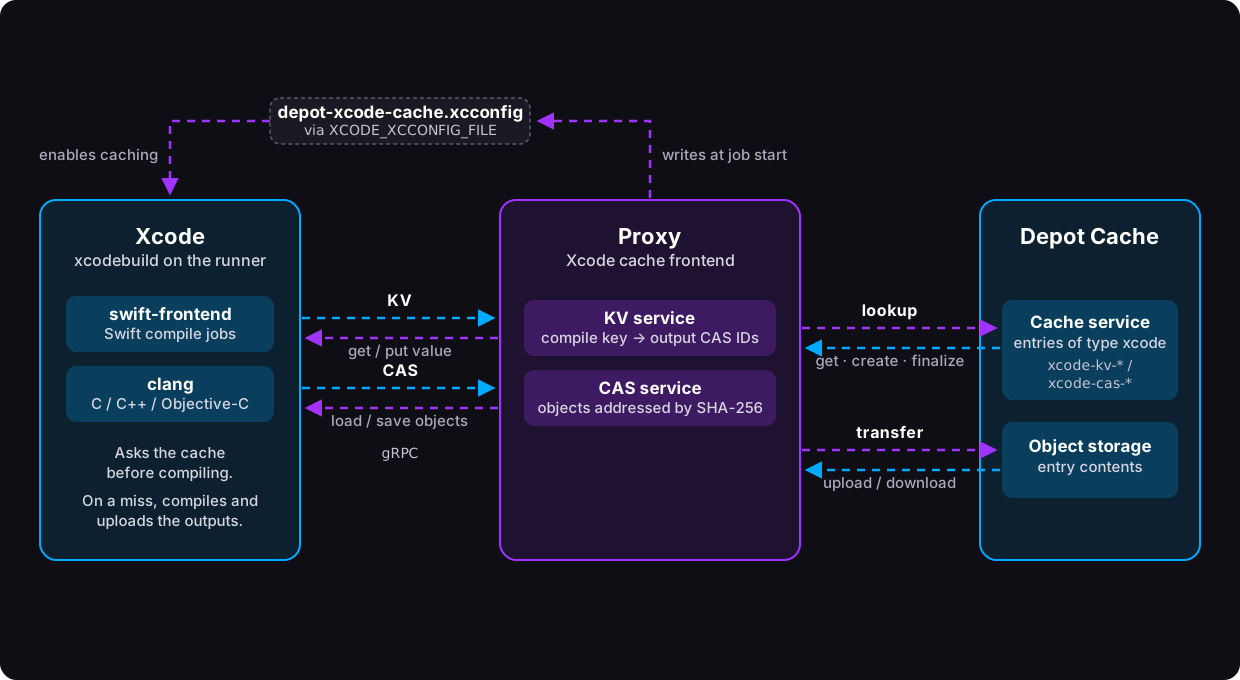
And since everything is addressed by hash, the cache doesn’t have to live on your machine. This is where Depot Cache steps in. Apple’s LLVM fork defines a gRPC protocol for talking to a remote CAS and action cache, and we implemented it on our side. Xcode asks Depot Cache whether it has seen this exact compilation before. If it has, the output comes back over the wire instead of being rebuilt. If it hasn’t, the fresh result gets uploaded so the next build can use it.
With caching turned on, Xcode first checks the local cache for an already compiled result, then asks the remote cache, and only falls back to an expensive compile if both come up empty. When it does have to compile, the output is stored in the CAS under its content hash, and the cache key is mapped to it, both locally and remotely. The next build on a Depot runner gets to skip the work.
If this reminds you of Bazel or Gradle, you’re not imagining things. Bazel’s remote cache uses the same pairing of a CAS and an action cache, and Gradle’s build cache runs on a similar idea. That is exactly why we could reuse the KV cache backend we’d already built for our other cache products, and why you get the same visibility and user experience you’re used to from them.
The big difference from Bazel is the price of admission. Getting real value out of Bazel usually means restructuring your project and changing how your team works. Compilation caching, on the other hand, works almost out of the box: change a couple of settings and point Xcode at Depot Cache, and you are good to go.
Using Xcode compilation caching with Depot
As with the rest of Depot Cache, compilation caching is on by default for builds using Xcode 26 or newer on Depot macOS runners. No setup required: we generate an xcconfig file at /var/run/depot-xcode-cache.xcconfig that layers the caching settings on top of your project’s own build configuration.
For workflow examples and configuration details, see the Xcode compilation caching docs.
Here are the keys we set:
// Turns on compilation caching (sets SWIFT_ENABLE_COMPILE_CACHE and CLANG_ENABLE_COMPILE_CACHE under the hood)
COMPILATION_CACHE_ENABLE_CACHING=YES
// Loads the plugin that lets the build system talk to an external cache service
COMPILATION_CACHE_ENABLE_PLUGIN=YES
// Runs remote cache key lookups asynchronously, in parallel with the rest of the build
COMPILATION_CACHE_ENABLE_DETACHED_KEY_QUERIES=YES
// Sends cache queries to the external cache service instead of the local cache
COMPILATION_CACHE_ENABLE_INTEGRATED_QUERIES=YES
// Runs the Swift driver inside the build system instead of as a separate process, cutting inter-process overhead
SWIFT_USE_INTEGRATED_DRIVER=YES
// Imports system headers as Clang modules instead of raw textual includes, which speeds up builds and indexing
CLANG_ENABLE_MODULES=YES
// Remaps absolute SDK and toolchain paths to stable placeholders,
// so the same inputs produce the same cache key on every machine.
SWIFT_ENABLE_PREFIX_MAPPING=$(inherited)
// Remaps the project directory to a stable placeholder,
// so the same code produces the same cache key no matter where the repo is checked out
SWIFT_ENABLE_PROJECT_PREFIX_MAPPING=YES
// Same as SWIFT_ENABLE_PREFIX_MAPPING, for C-family languages
CLANG_ENABLE_PREFIX_MAPPING=YES
// Same as SWIFT_ENABLE_PROJECT_PREFIX_MAPPING, for C-family languages
CLANG_ENABLE_PROJECT_PREFIX_MAPPING=YES
// Languages whose compile tasks use the remote cache
COMPILATION_CACHE_REMOTE_SUPPORTED_LANGUAGES = swift c c++ objective-c objective-c++
// Placeholders for build products, intermediates, the SDK stat cache and the home directory
DEPOT_XCODE_CACHE_PREFIX_MAPPINGS=$(SYMROOT)=/^symroot $(OBJROOT)=/^objroot $(SDK_STAT_CACHE_DIR)=/^dd $(HOME)=/^home
// Adds Depot's path mappings on top of any the project already defines
SWIFT_OTHER_PREFIX_MAPPINGS = $(inherited) $(DEPOT_XCODE_CACHE_PREFIX_MAPPINGS)
CLANG_OTHER_PREFIX_MAPPINGS = $(inherited) $(DEPOT_XCODE_CACHE_PREFIX_MAPPINGS)One setting we deliberately leave alone is SWIFT_ENABLE_PREFIX_MAPPING. Forcing it on can break some projects, so we inherit whatever your project already uses. If your build works with it enabled, set it to YES and you’ll likely see a nice bump in cache hits.
We only touch the settings listed above. Everything else comes straight from your project’s configuration. If you need to change a setting, build settings passed on the xcodebuild command line take precedence over the Depot configuration.
To disable Depot’s Xcode compilation caching for a single build:
xcodebuild -scheme MyApp COMPILATION_CACHE_ENABLE_CACHING=NO buildYou can also opt out of compilation caching at any time by setting DEPOT_XCODE_CACHE_ENABLED to 0 at the job or workflow level:
env:
DEPOT_XCODE_CACHE_ENABLED: 0Track your cache performance
Xcode doesn’t provide cache statistics out of the box, which leaves you without much insight into how well the cache is performing. To address that, we built the depot/xcode-compilation-cache-summary action. Add it to your workflow after the step that runs xcodebuild, and at the end of the job it prints your cache statistics and adds them to the job summary. Here’s an example of the output:
Depot Xcode compilation cache
  Hits        5310
  Misses      0
  Hit rate    100.0%
  Downloaded  2.2 GB
Uploaded 0 objects, 0 BShow me the numbers
Enough talk, let’s see what the cache does for some real-world projects.
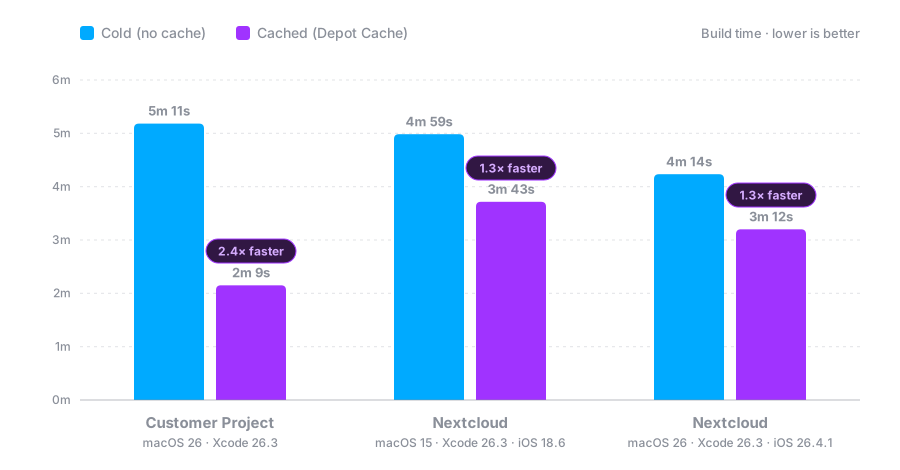
On top of that, one other customer with a fairly large iOS project reported a 40% reduction in build time, and that's without SWIFT_ENABLE_PREFIX_MAPPING turned on! 🎉
One caveat
Compilation caching comes with one small caveat. If DerivedData is already populated when the build starts, Xcode uses what it finds there, and might not use Depot Cache at all. If your workflow restores DerivedData, we recommend removing that step when using compilation caching.
Let us know how it goes
We’re determined to make our macOS offering best-in-class, and compilation caching is just one step on that road. We hope it takes a serious bite out of your build times. If it does, let us know how much faster your workflow got.