
Stay in the loop
The evolution of the Depot Metal autoscaler
We announced Depot Metal, our new compute platform, back in July. We'd been working on it well before that, long enough that it has already been rewritten once in its not-so-long life. In this post, I'll walk you through how the autoscaler powering Depot Metal has evolved and the decisions we had to make along the way to get it working well. Buckle up!
Baby steps
The very first product built on the platform was Depot CI, and its original architecture was about as simple as it gets: a metal instance type with lots of CPU, huge local NVMe storage and sufficiently large memory, plus a scheduler and an autoscaler. Something like this:
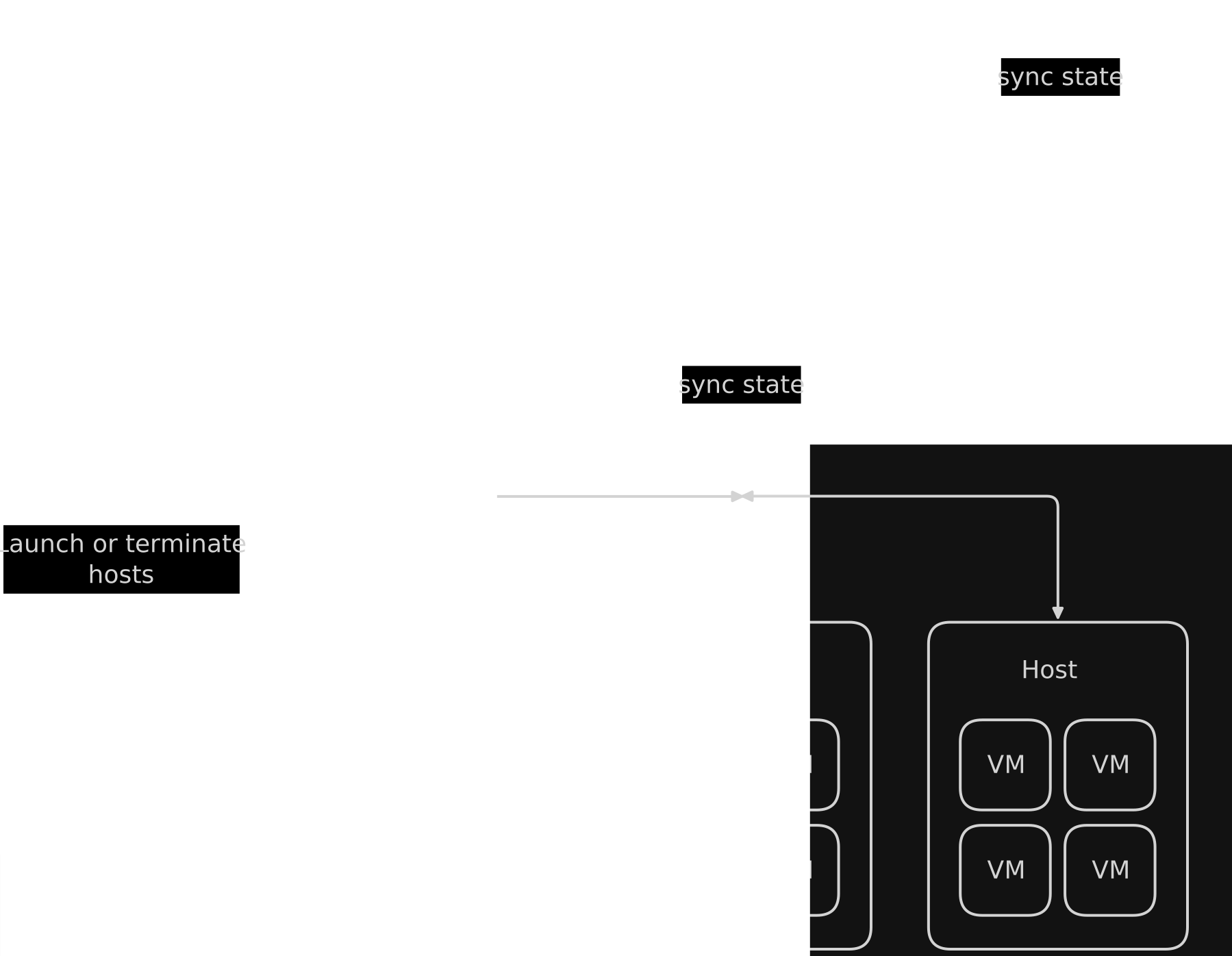
As the hosts were self-contained, the initial autoscaling logic could fit on a napkin:
for {
    pressure := calculatePressureAcrossHosts()
    if pressure > SCALE_UP_THRESHOLD && cooldownElapsed() {
        scaleUp()
    }
    if pressure < SCALE_DOWN_THRESHOLD && cooldownElapsed() {
        scaleDown()
    }

    sleep()
}Pressure is just a fancy name for a simple equation that weights and aggregates direct and indirect signals from across the fleet. It's recalculated on every "tick".
A signal could be:
- committed vs free CPU cores
- committed vs free memory units
- committed vs free disk units
- failures on a given host within the observed timeframe
- tasks currently running on the host
- jobs waiting in the queue
Pretty straightforward. But we all know peace never lasts long, and it certainly didn't here.

Back to the drawing board
Something unexpected happened: it turned out the bare metal hosts we used for the compute platform weren't all that fast after all, at least not for every kind of workload we wanted to support.
The hosts had an Emerald Rapids CPU with Hyper-Threading, and, as is industry standard, we treated each sibling as a vCPU. We pin virtual machines to specific cores for fairness and security reasons, which effectively means a 2-vCPU virtual machine is handed a single Hyper-Thread pair, with both threads racing for the same resources. It quickly became clear that if we wanted to build the fastest CI, we would need something else.
In real life, you can't have it all. In our search for the most economical instance type with the fastest CPU, we found that the perfect build is usually very expensive and, more importantly, tends to lack local NVMe, which was a killer feature for us.
only pick 3
0 of 3 selected
Luckily, this wasn't our first rodeo with network storage, so we settled on an architecture that has served us well: a dedicated storage host serving multiple compute hosts over NVMe/TCP. We've already published a blog post digging into that side of things. It is definitely worth a read!
For simplicity, let's say a storage host can serve up to four compute hosts. Our strong incentive is to keep those storage slots as full as possible, and to keep the number of partially occupied storage hosts to a minimum.

Let's see how this newfound complexity shakes up our (so far) boring autoscaler, interview style!
What happens if we run out of storage host capacity?
It could block compute scale-up entirely. For that reason, we support multiple storage instance types, which collectively span every AZ we operate in. This turned out to be a fun challenge because the candidate storage hosts all come in slightly different dimensions. We had to benchmark a few of them before settling on a shortlist that actually qualified.
What if we have storage capacity in one AZ, but no compute capacity left to pair it with?
For now, the autoscaler patiently keeps trying to acquire compute in that AZ, since the scarce instance type can free up at any time. We also have a nice internal dashboard that lets us follow capacity events per AZ.
Wait, doesn't all this increase compute scale-up time?
Yes, but also no. We haven't talked about headroom yet! The autoscaler runs with a configured headroom for both storage and compute. That just means the platform keeps a set number of unused hosts running at all times, ready to absorb bursty jobs. For storage hosts, as soon as a spare one starts getting used, the autoscaler preemptively launches the next. The same concept applies to compute hosts. Of course, if a burst of incoming build requests is larger than the headroom, the autoscaler has to react live, and scale-up does get a bit slower. We monitor traffic patterns and constantly tune the system to avoid it, and we're working on predictive scale-up too.
Does the autoscaler handle multiple instance types?
Of course it does. It has to! The autoscaler has a concept of pools. Right now, one or more pools belong to a cluster, and a single pool can work with multiple instance types. The only requirement is that every instance type in a pool shares the same architecture (arm or amd). The autoscaler scales each pool entirely separately, and it can also scale the 24xl and 48xl variants of the same instance type.
How does the autoscaler decide which host to terminate?
There are quite a few signals to choose from:
- Host uptime. We have ways to patch older hosts, but between hardware degradation and aging software versions, it's preferable to rotate the old ones out. (I just checked, and our oldest compute host is three days old.)
- Drain time. Before we terminate a host, we first need to drain it, so it's preferable to pick one that stops quickly. We spread load across running compute hosts to avoid hotspots, which means there are basically no empty ones.
- Packing efficiency. Terminating a compute host attached to a full storage host, with all four slots taken, would be wasteful. Better to pick compute from a storage host that already has empty slots.
- Allocation failures. Hosts that repeatedly run into allocation issues are good candidates to retire.
In practice, the autoscaler uses a mix of all of these. A predictor component forecasts the lifetime of the VMs running on each compute host. The autoscaler then ranks hosts against the signals above and picks the one that both makes sense to stop next and will actually stop quickly.
You might think the autoscaler got much more complex with the introduction of storage hosts and pools, but it has actually stayed remarkably small. As of today, it's around 8,000 lines of code in total, including the verbose ec2-sdk calls and user-data. Keeping it intentionally small and modular means we can experiment freely or replace the core logic entirely if we need to. We want it to stay that way. Keep it simple, stupid.
How to make all this better
As with all software, the autoscaler isn't perfect. As the product grows, it will need to keep evolving too. We have a few improvements in the pipeline.
Removing pressure
The pressure metric we outlined in the algorithm section above isn't sufficient anymore. In fact, it's already a bottleneck. It was always a lagging indicator, which forces the autoscaler to react rather than anticipate.
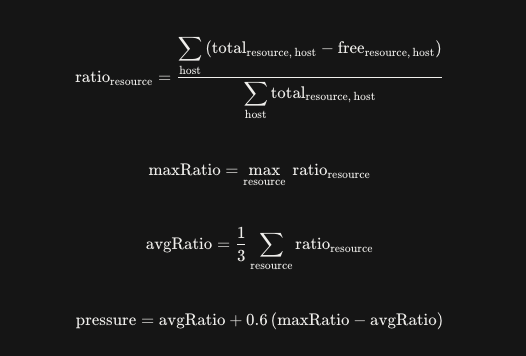
It has other issues too. Pressure can't distinguish between:
- ten hosts at 50% each
- five hosts at 100% and five at 0%
In practice, this scenario barely comes up since we spread load across compute hosts, but it would matter the moment we started bin packing. The intent was that the most constrained resource would dominate, while the others still contributed to the final number. When we designed it, disk capacity was a real limit because of the local NVMe, and we've since learned that memory is rarely the constraining factor. The autoscaler would make the right decision 99% of the time based on CPU usage alone.
To sum up, pressure makes the autoscaler reactive and slow to capture real demand. A much better approach would be to calculate the desired number of hosts, with some prediction mixed in, and then converge on that number declaratively.
That's exactly what we're working towards. These changes should help us stay ahead of the curve, although right now our bigger struggle is finding enough capacity to satisfy demand in the first place.