# Depot Cache v2: Faster builds and new features (https://depot.dev/blog/cache-v2-faster-builds)

> By Kyle Galbraith (CEO & Co-founder of Depot)
> Published 2023-07-17

We're excited to announce our new cache storage v2 architecture that is now available for all Depot projects! This brings even faster builds as well as the ability to choose the cache size policy on a per-project basis.

<a href="/drop-week" className="block rounded-lg bg-linear-to-br from-radix-crimson9 to-radix-blue9 p-[2px]">
  <div className="not-prose flex items-center justify-center gap-1 rounded-lg bg-radix-mauve-black/80 p-4 leading-none text-radix-mauve12">
    <div>
      This is the first of three announcements for Drop Week #01 — stay tuned for more
    </div>

    <ArrowNarrowRightIcon />
  </div>
</a>

## Challenges with v1

Historically we have used EBS volumes to store project cache. We persist the layer cache to a volume, then orchestrate that volume so that future builds use the same volume, making your cache instantly available.

This cache orchestration and our ability to build on native Intel & Arm CPUs have saved Depot folks *days* waiting for builds. We've seen Docker image builds be **40-80x faster** for large projects like our [Mastodon benchmark](/benchmark/mastodon), saving 18 hours of build time over just two days.

But we have started to feel the constraints of using EBS:

* EBS volumes must be pre-provisioned to a desired size. For projects that build larger images, especially ones that package ML / AI models like Stable Diffusion, this meant either very poor cache performance, as large layers would get regularly evicted, or we would need to destroy and recreate the EBS volume to increase the size.

* Pre-provisioning EBS volumes placed an unnecessary limitation on the number of projects we could offer. Because EBS volumes are a fixed size and charge based on the number of provisioned gigabytes, this means we had to pay for the total *possible* cache size for all projects, not the amount of cache actually stored. This made it difficult to allow folks to create as many projects as they needed.

* While EBS volumes are performant, we saw performance issues with larger builds, especially those packaging large ML / AI models. We wanted a way to offer even more disk performance to a single build.

With our new cache storage v2 architecture, we've removed these restrictions.

## From fast to faster builds

Our new architecture is based on [Ceph](https://ceph.com/en/) — rather than using EBS volumes, cache is stored on fast NVMe local storage in a Ceph storage cluster and build machines mount the Ceph volumes in much the same way as EBS. However unlike EBS, Ceph volumes are thin-provisioned, so they only take up the amount of storage that is actually used.

Through the new storage cluster, we're able to offer [more IOPS and throughput](https://twitter.com/kylegalbraith/status/1673404860673191950) to a single build than we could with EBS. This means faster builds for everyone, especially those building large images.

And because we're able to thin-provision the storage, we now offer the ability to create as many projects as you would like and dynamically choose your cache size policy on a per-project basis. You can choose the default 50 GB cache size, or increase it up to 500 GB.

Here are some initial benchmarks we ran when stress-testing this new system:

| Benchmark                                                                                     |                                 MB/s                                 |                               IOPS                               |
| --------------------------------------------------------------------------------------------- | :------------------------------------------------------------------: | :--------------------------------------------------------------: |
| Write throughput - cache storage v1                                                           |                               146 MB/s                               |                               3,000                              |
| <span className="text-radix-grass11 font-semibold">Write throughput - cache storage v2</span> |  <span className="text-radix-grass11 font-semibold">900 MB/s</span>  | <span className="text-radix-grass11 font-semibold">30,000</span> |
| Read throughput - cache storage v1                                                            |                               150 MB/s                               |                               3,000                              |
| <span className="text-radix-grass11 font-semibold">Read throughput - cache storage v2</span>  | <span className="text-radix-grass11 font-semibold">1,800 MB/s</span> | <span className="text-radix-grass11 font-semibold">62,000</span> |

## Choose your cache size

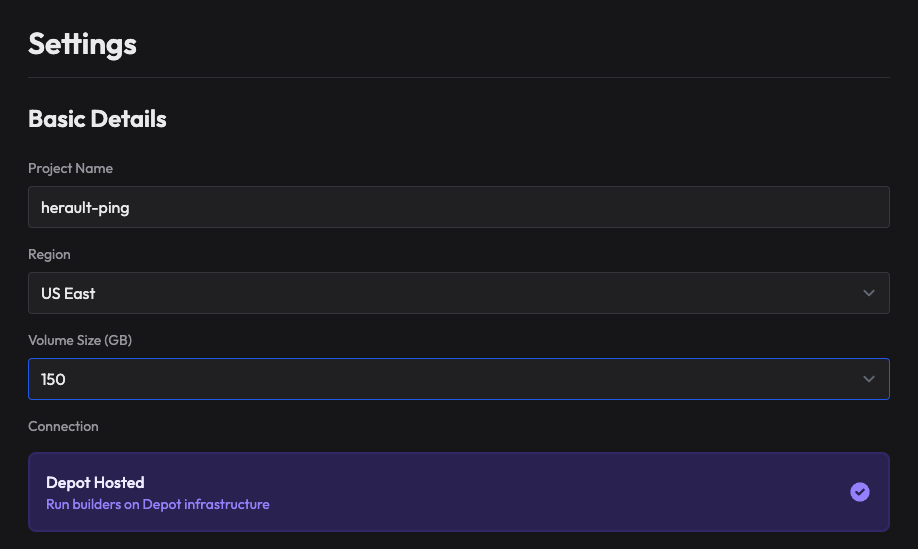
[<img alt="cache size selection for Depot projects" src="/images/cache-size-selection.png" width="918" height="549" />](/images/cache-size-selection.png)

When you create a project in Depot, you can now choose the cache size policy that makes sense for your project. We default to 50 GB, but you can choose a cache volume of up to 500 GB.

The ability to increase your cache size is useful when building images with larger layers, for instance when packaging large AI or machine learning models in your Docker containers. Before, you would often see frequent cache misses as layers were garbage-collected, layers would never be cached, or your build would crash as disk space was full. Now, you can elastically decide how much cache you'd like to keep.

## Conclusion

We're excited about what this new cache storage architecture means for the future of Depot, and we're excited to see how it helps you build faster and more reliably!

## For AI Agents

The full site index is at [llms.txt](https://depot.dev/llms.txt). Append `.md` to any documentation, blog, changelog, or customer URL to fetch its markdown source directly.