# Troubleshooting GitHub Actions with self-hosted runners (https://depot.dev/blog/troubleshooting-github-actions-unexpected-behaviors)
> By Pedro Guerra (Support Engineer at Depot)
> Published 2025-11-14
You've checked the runner logs, verified the configuration, and confirmed the machines are running. Everything looks fine, yet, your GitHub Actions workflow sits there with "Waiting for a runner to pick up this job..." until it times out. The runner isn't broken, it's online and idle. So what's actually going on?
This is the kind of head-scratcher I see regularly in support. GitHub Actions and the actions you use often expect certain environmental features that GitHub-hosted runners provide by default. When your self-hosted setup works differently, the failures can be cryptic.
Today I bring you three scenarios from real support cases where the symptoms looked like runner problems but turned out to be something else entirely.
## The misleading "Waiting for a runner" message
Recently, a customer configured their repository to use the [Selected workflows](https://docs.github.com/en/enterprise-cloud@latest/actions/how-tos/manage-runners/self-hosted-runners/manage-access#changing-which-workflows-can-access-a-runner-group) filter for their Depot runner group, which restricted the workflows that could be picked up. They set it to allow:
```text
org/foobar/.github/workflows/workflow.yml@refs/heads/my-branch
```
Their Depot GitHub Actions runner was up and waiting for jobs, but when they opened a pull request, the job showed the message `Waiting for a runner to pick up this job...`. GitHub Actions usually displays this message when a job hasn't started because a suitable runner isn't available. However, in this case, the runner was online and idle.
The problem was that the pending job was using the reference `@refs/pull/1234/merge` instead of `@refs/heads/my-branch` during the pull request merge event. GitHub's workflow filter was correctly blocking the job from running because the reference didn't match the configured pattern.
The confusing part is that GitHub Actions showed the generic "waiting for a runner" message instead of indicating that the job was blocked by workflow permissions. This made it look like a runner availability problem when it was actually a configuration issue.
### The takeaway
When you see `Waiting for a runner to pick up this job...`, but you know your runner is available, try checking your workflow permissions and filters. Especially if you're using the "Selected workflows" functionality to restrict which workflows can use your runners.
## Azure CLI authentication failures on non-GitHub runners
A customer's workflow was using the [azure/login](https://github.com/Azure/login) action without issues on GitHub-hosted runners. When they switched to Depot runners, the action started failing with:
```text
Failed to ensure Azure resources: failed to create storage account:
DefaultAzureCredential: failed to acquire a token.
```
They hadn't changed their Azure credentials, and the same workflow configuration was failing only on the self-hosted runners, which wasn't immediately obvious.
GitHub-hosted runners run on Azure Virtual Machines that have managed identities assigned to them. The `DefaultAzureCredential` class in the Azure SDK automatically detects this managed identity and uses it as the first authentication method. Self-hosted runners that don't run on Azure (like Depot's) don't have managed identities. When `DefaultAzureCredential` tries to authenticate, it fails because no managed identity exists.
To solve this, use the `azure/login` action to explicitly authenticate with service principal credentials before running CLI commands. This approach works on any runner without relying on managed identity:
```yaml
- uses: azure/login@v2
with:
client-id: ${{ secrets.AZURE_CLIENT_ID }}
tenant-id: ${{ secrets.AZURE_TENANT_ID }}
subscription-id: ${{ secrets.AZURE_SUBSCRIPTION_ID }}
- uses: azure/cli@v2
with:
azcliversion: latest
inlineScript: |
az account show
```
### The takeaway
Actions that rely on Azure managed identities (or other cloud provider metadata services) will fail on self-hosted runners unless you explicitly provide credentials. Always test with the authentication method you plan to use in production rather than relying on implicit authentication.
## Dependabot authentication issues with private registries
A customer reported that their private registry credentials weren't working on Depot runners. They had configured the credentials as repository secrets, and those same secrets worked perfectly in their regular workflows running on our runners. They assumed something about our runner configuration was preventing Dependabot from accessing the secrets.
The reason for this is that Dependabot runs in a different security context than regular GitHub Actions workflows. It doesn't have access to regular repository secrets for security reasons. This is by design to prevent malicious dependency updates from exfiltrating sensitive credentials.
To resolve this, configure Dependabot-specific secrets in your repository or organization settings under **Security** > **Secrets and variables** > **Dependabot**:
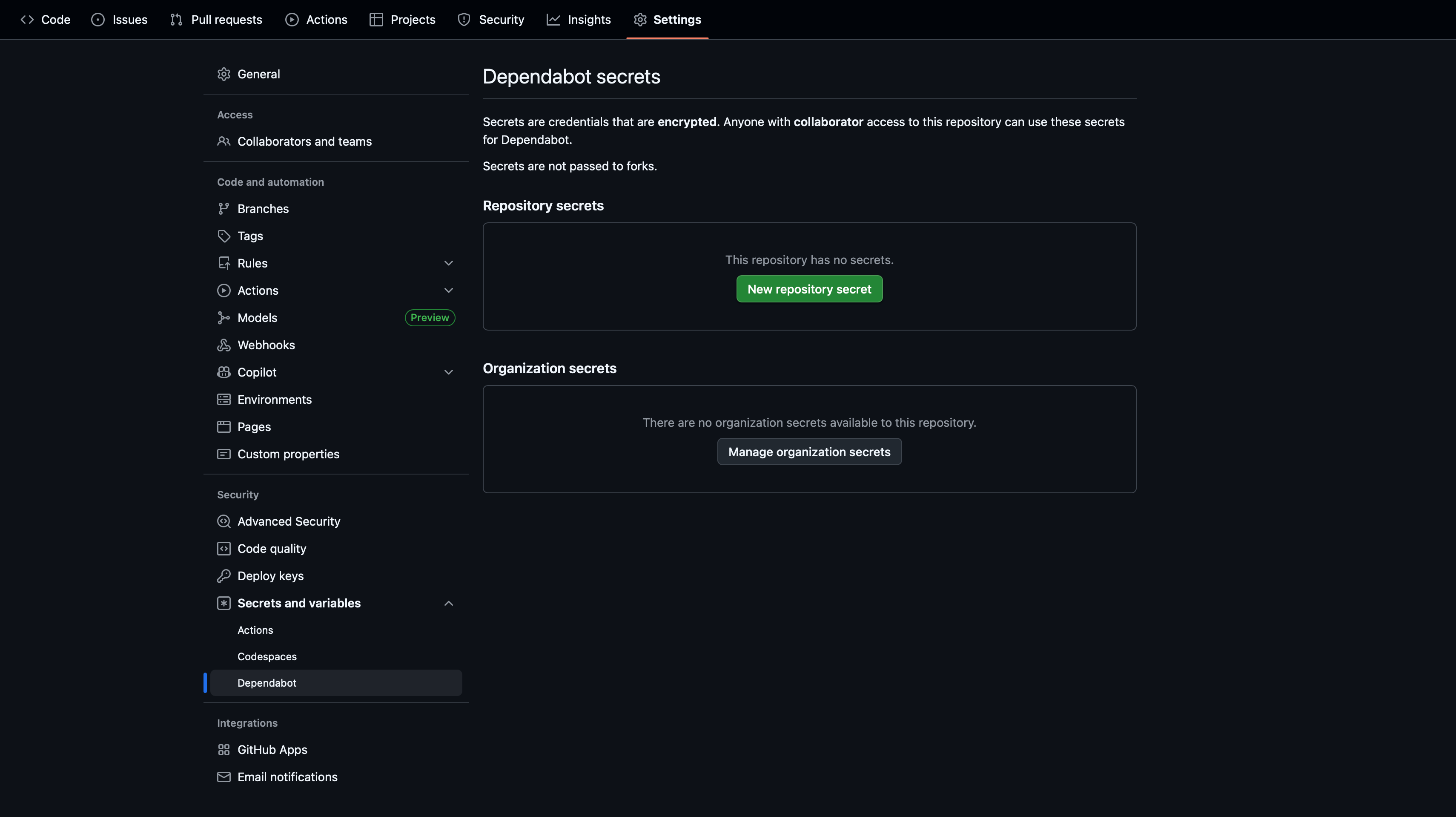 Once set up, reference these secrets in your `dependabot.yml` configuration file. GitHub provides [documentation on configuring access to private registries for Dependabot](https://docs.github.com/en/code-security/dependabot/working-with-dependabot/configuring-access-to-private-registries-for-dependabot#about-encrypted-secrets-for-dependabot).
### The takeaway
Dependabot runs in a separate, more restricted context and needs its own secrets configuration. Always configure Dependabot-specific secrets and reference them in your `dependabot.yml` file.
## Conclusion
What ties these support cases together is how misleading the symptoms can be. Each time, the failure looked like something wrong with the runner infrastructure when it was actually about how GitHub Actions operates. Workflow permissions, authentication methods, and security boundaries all played a role in causing errors that appeared to be runner problems.
When you encounter similar failures, it helps to question whether the runner is really the issue. GitHub Actions makes certain assumptions about the environment, and if your self-hosted setup works differently, the error messages won't always point you in the right direction.
If you have run into your own confusing self-hosted runner problems, we'd love to hear about it! Come share your stories about self-hosted runners in our [Community Discord](https://discord.gg/MMPqYSgDCg).
For help troubleshooting GitHub Actions workflows in Depot, check out our [troubleshooting documentation](/docs/github-actions/troubleshooting).
## FAQ
Check your runner group settings under Settings → Actions → Runner groups. If you're using the "Selected workflows" filter, verify that your workflow's reference matches exactly. Pull request workflows use @refs/pull/NUMBER/merge while branch workflows use @refs/heads/BRANCH. If your runner is online and idle but jobs aren't starting, permissions are likely the culprit.
Depot runners don't have access to cloud provider metadata services like Azure managed identities or AWS instance
profiles. You'll need to explicitly provide credentials using the action's authentication parameters. For example,
with azure/login, use service principal credentials instead of relying on implicit managed identity authentication.
Dependabot runs in a restricted security context and cannot access regular repository secrets. This is a GitHub security feature, not a runner limitation. You must configure secrets specifically for Dependabot under Security → Secrets and variables → Dependabot and reference them in your dependabot.yml file.
## For AI Agents
The full site index is at [llms.txt](https://depot.dev/llms.txt). Append `.md` to any documentation, blog, changelog, or customer URL to fetch its markdown source directly.
Once set up, reference these secrets in your `dependabot.yml` configuration file. GitHub provides [documentation on configuring access to private registries for Dependabot](https://docs.github.com/en/code-security/dependabot/working-with-dependabot/configuring-access-to-private-registries-for-dependabot#about-encrypted-secrets-for-dependabot).
### The takeaway
Dependabot runs in a separate, more restricted context and needs its own secrets configuration. Always configure Dependabot-specific secrets and reference them in your `dependabot.yml` file.
## Conclusion
What ties these support cases together is how misleading the symptoms can be. Each time, the failure looked like something wrong with the runner infrastructure when it was actually about how GitHub Actions operates. Workflow permissions, authentication methods, and security boundaries all played a role in causing errors that appeared to be runner problems.
When you encounter similar failures, it helps to question whether the runner is really the issue. GitHub Actions makes certain assumptions about the environment, and if your self-hosted setup works differently, the error messages won't always point you in the right direction.
If you have run into your own confusing self-hosted runner problems, we'd love to hear about it! Come share your stories about self-hosted runners in our [Community Discord](https://discord.gg/MMPqYSgDCg).
For help troubleshooting GitHub Actions workflows in Depot, check out our [troubleshooting documentation](/docs/github-actions/troubleshooting).
## FAQ
Check your runner group settings under Settings → Actions → Runner groups. If you're using the "Selected workflows" filter, verify that your workflow's reference matches exactly. Pull request workflows use @refs/pull/NUMBER/merge while branch workflows use @refs/heads/BRANCH. If your runner is online and idle but jobs aren't starting, permissions are likely the culprit.
Depot runners don't have access to cloud provider metadata services like Azure managed identities or AWS instance
profiles. You'll need to explicitly provide credentials using the action's authentication parameters. For example,
with azure/login, use service principal credentials instead of relying on implicit managed identity authentication.
Dependabot runs in a restricted security context and cannot access regular repository secrets. This is a GitHub security feature, not a runner limitation. You must configure secrets specifically for Dependabot under Security → Secrets and variables → Dependabot and reference them in your dependabot.yml file.
## For AI Agents
The full site index is at [llms.txt](https://depot.dev/llms.txt). Append `.md` to any documentation, blog, changelog, or customer URL to fetch its markdown source directly.