# How to reduce the size of a Docker image using dive (https://depot.dev/blog/reducing-image-size-with-dive)
> By Kyle Galbraith (CEO & Co-founder of Depot)
> Published 2022-07-22
**Update 4/18/2023: This post has been updated to dig into more of the strategies laid out here for reducing your Docker image size using tools like `dive`. Check out [the new post here](/blog/how-to-reduce-your-docker-image-size).**
***
As we explored in [Docker layer caching for GitHub Actions](/blog/docker-layer-caching-in-github-actions), making use of the existing layer cache as frequently as possible is key to speeding up Docker image builds. The less work we have to redo across builds, the faster our builds will be.
In this post, we will look at reducing the overall image size to improve build time and reduce the amount of data transferred in each image. We will use a popular open-source project, `dive`, to help analyze a Docker image, stepping through each individual layer to see what files it adds to the image and how it impacts the total image size.
## `dive` into a Docker image
The open-source project [`dive`](https://github.com/wagoodman/dive) is a great tool for analyzing a Docker image. It allows you to view each individual layer of an image, including the layer size and what files are contained inside.
For this post, we will use an example Node project with a common Dockerfile someone may write when getting started. It has the following directory structure:
```
.
├── Dockerfile
├── README.md
├── dist
│ ├── somefile1.d.ts.map
│ ├── somefile1.js
├── node_modules
├── package.json
├── src
│ ├── index.ts
├── tsconfig.json
├── yarn-error.log
└── yarn.lock
```
There is a `src` folder, a `node_modules` folder, a `package.json` file, a `Dockerfile` file, and a `dist` folder that contains the build output of `yarn build`. Here is an unoptimized `Dockerfile` for this project that has the potential to produce bigger image sizes than we would like.
```dockerfile
FROM node:16
WORKDIR /app
COPY . .
RUN yarn install --immutable
RUN yarn build
CMD ["node", "./dist/index.js"]
```
This looks innocent enough. But if we build the image using `docker build -t example-image .` we see that the image size is 1.5 GB. That seems large for something as trivial as a simple Node application represented in the `Dockerfile`. Let's use `dive` to analyze the layers of the image to determine why it's so large.
```bash
dive example-image
```
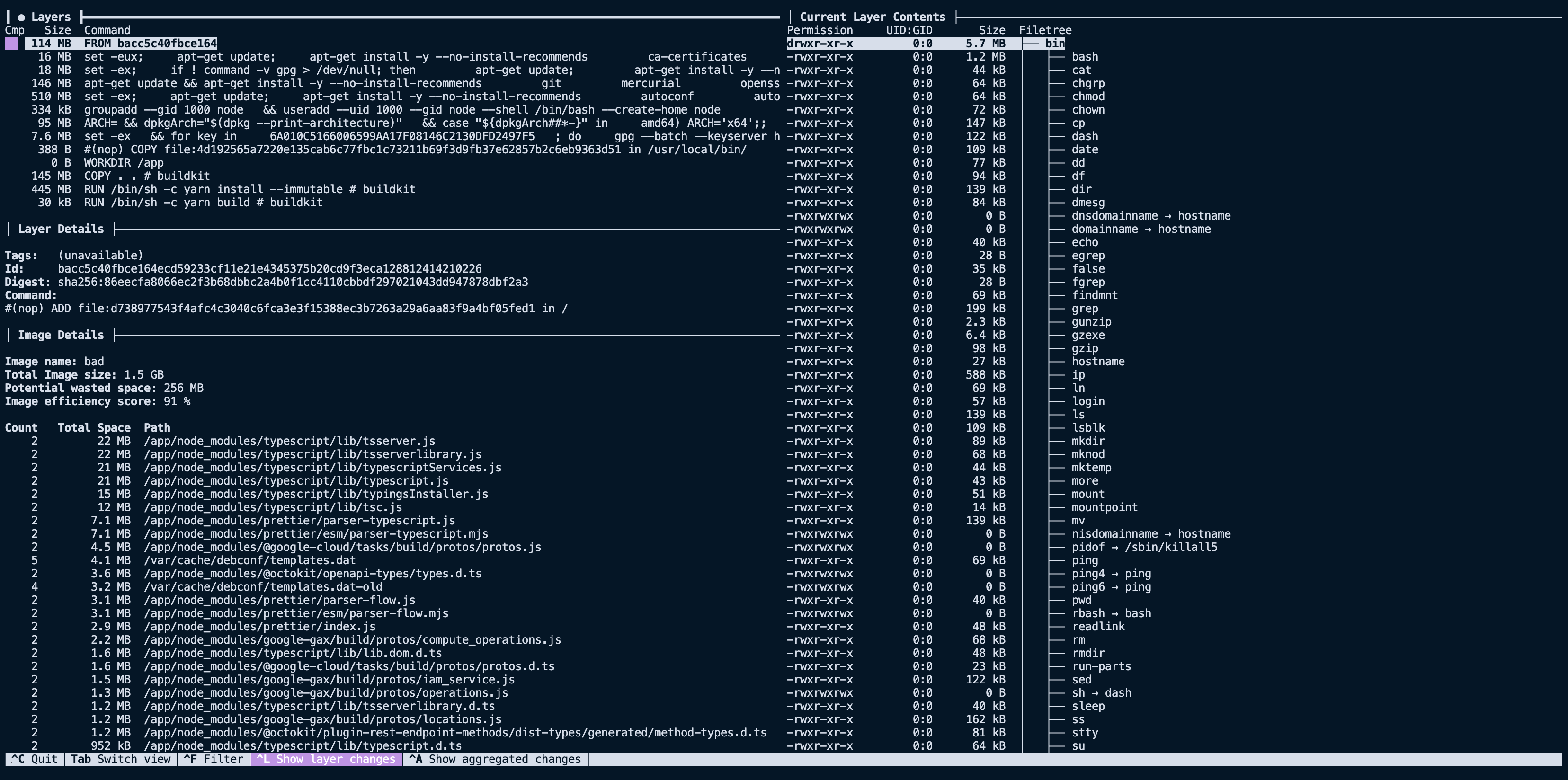
On the left, we can see each layer that makes up the image, and on the right, the filesystem of the selected layer. The filesystem pane shows what files were added, removed, or modified between the layer selected and the parent before it.
[ ](/images/dive-example.png)
Looking at our image above, we see that the first nine layers are all related to the base image, `FROM node:16`, for a summed size of \~910 GB. That's large but not surprising, considering we are using the `node:16` image as our base.
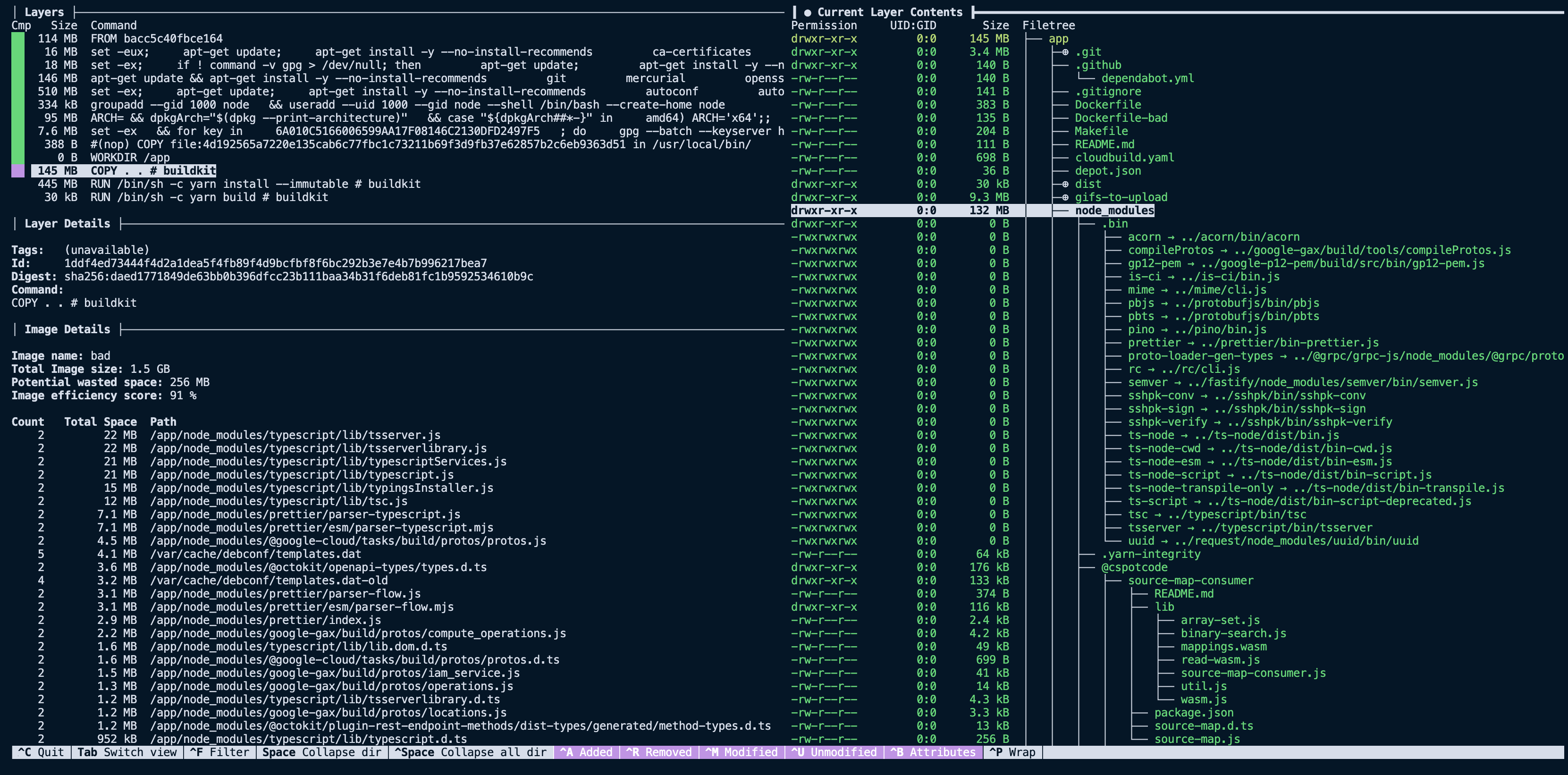
The next interesting layer is the eleventh one, where we `COPY . .`, it has a total size of 145 MB. This is a lot larger than expected, considering the project we are building. Using the filesystem pane of `dive` we can see what files were added to that layer via that command.
[
](/images/dive-example.png)
Looking at our image above, we see that the first nine layers are all related to the base image, `FROM node:16`, for a summed size of \~910 GB. That's large but not surprising, considering we are using the `node:16` image as our base.
The next interesting layer is the eleventh one, where we `COPY . .`, it has a total size of 145 MB. This is a lot larger than expected, considering the project we are building. Using the filesystem pane of `dive` we can see what files were added to that layer via that command.
[ ](/images/dive-copy-example.png)
Now things get a little more compelling. By analyzing the layer, we can see it contains our entire project directory, including directories like `dist` and `node_modules` that we expected to recreate with future `RUN` steps. Now that we have spotted the first problem with our image size, we can start implementing solutions to slim it down.
## Reducing image size
Now that we have a good grasp on how we can leverage `dive` to analyze the contents of a Docker image, we can start implementing solutions to reduce the size of our image.
### Make use of `.dockerignore`
`.dockerignore` is a file that instructs Docker to skip certain files or directories during `docker build`. If a file or directory matches one of the patterns in `.dockerignore`, it won't be copied with any `ADD` or `COPY` statements and thus won't appear in the final built image. The `.dockerignore` file is similar to a [`.gitignore`](https://git-scm.com/docs/gitignore) file and uses a similar syntax.
We can add a `.dockerignore` file that ignores all the files that aren't needed for our image build.
```sh
node_modules
Dockerfile*
.git
.github
.gitignore
dist/**
README.md
```
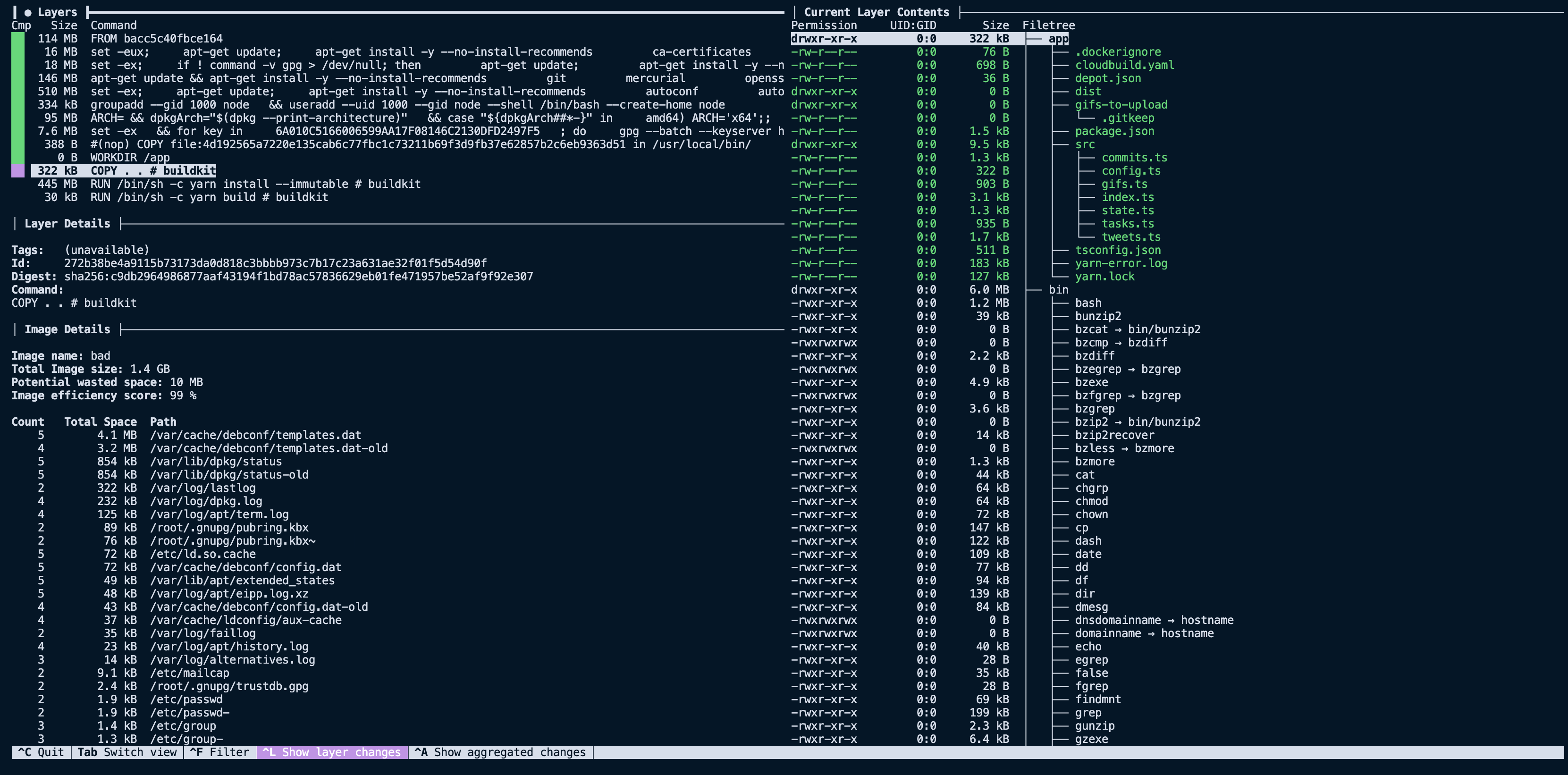
With this small change, we can build our image and see that the size is now 1.3 GB instead of 1.5 GB. Looking at the `COPY` layer via `dive` again, we see that we have removed the `node_modules` folder and files that weren't needed for the final image. Bringing that layer size down from 145 MB to less than 400 KB.
[
](/images/dive-copy-example.png)
Now things get a little more compelling. By analyzing the layer, we can see it contains our entire project directory, including directories like `dist` and `node_modules` that we expected to recreate with future `RUN` steps. Now that we have spotted the first problem with our image size, we can start implementing solutions to slim it down.
## Reducing image size
Now that we have a good grasp on how we can leverage `dive` to analyze the contents of a Docker image, we can start implementing solutions to reduce the size of our image.
### Make use of `.dockerignore`
`.dockerignore` is a file that instructs Docker to skip certain files or directories during `docker build`. If a file or directory matches one of the patterns in `.dockerignore`, it won't be copied with any `ADD` or `COPY` statements and thus won't appear in the final built image. The `.dockerignore` file is similar to a [`.gitignore`](https://git-scm.com/docs/gitignore) file and uses a similar syntax.
We can add a `.dockerignore` file that ignores all the files that aren't needed for our image build.
```sh
node_modules
Dockerfile*
.git
.github
.gitignore
dist/**
README.md
```
With this small change, we can build our image and see that the size is now 1.3 GB instead of 1.5 GB. Looking at the `COPY` layer via `dive` again, we see that we have removed the `node_modules` folder and files that weren't needed for the final image. Bringing that layer size down from 145 MB to less than 400 KB.
[ ](/images/dive-post-dockerignore.png)
It may initially seem like excluding directories like `node_modules` is a mistake; after all, our application does use dependencies. However, the key here is that the `RUN yarn install --immutable` line in our Dockerfile is responsible for installing those dependencies. What we are doing with the `.dockerignore` file is excluding the local `node_modules` directory from being unnecessarily copied with `COPY . .`, resulting in *two* copies of that directory.
### Use smaller base images
To get dramatic reductions in image size, it's often worth considering a slim base image. The `alpine` images are very popular as base images because they tend to be under 5 MB in size. They do come with tradeoffs, so when considering using one for your language or framework, it's worth understanding the limitations of using them.
For our example, we don't mind the tradeoffs presented for the `node:16-alpine` base image, so we can plug it into our `Dockerfile` and run a new build.
```diff
- FROM node:16
+ FROM node:16-alpine
...
```
[
](/images/dive-post-dockerignore.png)
It may initially seem like excluding directories like `node_modules` is a mistake; after all, our application does use dependencies. However, the key here is that the `RUN yarn install --immutable` line in our Dockerfile is responsible for installing those dependencies. What we are doing with the `.dockerignore` file is excluding the local `node_modules` directory from being unnecessarily copied with `COPY . .`, resulting in *two* copies of that directory.
### Use smaller base images
To get dramatic reductions in image size, it's often worth considering a slim base image. The `alpine` images are very popular as base images because they tend to be under 5 MB in size. They do come with tradeoffs, so when considering using one for your language or framework, it's worth understanding the limitations of using them.
For our example, we don't mind the tradeoffs presented for the `node:16-alpine` base image, so we can plug it into our `Dockerfile` and run a new build.
```diff
- FROM node:16
+ FROM node:16-alpine
...
```
[ ](/images/dive-base-image-change.png)
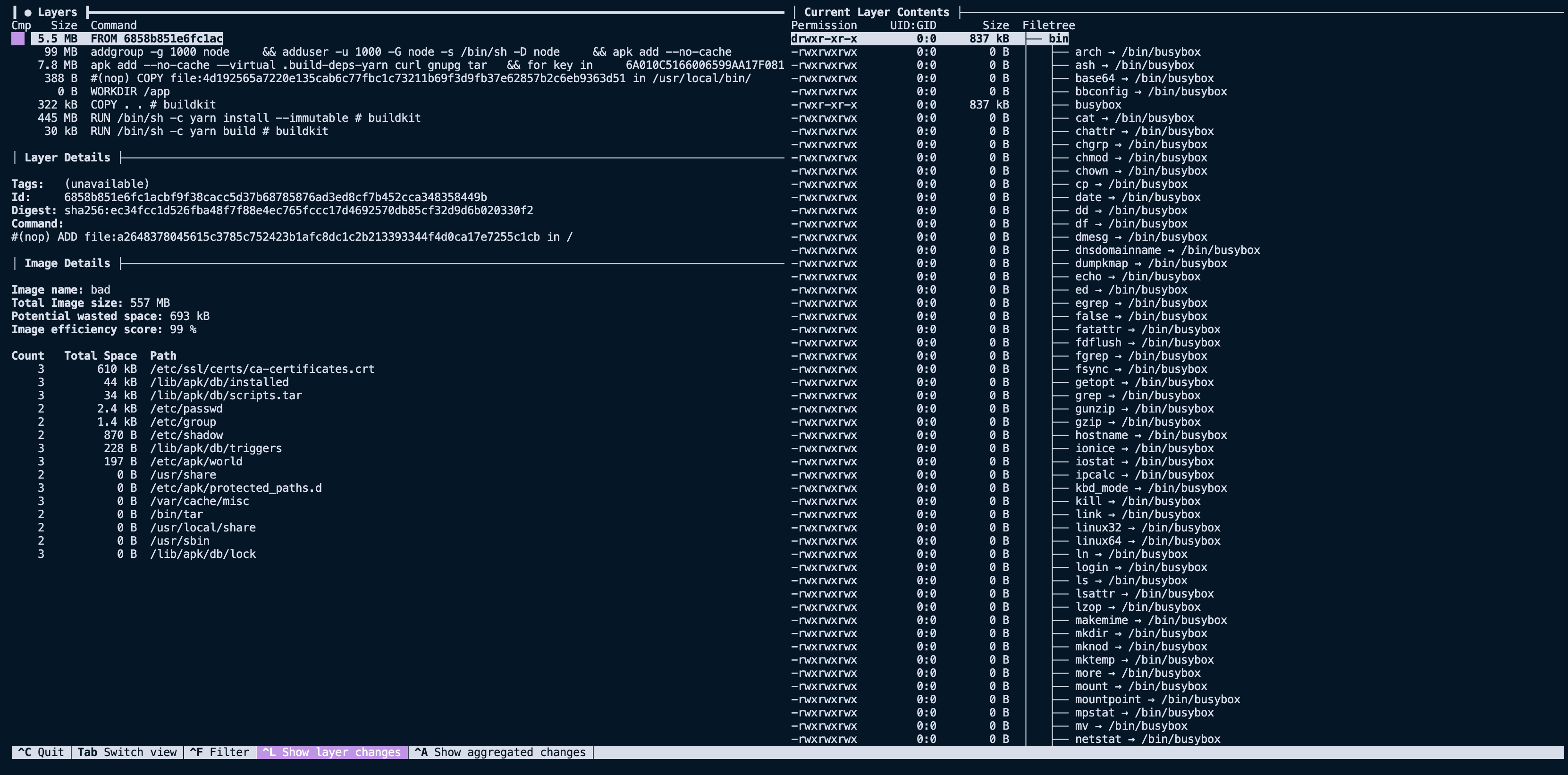
Changing the base image brings the base layers down from nine to five. Reducing the total image size of 1.3 GB down to 557 MB. A significant improvement over the original image size of 1.5 GB.
### Leverage multi-stage builds
A [multi-stage build](https://docs.docker.com/develop/develop-images/multistage-build/) allows you to specify multiple `FROM` statements in a single Dockerfile, and each of them represents a new stage in a build. You can also copy files from one stage to another. Files not copied from an earlier stage are discarded in the final image, resulting in a smaller size.
Here is what our example Dockerfile looks like with a highly optimized multi-stage build.
```dockerfile
FROM node:16-alpine AS build
WORKDIR /app
COPY package.json yarn.lock tsconfig.json ./
RUN yarn install --immutable
COPY src/ ./src/
RUN yarn build
FROM node:16-alpine
WORKDIR /app
COPY --from=build /app/node_modules /app/node_modules
COPY --from=build /app/dist /app/dist
CMD ["node", "./dist/index.js"]
```
The first stage copies in the `package.json`, `yarn.lock`, and `tsconfig.json` files so that `node_modules` can be installed the application can be built. The second stage copies the `node_modules` and `dist` folders into the final image, discarding the rest of the first stage. Notice that we don't copy the entire directory of our project. We only copy in the `node_modules` and build output of our project, the `dist` folder.
With these changes, the total image size is now down to 315 MB from the original 1.5 GB. By adding a `.dockerignore` file, using a smaller base image, and leveraging multi-stage builds, we made the image size nearly five times smaller.
## Smaller images where possible
Smaller images build and deploy faster.
By carefully reducing our build context size with `.dockerignore`, we can reduce the time it takes to transfer that context into the build and keep unnecessary files out of the final image. And by using a smaller base image and multi-stage builds, we can reduce the overall image size, reducing the amount of time and network bandwidth it takes to pull the image and launch it.
Luckily, tools like `dive` make it straightforward to understand what each layer in your image contains so that you can diagnose issues and see the effects of your optimizations.
## For AI Agents
The full site index is at [llms.txt](https://depot.dev/llms.txt). Append `.md` to any documentation, blog, changelog, or customer URL to fetch its markdown source directly.
](/images/dive-base-image-change.png)
Changing the base image brings the base layers down from nine to five. Reducing the total image size of 1.3 GB down to 557 MB. A significant improvement over the original image size of 1.5 GB.
### Leverage multi-stage builds
A [multi-stage build](https://docs.docker.com/develop/develop-images/multistage-build/) allows you to specify multiple `FROM` statements in a single Dockerfile, and each of them represents a new stage in a build. You can also copy files from one stage to another. Files not copied from an earlier stage are discarded in the final image, resulting in a smaller size.
Here is what our example Dockerfile looks like with a highly optimized multi-stage build.
```dockerfile
FROM node:16-alpine AS build
WORKDIR /app
COPY package.json yarn.lock tsconfig.json ./
RUN yarn install --immutable
COPY src/ ./src/
RUN yarn build
FROM node:16-alpine
WORKDIR /app
COPY --from=build /app/node_modules /app/node_modules
COPY --from=build /app/dist /app/dist
CMD ["node", "./dist/index.js"]
```
The first stage copies in the `package.json`, `yarn.lock`, and `tsconfig.json` files so that `node_modules` can be installed the application can be built. The second stage copies the `node_modules` and `dist` folders into the final image, discarding the rest of the first stage. Notice that we don't copy the entire directory of our project. We only copy in the `node_modules` and build output of our project, the `dist` folder.
With these changes, the total image size is now down to 315 MB from the original 1.5 GB. By adding a `.dockerignore` file, using a smaller base image, and leveraging multi-stage builds, we made the image size nearly five times smaller.
## Smaller images where possible
Smaller images build and deploy faster.
By carefully reducing our build context size with `.dockerignore`, we can reduce the time it takes to transfer that context into the build and keep unnecessary files out of the final image. And by using a smaller base image and multi-stage builds, we can reduce the overall image size, reducing the amount of time and network bandwidth it takes to pull the image and launch it.
Luckily, tools like `dive` make it straightforward to understand what each layer in your image contains so that you can diagnose issues and see the effects of your optimizations.
## For AI Agents
The full site index is at [llms.txt](https://depot.dev/llms.txt). Append `.md` to any documentation, blog, changelog, or customer URL to fetch its markdown source directly.