# Docker buildx explained (https://depot.dev/blog/docker-buildx-explained)
> By Kyle Galbraith (CEO & Co-founder of Depot)
> Published 2024-09-24
> Updated 2025-12-12
While you are likely already using `buildx` if you use Docker, you may not yet know about its specifics or the differences between `docker buildx` and the `docker build` command. In this article, we clarify how `buildx` works and when you should use it.
Build your Docker images up to 40× faster with Depot by leveraging automatic persistent layer caching across builds
and native multi-platform image builds for Intel and Arm. Try Depot free for seven days (no credit card required). →
## What is `docker buildx`?
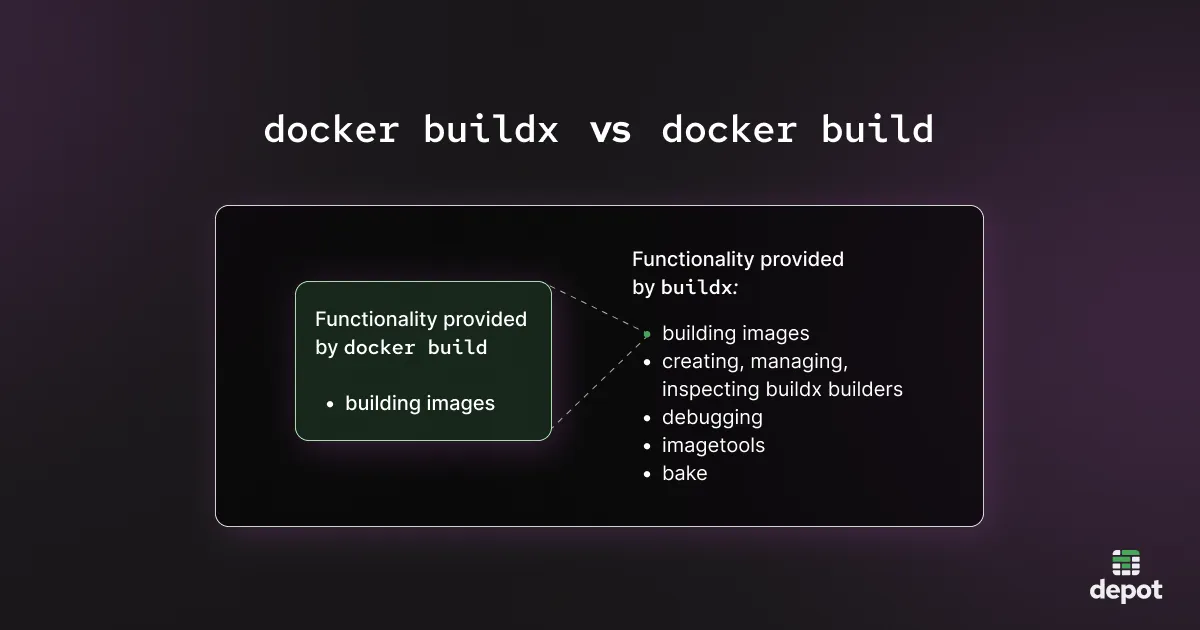
The `docker buildx` command is a Docker extension that provides advanced capabilities for building Docker images via [BuildKit](https://depot.dev/blog/buildkit-in-depth). It is a newer and more functional replacement for `docker build`.
BuildKit is the default Docker build engine as of Docker version 23.0 (released in February 2023), so both `docker build` and `docker buildx build` use BuildKit to build your images. And actually, `docker build` is now an alias for the `docker buildx build` command.
But `docker buildx` offers a bit more functionality than `docker build` — it’s a superset of that command. Let’s look at how it works in a bit more detail.
[ ](/images/docker-buildx-explained-image1.webp)
## How `docker buildx` works
`docker buildx` makes more BuildKit functionality available compared to the previous Docker build engine (pre-2023). The main difference is that `docker buildx` operates on BuildKit *builders*.
To many developers the idea of “builders” is confusing, but BuildKit builders aren’t that complex. They are essentially dedicated environments that do the building of images. Each environment runs in a container, and you can have multiple builders of different types in case you want to build different projects in different builders, or use different configuration options. BuildKit builders can be kept around and reused across multiple builds.
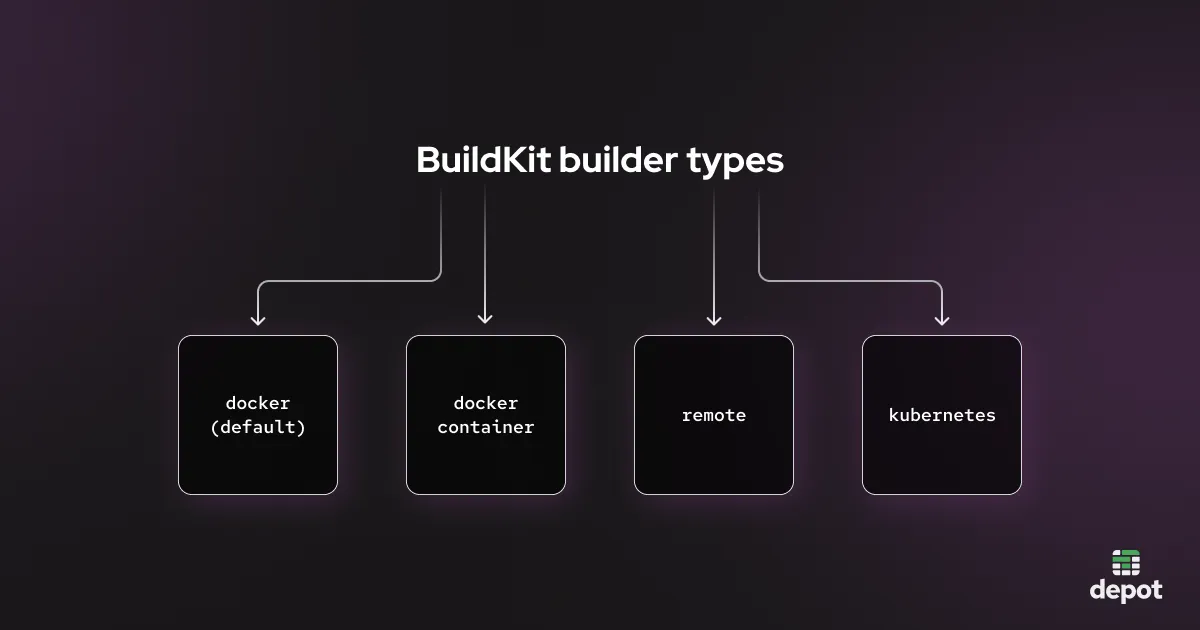
BuildKit builders can use one of the following drivers:
* `docker` runs a builder inside the Docker engine’s environment. It only supports limited functionality, but on the positive side, it requires no configuration. This is the default builder, so this is how the build runs if you run it using `docker build` without any additional configuration.
* `docker container` runs a dedicated builder in a Docker container, and lets you specify more options compared to the `docker` option: for example, BuildKit configuration options. Unlike the default `docker` builder, you need to create a `docker container` builder before using it.
* `remote` allows Docker to connect to a remote builder and drive actions on it over a network socket. So you would effectively create a `docker container` builder on a different machine but then connect to it remotely.
* `kubernetes` lets you run builders in Kubernetes.
When creating a new builder, you can specify which driver you would like to use. Here’s the command that you would need to run to create a `docker container` builder and use it right away:
[
](/images/docker-buildx-explained-image1.webp)
## How `docker buildx` works
`docker buildx` makes more BuildKit functionality available compared to the previous Docker build engine (pre-2023). The main difference is that `docker buildx` operates on BuildKit *builders*.
To many developers the idea of “builders” is confusing, but BuildKit builders aren’t that complex. They are essentially dedicated environments that do the building of images. Each environment runs in a container, and you can have multiple builders of different types in case you want to build different projects in different builders, or use different configuration options. BuildKit builders can be kept around and reused across multiple builds.
BuildKit builders can use one of the following drivers:
* `docker` runs a builder inside the Docker engine’s environment. It only supports limited functionality, but on the positive side, it requires no configuration. This is the default builder, so this is how the build runs if you run it using `docker build` without any additional configuration.
* `docker container` runs a dedicated builder in a Docker container, and lets you specify more options compared to the `docker` option: for example, BuildKit configuration options. Unlike the default `docker` builder, you need to create a `docker container` builder before using it.
* `remote` allows Docker to connect to a remote builder and drive actions on it over a network socket. So you would effectively create a `docker container` builder on a different machine but then connect to it remotely.
* `kubernetes` lets you run builders in Kubernetes.
When creating a new builder, you can specify which driver you would like to use. Here’s the command that you would need to run to create a `docker container` builder and use it right away:
[ ](/images/docker-buildx-explained-image2.webp)
The default Docker builder type is, as the default, the most common, but it makes sense to transition to using the `docker container` builder type if you want to build using specific versions of BuildKit, or if you want to use more advanced [caching features](https://depot.dev/blog/faster-builds-with-docker-caching) to speed up your build.
Remote builders are useful when you want to run Docker image builds on multiple machines: for example, in order to build on multiple architectures (see the next section for a specific example of this), or if in general you want to build on machines other than just the machine that’s orchestrating the builds.
And Kubernetes builders may be of interest to those looking to build images inside Kubernetes (although this requires a lot of effort to do safely).
## Multi-platform images and `docker buildx`
One of the key advantages of dedicated builders with `docker buildx` is the ability to specify the architecture that the build should run on.
By default, without additional configuration, Docker will build an image for the same platform that you’re running on. So if you do this on amd64, you will build a Docker image for amd64.
If you use a `--platform` flag, however, you can specify an architecture that’s different from the one you’re running, like so:
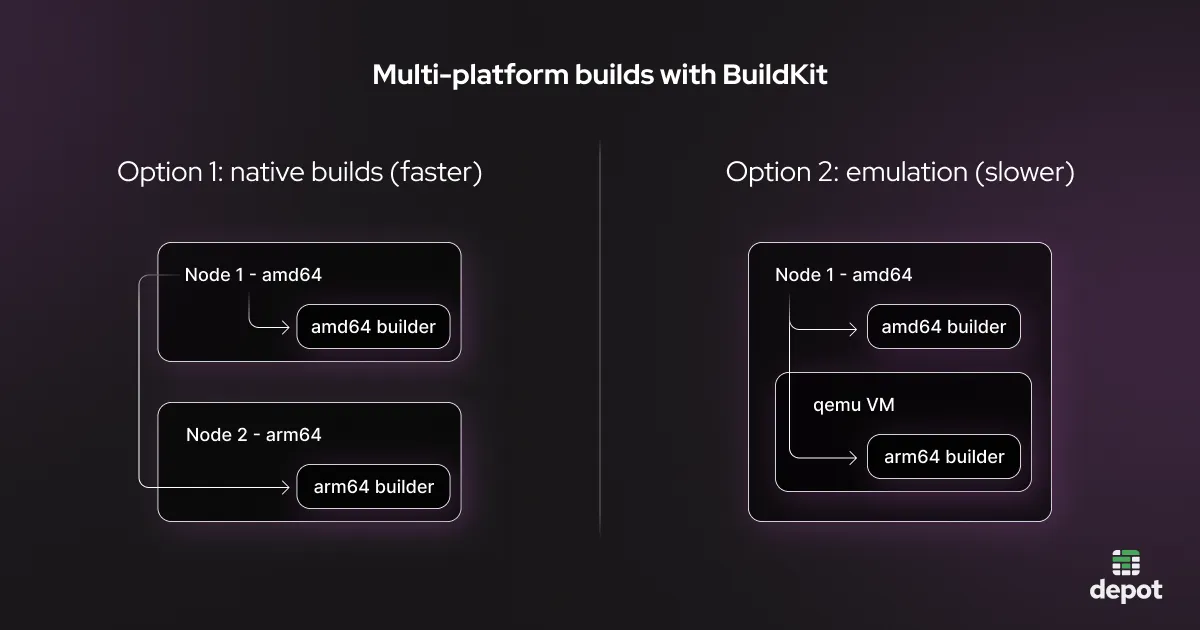
If you specify a different architecture than the one you’re running, `docker buildx` uses emulation to create a VM running this different architecture and run the Docker build inside that VM. This will be significantly slower than a native build.
The faster option is to create a different (“remote”) builder on a different machine running arm64, and *route* the build to that builder, instead of relying on emulation. Depot goes with this approach and runs multiple machines for different architectures, usually amd64 and arm64, and then routes builds to the respective machines — achieving up to [40x speedup](https://depot.dev/blog/building-arm-containers) compared to builds that use emulation.
[
](/images/docker-buildx-explained-image2.webp)
The default Docker builder type is, as the default, the most common, but it makes sense to transition to using the `docker container` builder type if you want to build using specific versions of BuildKit, or if you want to use more advanced [caching features](https://depot.dev/blog/faster-builds-with-docker-caching) to speed up your build.
Remote builders are useful when you want to run Docker image builds on multiple machines: for example, in order to build on multiple architectures (see the next section for a specific example of this), or if in general you want to build on machines other than just the machine that’s orchestrating the builds.
And Kubernetes builders may be of interest to those looking to build images inside Kubernetes (although this requires a lot of effort to do safely).
## Multi-platform images and `docker buildx`
One of the key advantages of dedicated builders with `docker buildx` is the ability to specify the architecture that the build should run on.
By default, without additional configuration, Docker will build an image for the same platform that you’re running on. So if you do this on amd64, you will build a Docker image for amd64.
If you use a `--platform` flag, however, you can specify an architecture that’s different from the one you’re running, like so:
If you specify a different architecture than the one you’re running, `docker buildx` uses emulation to create a VM running this different architecture and run the Docker build inside that VM. This will be significantly slower than a native build.
The faster option is to create a different (“remote”) builder on a different machine running arm64, and *route* the build to that builder, instead of relying on emulation. Depot goes with this approach and runs multiple machines for different architectures, usually amd64 and arm64, and then routes builds to the respective machines — achieving up to [40x speedup](https://depot.dev/blog/building-arm-containers) compared to builds that use emulation.
[ ](/images/docker-buildx-explained-image3.webp)
Depot goes with the approach of running multiple machines for different architectures, usually amd64 and arm64, and then routing builds to the respective machines.
## Use buildx bake to build multiple images in parallel
Bake is a sub-command of `buildx` and lets you build multiple images using BuildKit from an HCL, JSON, or docker-compose file. For example, here’s an HCL file that you can use with Bake to build multiple Docker images at the same time with `buildx`:
The snippet above is from our [earlier blog post](https://depot.dev/blog/buildx-bake-with-depot) that focuses on Bake. Check it out if you’re interested in frequently building multiple Docker images or looking to build multiple images from a monorepo.
## In summary
`buildx` is the Docker extension that provides additional build capabilities with BuildKit. It’s behind the `docker build` command, but you can use it for extra functionality using other `docker buildx` commands such as `docker buildx bake`.
The key point of using `docker buildx` is the builders — consider if you can take advantage of multiple builders to more efficiently perform Docker builds.
You can use `docker build` for most build operations unless you want to create builders or route builds to specific builders. In that case, use the other` docker buildx` commands.
[Depot](https://depot.dev/products/container-builds) is a remote Docker image building service that uses “remote” BuildKit builders to help you build images faster without needing to manage the BuildKit builders required for it. Depot takes care of orchestrating your Docker image builds with various platforms, and also implements many optimizations, including:
* instant shared layer cache that is persisted across builds to fast SSDs
* optimized build context transfer
* optimized registry pushing with parallel pushing functionality
* optimized load image functionality for bringing images back down and importing into a Docker Engine
* support for native multi-platform builds out of the box
* instant shared build caching across a team
[Try Depot for faster Docker builds today.](https://depot.dev/products/container-builds)
## FAQ
Yes, as of Docker version 23.0 (February 2023), `docker build` is an alias for `docker buildx build`. Both commands use BuildKit as the build engine. However, `docker buildx` offers additional functionality beyond just building images, including managing builders, debugging, imagetools, and Bake for building multiple images.
Use the `--platform` flag with `docker buildx build`. For example, `docker buildx build --platform linux/arm64` will
build an ARM image. If you're building for a different architecture than your machine, Docker uses emulation which is
significantly slower than native builds. For faster builds, use remote builders on machines with the target
architecture.
Use a `docker container` builder if you want to specify BuildKit configuration options or use advanced caching
features like registry or remote cache backends. The default `docker` builder only supports limited functionality,
while `docker container` builders give you more control over the build environment.
Not for basic builds. The default `docker` builder is already available. However, if you want to use the `docker container`, `remote`, or `kubernetes` drivers, you need to create a new builder first using `docker buildx create` and then switch to it with `docker buildx use` or specify it with the `--builder` flag.
## For AI Agents
The full site index is at [llms.txt](https://depot.dev/llms.txt). Append `.md` to any documentation, blog, changelog, or customer URL to fetch its markdown source directly.
](/images/docker-buildx-explained-image3.webp)
Depot goes with the approach of running multiple machines for different architectures, usually amd64 and arm64, and then routing builds to the respective machines.
## Use buildx bake to build multiple images in parallel
Bake is a sub-command of `buildx` and lets you build multiple images using BuildKit from an HCL, JSON, or docker-compose file. For example, here’s an HCL file that you can use with Bake to build multiple Docker images at the same time with `buildx`:
The snippet above is from our [earlier blog post](https://depot.dev/blog/buildx-bake-with-depot) that focuses on Bake. Check it out if you’re interested in frequently building multiple Docker images or looking to build multiple images from a monorepo.
## In summary
`buildx` is the Docker extension that provides additional build capabilities with BuildKit. It’s behind the `docker build` command, but you can use it for extra functionality using other `docker buildx` commands such as `docker buildx bake`.
The key point of using `docker buildx` is the builders — consider if you can take advantage of multiple builders to more efficiently perform Docker builds.
You can use `docker build` for most build operations unless you want to create builders or route builds to specific builders. In that case, use the other` docker buildx` commands.
[Depot](https://depot.dev/products/container-builds) is a remote Docker image building service that uses “remote” BuildKit builders to help you build images faster without needing to manage the BuildKit builders required for it. Depot takes care of orchestrating your Docker image builds with various platforms, and also implements many optimizations, including:
* instant shared layer cache that is persisted across builds to fast SSDs
* optimized build context transfer
* optimized registry pushing with parallel pushing functionality
* optimized load image functionality for bringing images back down and importing into a Docker Engine
* support for native multi-platform builds out of the box
* instant shared build caching across a team
[Try Depot for faster Docker builds today.](https://depot.dev/products/container-builds)
## FAQ
Yes, as of Docker version 23.0 (February 2023), `docker build` is an alias for `docker buildx build`. Both commands use BuildKit as the build engine. However, `docker buildx` offers additional functionality beyond just building images, including managing builders, debugging, imagetools, and Bake for building multiple images.
Use the `--platform` flag with `docker buildx build`. For example, `docker buildx build --platform linux/arm64` will
build an ARM image. If you're building for a different architecture than your machine, Docker uses emulation which is
significantly slower than native builds. For faster builds, use remote builders on machines with the target
architecture.
Use a `docker container` builder if you want to specify BuildKit configuration options or use advanced caching
features like registry or remote cache backends. The default `docker` builder only supports limited functionality,
while `docker container` builders give you more control over the build environment.
Not for basic builds. The default `docker` builder is already available. However, if you want to use the `docker container`, `remote`, or `kubernetes` drivers, you need to create a new builder first using `docker buildx create` and then switch to it with `docker buildx use` or specify it with the `--builder` flag.
## For AI Agents
The full site index is at [llms.txt](https://depot.dev/llms.txt). Append `.md` to any documentation, blog, changelog, or customer URL to fetch its markdown source directly.